
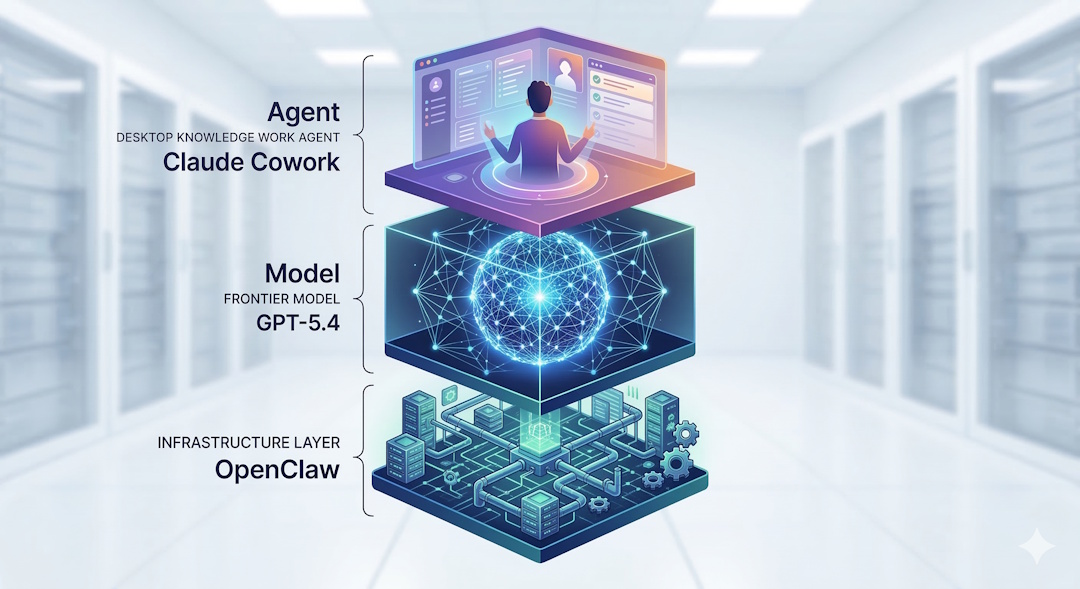
Have you noticed what happens every time a new AI product drops? People throw three or four very different tools into one conversation, compare them as if they’re the same thing, and then declare a winner by dinner time. That’s exactly what’s happening right now when people are comparing GPT-5.4 vs Claude Cowork vs OpenClaw.
I’ve been following the GPT-5.4 launch closely. I also spent time reviewing what Anthropic’s Claude Cowork is actually becoming, and I looked again at where OpenClaw fits when your goal isn’t just to chat with AI, but to make work keep moving when you’re not sitting in front of your machine. I spent a signigficant amout of time this morning running some more tests with GPT 5.4 and now I am ready to share my thoughts!
Here’s what most people miss. These three aren’t competing at the exact same layer.
- GPT-5.4 is a frontier model
- Claude Cowork is a desktop knowledge-work agent
- OpenClaw is a self-hosted agentic infrastructure layer
If you compare them like-for-like, you’ll confuse yourself, and if you are just following what other confused people are talking on Youtube, you will be totally lost!
Let's try to understand what each one of these layers are and keep things simple.
Why GPT-5.4 Is Getting So Much Attention
OpenAI did not position GPT-5.4 as a routine model refresh. They launched it in ChatGPT, the API, and Codex, and described it as their most capable and efficient frontier model for professional work. That matters because this release is clearly aimed at people who want one model to handle reasoning, research, documents, tool use, coding, and agent workflows in the same system.
That’s why people are talking.
Not because one more benchmark chart appeared on the internet. But because GPT-5.4 looks like OpenAI’s most serious attempt yet to ship a model that can move across knowledge work and agent work without falling apart every time the task gets longer or the tool stack gets messier.
The release details that matter
According to OpenAI, GPT-5.4 brings together several things that were previously more scattered across their lineup:
- stronger reasoning for professional tasks
- the coding strengths of GPT-5.3-Codex (see my Claude Code vs Codex comparison)
- native computer-use capability
- better deep web research behavior
- better tool use across larger tool ecosystems
- up to 1 million tokens of context in Codex
- higher token efficiency than GPT-5.2
That’s a real step forward. This isn’t just “answer my question better.” It’s much closer to: plan, search, use tools, operate software, and keep context over longer horizons.
And that’s exactly where the market is moving.
GPT-5.4 in Reality: What Is Actually New?
Let’s get concrete.
1. GPT-5.4 is built for knowledge work, not just chat
OpenAI says GPT-5.4 reaches 83.0% on GDPval, their benchmark for well-specified professional work across 44 occupations, compared with 70.9% for GPT-5.2.
That may sound abstract, so let me translate it.
This means OpenAI is no longer talking only about coding demos and puzzle-solving. They are talking about spreadsheets, presentations, documents, planning, research, and multi-step work products.
That’s why this release matters to people outside pure engineering.
OpenAI also claims: – 87.3% on internal spreadsheet modeling tasks versus 68.4% for GPT-5.2 – human raters preferred GPT-5.4-generated presentations 68% of the time over GPT-5.2 presentations
That’s the kind of detail knowledge workers actually care about.
2. Native computer use changes the conversation
This is one of the most important things in the entire launch.
OpenAI says GPT-5.4 is its first general-purpose model with native computer-use capability.
That matters because once a model can operate software, browse, click, type, inspect screenshots, and work across interfaces, it stops being just a smart responder and starts becoming a practical worker inside a system.
On OpenAI’s published numbers, GPT-5.4 reached: – 75.0% on OSWorld-Verified – above the reported human baseline of 72.4% – far ahead of GPT-5.2 at 47.3%
Let that sink in.
This is why GPT-5.4 is getting real attention from people building agents, not just people collecting benchmark screenshots.
3. Tool search is a bigger deal than it sounds
A lot of people will skip this because it does not sound glamorous. That’d be a mistake.
One of the most annoying parts of serious agent work is giving a model access to lots of tools without drowning the prompt in tool definitions. OpenAI introduced tool search so GPT-5.4 can pull in the tool definition when needed, rather than stuffing every tool into context from the start.
OpenAI says this reduced token usage by 47% on a 250-task MCP Atlas evaluation while preserving accuracy.
If you’re building real workflows, that matters.
Lower token waste. Better cache behavior. Cleaner long-running sessions. Less junk in context.
That’s not marketing fluff. That’s operating efficiency.
4. GPT-5.4 is also trying to be more factual
This part matters to me because I’ve seen how much time gets wasted when a model sounds confident but drifts on the facts.
OpenAI says GPT-5.4 is their most factual model so far, with individual claims 33% less likely to be false and full responses 18% less likely to contain any errors relative to GPT-5.2 on a set of de-identified prompts where users had flagged factual errors.
If that holds up in real work, it’s more valuable than many people realize.
A model that sounds smooth but drifts factually creates cleanup work. A model that needs less correction saves time.
5. Pricing still matters
Capability is one thing. Cost is another.
OpenAI lists GPT-5.4 API pricing at: – $2.50 / million input tokens – $0.25 / million cached input tokens – $15 / million output tokens
GPT-5.4 Pro is much more expensive.
So yes, GPT-5.4 looks strong. But if your workflow is constant, repetitive, or agent-heavy, your cost structure still matters. That’s why this comparison with Claude Cowork and OpenClaw is useful.
What People Seem to Be Discussing About GPT-5.4 Right Now
After going through the launch material and current coverage, I see four real discussion themes.
It looks like an actual agent model
The combination of reasoning, coding, computer use, tool search, and long context makes GPT-5.4 feel less like a chatbot upgrade and more like an agent foundation.
It’s broad, not narrow
That’s good for many professionals. But it also creates a fair question: if a model becomes more general-purpose, does it stay elite on specialist coding tasks? That question is already showing up in the early conversation around Codex users.
The value is reduced workflow friction
If one model can handle research, spreadsheets, documents, browsing, tool use, and code, you spend less time gluing five different tools together.
It still does not magically become your full operating system
This is the key transition point in this article.
A great model is still a model.
That’s where Claude Cowork and OpenClaw enter the picture.
Where Claude Cowork Fits
Claude Cowork isn’t just Claude in a different tab. It’s Anthropic’s push to make an AI agent useful for a broader knowledge-work audience, not just developers who are comfortable living in a terminal.
From reporting across WIRED, Engadget, and CNBC, Claude Cowork started as a research preview for higher-tier Anthropic users and has been widening out with more practical features and broader access.
Here is what appears consistent across current coverage:
- it runs through the Claude app on macOS
- it’s built to work with your files and local computer tasks
- it can help with file organization, file conversion, reports, and browser-based work
- it grew out of Anthropic’s work on Claude Code
- Anthropic is pushing it toward knowledge-worker use cases, not just coding use cases
CNBC also reports that Anthropic added connectors and plugins for tools like Google Drive, Gmail, DocuSign, and FactSet as it moved Claude Cowork toward a more enterprise-grade product.
That matters.
Because once a desktop AI agent can combine: – local file access – browser actions – connectors into business tools – reusable institutional workflows
it starts to look less like a novelty and more like a real productivity layer for office work.
What Claude Cowork appears to be good at
Based on the current reporting, Claude Cowork looks strongest when you want a more approachable interface than a coding terminal – local file work – browser-assisted tasks – inbox, documents, folder cleanup, report generation – a human-in-the-loop desktop experience
In other words, Claude Cowork feels like Anthropic’s answer to this question:
What if Claude Code had a friendlier operating surface for knowledge workers?
That’s a meaningful product direction.
Where Claude Cowork still has limits
The same reporting also shows the limitations clearly.
Claude Cowork is still tied closely to the desktop app experience. It has safety warnings around file access and browser interaction. It’s useful, but it’s still very much a tool that lives close to your active machine and your supervision loop.
That makes it different from OpenClaw in an important way.
Claude Cowork helps you work on your computer. OpenClaw helps your agent system keep working even when you walk away from your computer.
That’s not a small difference. It's a very very large gap in use cases of OpenClaw and Cowork!
Where OpenClaw Fits
OpenClaw isn’t trying to be a single frontier model, and it isn’t trying to be a polished desktop app for office workers.
OpenClaw is a self-hosted gateway and agent platform (here’s my complete setup guide).
That means it gives you: – messaging-channel access across Discord, Telegram, WhatsApp, iMessage, and more (I wrote about 7 ways I use OpenClaw to run my business while I sleep) – sessions and memory – tools – cron jobs and scheduled work – multi-agent routing – browser control – self-hosted control over the whole system.
Think about it this way.
If GPT-5.4 is the engine, and Claude Cowork is a well-designed vehicle for desktop work, OpenClaw is closer to the infrastructure that lets multiple vehicles run on your schedule, across your routes, even when you’re not physically in the seat.
Where OpenClaw gets really interesting
OpenClaw becomes compelling when your problem is no longer just “help me with this task” but rather:
- help me route work to different specialist agents
- let me message that system from anywhere
- let jobs run on a schedule
- let me keep state, memory, and tools attached to the right session
- let me own the environment where this runs
That’s a different level of problem.
And for many builders, operators, and business owners, it’s the more important level.
A concrete example
Suppose you want all three of these things: – frontier reasoning from the latest OpenAI model – a way to trigger work from Discord or WhatsApp – scheduled follow-up and persistent session memory
GPT-5.4 can give you the model capability.
OpenClaw can give you the framework that routes the job, calls the model, keeps the session alive, and sends the result back to you through the channel you actually use.
That’s why I don’t see OpenClaw as a direct substitute for GPT-5.4. I see it as the operating layer that can make a strong model more useful in daily life.
OpenClaw’s tradeoff
Of course, this doesn’t come free.
OpenClaw asks more from you: – setup – configuration – choosing models/providers – defining how agents should behave – maintaining your own system
So it isn’t the easiest path.
But when you care about control, persistence, and always-on execution, that extra setup can be exactly what gives it an edge.
The Head-to-Head View
Here is the simplest way to compare them.
| Category | GPT-5.4 | Claude Cowork | OpenClaw |
|---|---|---|---|
| What it’s | Frontier model | Desktop AI agent for knowledge work | Self-hosted agent infrastructure |
| Core strength | Reasoning, coding, tool use, computer use | File work, browser work, knowledge-worker usability | Persistent multi-agent workflows across channels |
| Best for | People who want the newest OpenAI capability stack | People who want AI help on their Mac without building infrastructure | People who want control, orchestration, messaging access, and always-on execution |
| Main limitation | Still a model, not a full operating layer by itself | More tied to desktop supervision and Anthropic’s product surface | More setup and systems thinking required |
| Pricing lens | Token/API pricing and premium tiers | Subscription-led product model | Infrastructure + model/provider costs |
That table matters because it stops the wrong debate before it starts.
So Which One Should You Choose?
Choose GPT-5.4 if:
- you want the strongest current OpenAI work model
- you care about reasoning, coding, tool use, and computer use in one place
- you want a serious foundation for agent-style tasks
- you’re comfortable paying for premium capability
Choose Claude Cowork if:
- you want a more approachable desktop AI experience
- you want help with file work, browser tasks, reports, and day-to-day knowledge work
- you want something more guided than building your own agent system
- you expect to stay in the loop while it works
Choose OpenClaw if:
- you want agent workflows that keep running from your own infrastructure
- you want messaging-first control from anywhere
- you want multiple agents, memory, scheduling, and orchestration
- you care about owning the system, not just renting access to one app
My Honest Take
If your biggest bottleneck is raw model capability, GPT-5.4 is the most interesting thing in this conversation.
If your bottleneck is desktop usability for knowledge work, Claude Cowork is the more relevant product.
If your bottleneck is always-on orchestration and control, OpenClaw is playing the more powerful long game.
That’s why I wouldn’t reduce this to a cage match.
These tools don’t live at the same layer.
And that’s exactly why smart people are getting confused by the comparison.
A model can be amazing and still need an operating layer. A desktop agent can be useful and still not be true always-on infrastructure. A self-hosted platform can be powerful and still depend on the quality of the models you plug into it.
Once you see those layers clearly, the decision becomes much easier.
Your Turn To Share
What is the real bottleneck in your workflow right now?
Do you need a better model, a better desktop agent, or a better always-on system to keep work moving when you’re away?
That’s the question that matters.