Have you ever asked an AI agent to summarize a video and felt that something was missing?
Maybe the summary looked decent at first. The agent gave you the main points, a few bullets, and maybe even some timestamps. But then you realized the most important part of the video was not spoken out loud. It was shown on the screen.
A diagram. A terminal command. A dashboard. A chart. A slide. A UI walkthrough. A code file. A configuration screen.
And the transcript simply said, “as you can see here.”
Does this sound familiar?
If you are like me, you know that videos have become one of the richest sources of technical learning today. Tutorials, demos, product launches, research talks, walkthroughs, bug recordings, course lessons, webinars, and even short social videos often contain information that is not fully captured in the spoken words.
Here’s the thing: most AI agents still treat video like audio.
They pull the transcript, summarize the text, and act as if they understood the video. But they did not actually see what was shown.
That is not good enough anymore.
If we are going to rely on AI agents for serious work, they need more than transcripts. They need visual evidence.
That is why I built a Hermes Agent skill called Hermes Video Watch. And I am giving it away for free on GitHub.
I also recorded a walkthrough of the skill on YouTube here:
I Gave My Hermes AI Agent Eyes to Instantly Watch Any Video.
The Problem With Transcript-Only Video Summaries
For a long time, I used AI tools to summarize videos the same way many people do.
I would give the tool a YouTube link. It would fetch the captions. Then it would create a summary based on the transcript.
That works fine when the video is basically a podcast.
If two people are talking and everything important is spoken clearly, a transcript-based summary is useful. In fact, it can save a lot of time.
But many useful videos are not like that.
Think about a developer tutorial. The instructor says:
“Now change this setting and restart the server.”
The transcript captures that sentence.
But the screen shows:
- The actual config file
- The exact field name
- The terminal command
- The error message after restart
- The directory path
- The value that was changed
If your AI agent only reads the transcript, it knows something happened. But it does not know what actually happened.
Think about an architecture video. The speaker says:
“The request goes through this layer, then this service, and finally the database.”
But the diagram on screen shows the real flow, labels, arrows, edge cases, and sometimes even a missing piece the speaker never explains in words.
Think about a product demo. The narrator claims the product is simple and powerful. But the screen may show a confusing UI, missing features, or a workflow that takes five clicks when it should take one.
If the agent only reads what the narrator said, it may repeat the marketing claim. If it also sees the screen, it can analyze what the product actually does.
Let that sink in.
A transcript-only agent can sound confident while missing half the context.
And the worst part is this: you may not even know what it missed because you did not watch the video yourself.
Why This Matters More Than You Think
I have been moving more and more of my workflow into Hermes Agent. If you have followed my posts on OpenClaw and AI agent automation or my breakdown of Claude Skills and reusable AI workflows, you already know why this matters to me.
If you are one of my AI Mastery students or a member of the KGF Pathshala community, you also know that I have been building my agentic team around Hermes.
Hermes is not just a chat interface for me. It is an agent environment.
It can run tools. It can read files. It can use skills. It can create documents. It can inspect artifacts. It can remember workflows. It can work across a real operating system.
So when I ask Hermes to help me with research, learning, content creation, product analysis, or debugging, I do not want half-cooked output.
I want evidence.
When I give Hermes a technical video, I do not want it to only tell me what was spoken. I want it to help me understand what was shown. This is the same larger direction I wrote about in From RAG to AI Agents. The real value comes when AI stops being a passive answer box and starts becoming a workflow partner.
That distinction matters for many use cases:
- Technical learning: Convert long tutorials into study notes with relevant screenshots.
- Code demos: Capture exact commands, errors, config files, and output shown on screen.
- Product research: Analyze what the product actually shows, not just what the narrator claims.
- Content research: Study hooks, pacing, visual setups, transitions, and curiosity moments.
- QA and debugging: Give Hermes a screen recording and ask what changed, what broke, and where.
- Second brain workflows: Turn videos into notes with timestamps and visual references.
That is why I say most AI video tools are useful but incomplete.
They can hear. But they cannot see.
And for many videos, seeing is the whole point.
What Hermes Video Watch Does
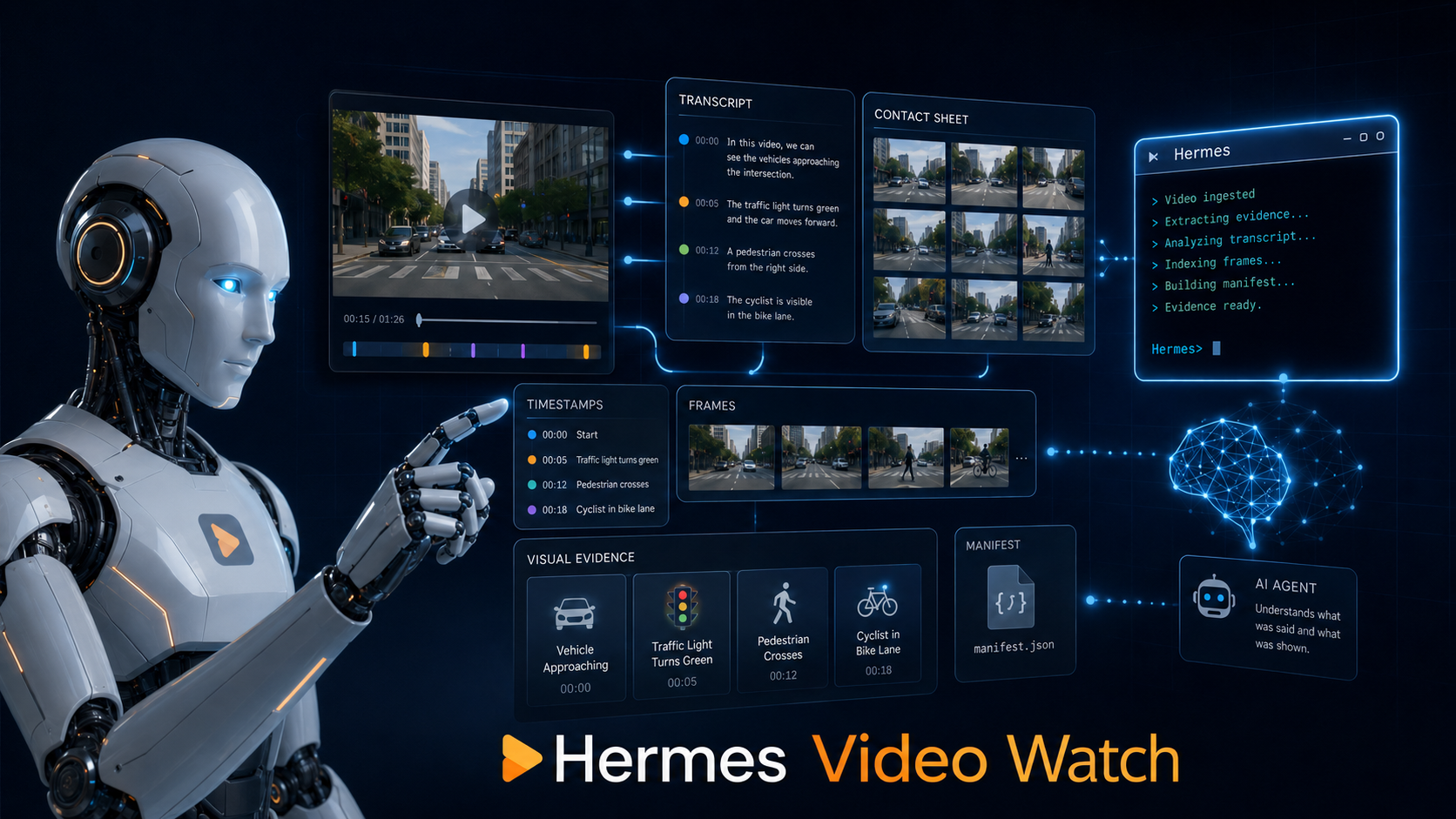
Hermes Video Watch is a skill that turns videos into agent-readable context.
That may sound fancy, but the idea is simple.
Instead of giving Hermes only a transcript, the skill breaks the video into structured artifacts an agent can actually reason over.
It can take inputs like:
- YouTube videos
- Instagram videos
- TikTok videos
- X videos
- Loom recordings
- Screen recordings
- Local video files
Then it can create:
- Timestamped transcripts
- Screenshots
- Contact sheets
- Frame manifests
- Focused visual evidence
- Structured reports
- JSON artifacts for downstream processing
That means Hermes can work with both sides of the video:
What was said and what was shown.
That is the whole point.
Here is a simple way to think about it.
A transcript gives your agent ears.
Screenshots give your agent eyes.
Hermes Video Watch gives your agent both.
The Workflow I Wanted
I did not build this because I wanted another “summarize this video” trick.
We already have plenty of those.
The workflow I wanted was different.
I wanted to ask:
“Find the visually important parts of this video. Extract the evidence. Help me reason from it.”
That is a very different request from:
“Summarize this transcript.”
For short videos, a normal frame scan may be enough. You can take screenshots every few seconds and let the agent inspect a contact sheet.
But for long videos, that does not work well.
Imagine a two-hour tutorial. If you randomly extract frames, you may capture the presenter’s face, blank transition slides, or moments where nothing important is on screen.
What you really want are the moments where the creator is showing something meaningful.
That is why Hermes Video Watch can scan the transcript for visual cues such as:
- diagram
- screen
- slide
- chart
- terminal
- command
- code
- demo
- dashboard
- UI
- workflow
Then it can suggest timestamp ranges where visual extraction is likely to matter.
After that, Hermes can extract focused screenshots from those ranges instead of wasting context on random frames.
This is important because agent context is not unlimited. You do not want to dump hundreds of images into an AI agent and hope something useful happens.
You want the right evidence at the right time.
That is what this skill is designed to help with.
Under The Hood, It Is Intentionally Simple
I did not want to create a complicated platform for this.
No expensive video model is required by default. No magic black box. No middle layer that makes the workflow harder to understand.
The skill uses tools developers already know and trust:
- yt-dlp for downloading or clipping supported public video URLs
- FFmpeg for audio extraction, frame extraction, video processing, and contact sheets
- Whisper or other transcribers when captions are not available
- Hermes skills and tools to inspect the resulting artifacts
The key idea is not that these tools are new.
They are not.
The key idea is packaging the workflow in a reusable way so Hermes can use it whenever video understanding matters.
That is what skills are for.
A good skill turns a workflow into a repeatable capability.
And once the capability exists, your agent can improve how it uses it.
That is why this belongs inside Hermes instead of being a one-off script sitting somewhere on your machine.
A Practical Example
Let me show you why this matters with a simple example.
Suppose you are watching a tutorial where the instructor says:
“Now update the environment variable and run the command again.”
A transcript-only summary may say:
“The instructor updated an environment variable and reran the command.”
That is technically true, but it is not useful enough.
With visual extraction, Hermes may capture the exact screen where the instructor shows:
export OPENAI_API_KEY=your_api_key_here
npm run dev
Or maybe it captures the exact error message:
Error: Missing required environment variable DATABASE_URLNow the agent has something concrete.
It can explain what failed. It can suggest the next command. It can write notes. It can compare the video’s instructions against your local environment.
That is a different level of usefulness.
The same applies to UI walkthroughs.
If a video says, “click the setting here,” the transcript is almost useless. But a screenshot can show the actual menu, button label, and surrounding context.
That is the difference between generic help and grounded help.
Why I Built This For Hermes
You’re probably wondering: why build this as a Hermes skill?
Because Hermes is built for this kind of reusable agent workflow.
A normal chatbot can answer questions. Hermes can operate.
It can use a skill, run a script, save artifacts, inspect files, call vision tools, and then generate a useful output based on evidence.
That makes it a natural fit for video analysis.
I do not want video understanding to be a separate website I visit occasionally. I want it to be part of my agent’s toolbox.
When I give Hermes a video, I want it to know what to do:
- Get the transcript if captions are available.
- Fall back to speech-to-text if captions are missing.
- Extract frames or contact sheets.
- Identify visually important ranges.
- Create artifacts I can inspect later.
- Use both transcript and visual evidence to answer questions.
That is a repeatable workflow.
And repeatable workflows belong in skills.
Cost And Privacy Considerations
The good news is, this does not have to be expensive.
If a YouTube video has captions, transcript extraction can be free.
Frame extraction runs locally through FFmpeg.
If captions are missing, speech-to-text may cost a little depending on the provider you choose. You can use local Whisper or faster-whisper to avoid cloud APIs. Or you can use OpenAI, Groq, Mistral, or any custom command-line transcriber if that fits your workflow better.
The skill does not bypass private videos or platform access controls.
If a video requires login or cannot be downloaded, you can provide a local file export. Then Hermes can still process the file you give it.
That is important.
I am not interested in building something shady. I want a clean workflow that helps your agent understand videos you legitimately have access to.
What This Opens Up
Think about what becomes possible when your agent can work with video properly.
You can give Hermes a 45-minute tutorial and ask it to create study notes with screenshots next to the relevant explanation.
You can give it a product demo and ask it to extract the actual onboarding flow, not the marketing language.
You can give it a screen recording of a bug and ask, “Where did the UI break?”
You can give it a competitor’s video and ask it to analyze the hook, pacing, visual transitions, offer framing, and the exact moment curiosity is created.
You can give it a research talk and ask it to capture diagrams that explain the architecture.
This is where the leverage becomes obvious.
You stop treating videos as something you have to manually scrub through.
You start treating videos as source material your agent can process, cite, analyze, and reuse.
That is a big shift.
How To Get Started
The skill is free on GitHub. I shared the link in the video description.
Because the skill includes helper scripts, install the whole directory, not just the SKILL.md file.
The basic setup is simple:
- Clone the repository.
- Install the skill directory into Hermes.
- Make sure dependencies like
yt-dlpandffmpegare available. - Give Hermes a video URL or local video file.
- Ask it to watch the video and extract transcript plus visual evidence.
You can also ask Hermes to inspect the GitHub repository first and tell you whether it is safe and useful to add.
That is actually a good habit.
Before adding any skill to your agent environment, ask the agent to inspect it. Let it read the scripts, understand the dependencies, and tell you what it does.
If the agent says, “Yes, this fills a real gap,” then install it.
That is how I use Hermes myself.
My Honest Take
I do not want to overclaim this.
Hermes Video Watch is not magic. It does not mean your agent watches every pixel of a three-hour video with perfect understanding.
That would be wasteful and expensive in terms of context.
The better approach is smarter extraction.
Use transcripts when text is enough. Use screenshots when visuals matter. Use focused ranges when the video is long. Use contact sheets when you need a quick visual overview.
That is the practical balance.
The goal is not to replace human judgment completely.
The goal is to stop forcing humans to manually scrub through every video just to find the important parts.
For me, that is already valuable.
And because this is a Hermes skill, it becomes part of a larger agent workflow. It can feed study notes, research briefs, content ideas, product analysis, QA reports, and second brain systems.
That is why I am excited about it.
Not because it is flashy.
Because it is useful.
Your Turn To Share
I am curious: what kind of videos do you wish your AI agent could actually watch properly instead of only reading the transcript? Tutorials, product demos, research talks, screen recordings, or something else?
Share your use case in the comments. I read every one.