
In my long career of about 30 years in IT Industry, I have watched so many times, a big software project drift away from what everyone actually agreed to build and what ended up building in the end. Almost every time, in every project I have seen, and I am sure you are probably nodding already, the spec said one thing while the code said another.
That is why everytime one needs to look into a project already in production, we find it so hard to trust the specs and existing documentations because we always suspect that someone coded something without updating the spec documentations.
That issue has only multiplied after the advent of AI and agentic coding systems. By the time anyone notices, three teams and two AI coding agents have already run off in different directions in full speed, in fact, at an amazing speed.
If you’re nodding along, you already understand the oldest problem in software: the gap between what we mean to build and what we actually ship. For decades, we’ve tried to close that gap with better documentation, more detailed requirements, and stricter processes. It never fully worked, because we treated the specification as scaffolding, something we built, glanced at once, and then discarded the moment “real coding” began. It needed real discipline and strict reviews to just keep the specifications and code in tandem.
In this post I am going to share a possible solution to this age old problem because AI agents and coding tools technically have a better discipline in following instructions/prompts and so there might be a better chance now to keep the code and the spec in sync.
If you’re nodding along, you already understand the oldest problem in software: the gap between what we mean to build and what we actually ship. For decades, we’ve tried to close that gap with better documentation, more detailed requirements, and stricter processes. It never fully worked, because we treated the specification as scaffolding, something we built, glanced at once, and then discarded the moment “real coding” began.
A GitHub open-source project called Spec Kit is trying to solve this problem for Agentic coding teams.. And for enterprise teams running lots of developers alongside lots of AI coding agents, the idea behind it, spec-driven development, is worth understanding carefully before you decide whether to adopt it.
Let me walk you through what it is, how the workflow actually runs, how it maps onto your agile process, and where you should be cautious.
What Spec-Driven Development Actually Means
In traditional development, code is king. The Product Requirements Document (PRD) guides the code. The design doc informs the code. But the code itself is the source of truth. As the code moves forward, the specs rarely keep pace, and they quietly rot.
Spec-Driven Development (SDD) inverts that power structure. As the methodology puts it: specifications don’t serve code, code serves specifications. The PRD isn’t a guide for implementation; it’s the source that generates the implementation. The spec becomes the primary artifact, and code becomes its expression in a particular language and framework. And with agentic coding platforms now dominating with every passing day, it is easier to now enforce this methodology as AI agents are much better at following protocols as opposed to we humans!
Think about it this way. Instead of writing code first and documenting later, you write and refine the specification first, then you let an AI coding agent execute that spec into working code. The specification becomes executable. (If you’ve ever watched an AI generate a mountain of plausible-looking code with no plan behind it, that’s the failure mode I covered in The Vibe Coding Trap.)
Why is this possible now and not ten years ago? Three trends line up, according to the Spec Kit methodology:
- AI can reliably generate working code from natural-language specifications. This isn’t about replacing developers, it’s about amplifying their effectiveness by automating the mechanical translation from spec to implementation.
- Software complexity grows exponentially. Modern systems stitch together dozens of services and dependencies. Keeping all of that aligned with original intent through manual processes gets harder every year.
- The pace of requirement change keeps accelerating. Pivots are no longer exceptional; they’re expected. When specifications drive implementation, a pivot becomes a systematic regeneration rather than a manual rewrite across docs, design, and code.
The SDD rests on four philosophy pillars worth memorizing: intent-driven development (the “what” before the “how”), rich specification creation using guardrails and organizational principles, multi-step refinement rather than one-shot generation, and heavy reliance on advanced AI model capabilities to interpret specifications.
A Quick Word on What Spec Kit Is
Spec Kit is an official GitHub open-source project (the repository is github/spec-kit), released under the MIT license. Its own one-liner describes it as “an open source toolkit for building high-quality software with any AI coding agent, a ready-to-use spec-driven process (or bring your own), endlessly extensible, community-driven, and built for your whole organization.”
A few facts that tell you how much traction it has, as of late July 2026: the repo sits at over 123,000 stars and roughly 11,000 forks. The latest release at that point was v0.13.4, and the cadence is genuinely rapid, versions ship within days of each other. It works with 30+ AI coding agents, both command-line tools and IDE-based assistants, including names you’ll recognize like GitHub Copilot, Claude, and Codex (two I compare directly in Claude Code vs Codex).
Because it moves this fast, treat any specific version number or star count as a snapshot. Check the official Spec Kit documentation for what’s current before you standardize on anything.
The Command Workflow: Five Core Commands Plus Two Quality Checks
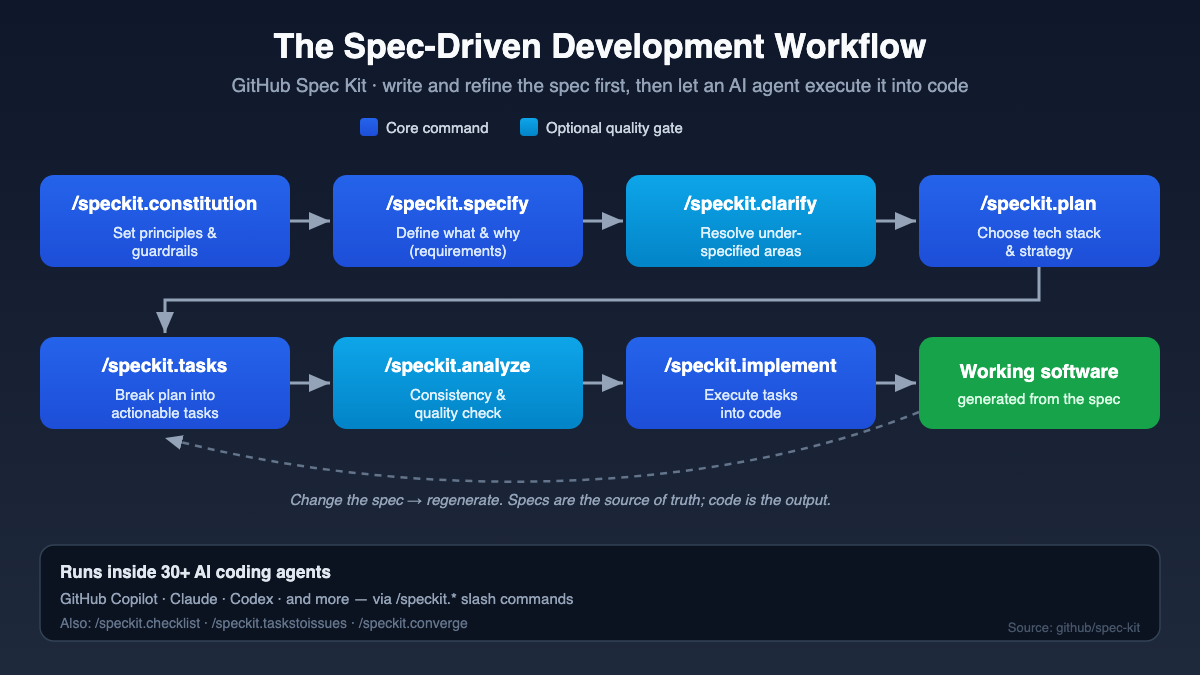
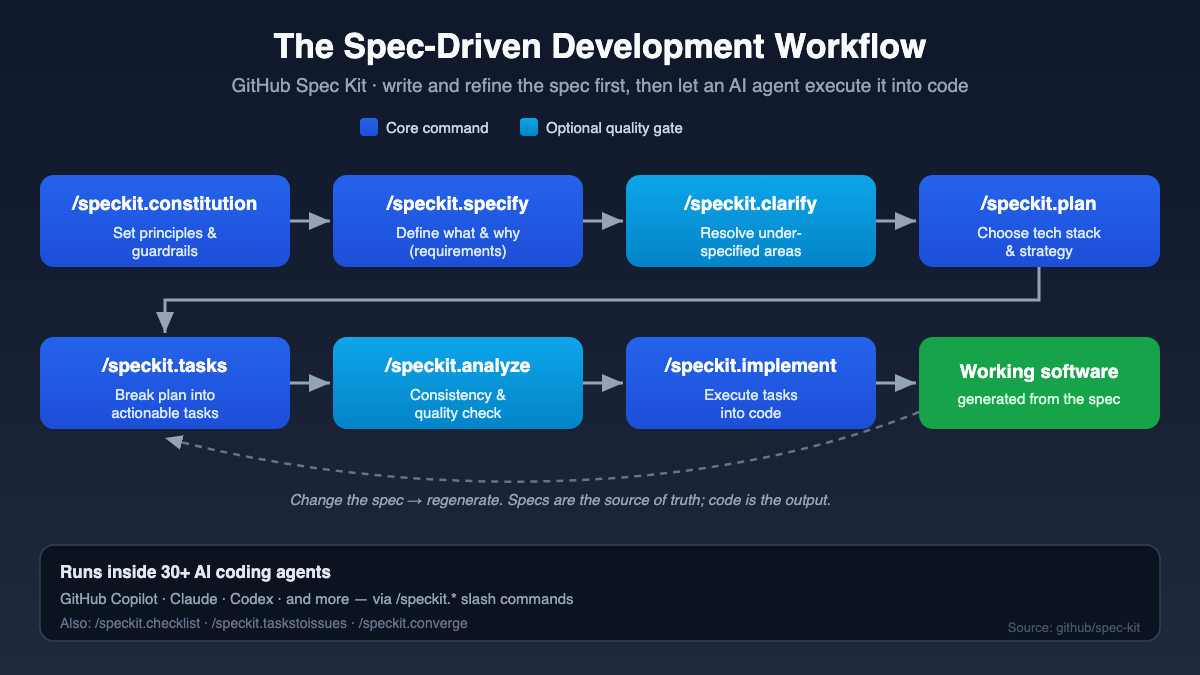
This is where it gets concrete. Spec Kit exposes its process as slash commands inside your AI coding agent, you’ll type things like /speckit.specify right in the agent’s prompt. (Some agents vary the syntax; Codex CLI in skills mode uses $speckit-*, and GitHub Copilot CLI uses /agents.)
Here’s an important distinction the README makes, and one worth honoring. There are core commands that form the essential SDD workflow, and there are optional quality commands you layer in when you want extra rigor. Let me show you both, in the recommended running order.
| Step | Command | Type | What it does |
|---|---|---|---|
| 1 | /speckit.constitution |
Core | Create or update the project’s governing principles and development guidelines, your guardrails |
| 2 | /speckit.specify |
Core | Define what you want to build (requirements and user stories); focus on the what and why, not the tech stack |
| 3 | /speckit.clarify |
Optional | Clarify underspecified areas before planning (recommended before /speckit.plan) |
| 4 | /speckit.plan |
Core | Create the technical implementation plan with your chosen tech stack and architecture |
| 5 | /speckit.tasks |
Core | Generate an actionable task list from the plan |
| 6 | /speckit.analyze |
Optional | Cross-artifact consistency and coverage analysis (run after tasks, before implement) |
| 7 | /speckit.implement |
Core | Execute all tasks to build the feature according to the plan |
Notice the shape of it. The five core commands are constitution, specify, plan, tasks, and implement. The two optional commands, clarify and analyze, slot into the recommended sequence at exactly the right moments to catch problems early, but you can run the core loop without them.
Let me explain each in plain English.
/speckit.constitution comes first because it sets the rules of the house. This is where you encode your governing principles, code quality standards, testing requirements, architectural discipline. In the methodology, the constitution is organized as numbered “articles” enforced through phase gates, covering things like library-first design, test-first development, and simplicity limits that push back against over-engineering. For an enterprise, this is the single most important step, and I’ll come back to why.
/speckit.specify is where you describe what to build. The trick here, and the templates enforce it, is to stay on the what and why, not the how. No tech stack, no API design yet. Behind the scenes this command auto-creates a semantic branch and a specs/[branch-name]/ directory with numbered features (001, 002, and so on), so your specs live in version control like everything else.
/speckit.clarify (optional but recommended) is the one that saves you later. It surfaces underspecified areas and forces [NEEDS CLARIFICATION] markers instead of letting the AI quietly guess that your “login system” means email and password when you actually meant SSO. Run it before you plan.
/speckit.plan takes your stable spec and adds the technical decisions: the stack, the architecture, the data models, the contracts. Every technology choice gets a documented rationale that traces back to a requirement.
/speckit.tasks turns that plan into an executable task list. Independent tasks get marked [P] so they can safely run in parallel, a detail that matters enormously when you’ve got multiple agents working at once.
/speckit.analyze (optional) does a cross-artifact consistency and coverage check after tasks and before implementation. It’s your chance to catch contradictions between spec, plan, and tasks before an agent starts writing code against a flawed foundation.
/speckit.implement executes the tasks and builds the feature according to the plan.
There are two more core commands worth knowing about: /speckit.taskstoissues, which converts your generated task list into GitHub issues for tracking, and /speckit.converge, which assesses the existing codebase against your spec, plan, and tasks and appends the remaining work as new tasks. And there’s a third optional command, /speckit.checklist, which generates custom quality checklists, the methodology calls these “unit tests for English.”
Hands-On: Install and Run the Flow
Enough theory. Here’s what you actually type. You’ll need uv (recommended) or pipx, Python 3.11+, Git, and a supported AI coding agent, on Linux, macOS, or Windows.
First, install the CLI. Pin a release tag and keep the leading v:
uv tool install specify-cli --from git+https://github.com/github/[email protected]Prefer PyPI? The package lives there too:
uv tool install specify-cliThen initialize a project and move into it:
specify init my-project --integration copilot
cd my-project
To check for or apply updates without surprises:
specify self check
specify self upgrade
Now launch your coding agent inside the project directory and run the flow. (New to these agents? My Claude Code tutorial and OpenAI Codex tutorial walk you through either one from scratch.) Here’s the core sequence, with the two optional quality steps included where they belong:
/speckit.constitution Create principles focused on code quality, testing standards, UX consistency, and performance
/speckit.specify Build an app to organize photos into albums grouped by date, re-orderable by drag and drop, with a tile preview per album
/speckit.clarify
/speckit.plan Use Vite with vanilla HTML, CSS, and JavaScript; store metadata in a local SQLite database
/speckit.tasks
/speckit.analyze
/speckit.implement
That’s it. Run specify integration list any time to see what integrations your installed version supports.
Making Spec Kit Enterprise-Ready
Now, here’s what most people miss when they first look at Spec Kit. The demo is fun, but the real value for a large organization is in how you shape the tool to your standards, part of the bigger question of why you need an actual AI tool strategy, not just a scattering of chatbots. There are four layers to know.
The Constitution as Guardrails
Your constitution is your architectural DNA. This is where you formalize the non-negotiables as explicit, numbered articles enforced through phase gates, things like “every feature begins as a standalone library,” “no implementation code before tests,” and simplicity gates that cap how many projects a feature can spawn. When you have many developers and several AI agents generating code, this constitution is what keeps everyone architecturally compatible. Different agents produce code that follows the same principles.
Presets: Adapt the Workflow to How You Work
Presets change how Spec Kit works without adding new capabilities. And here’s the part agile shops will love: the repo explicitly says presets can “adapt the workflow to fit the methodology you use (e.g., Agile, Kanban, Waterfall, jobs-to-be-done, or domain-driven design).” You can also enforce a compliance-oriented spec format, add mandatory security review gates, enforce test-first task ordering, or localize the whole workflow.
specify preset add <preset-name>Extensions: Add New Capabilities
Extensions add brand-new commands and capabilities that go beyond the core. The examples the repo cites are exactly the ones enterprises ask for: Jira integration, post-implementation code review, V-Model test traceability, and project health diagnostics.
specify extension add <extension-name>So if your teams live in Jira, an extension is how you bridge Spec Kit’s task output into your existing tracking, rather than forcing everyone into a new tool.
Bundles: Role-Based Setups in One Command
Finally, bundles package a curated set of extensions, presets, steps, and workflows into one versioned, role-oriented install. Instead of hand-configuring each person, you provision a whole persona at once. The repo ships example manifests for a product manager, a business analyst, a security researcher, and a developer.
specify bundle install <bundle-id>When these layers collide, resolution priority runs Project-Local Overrides > Presets > Extensions > Spec Kit Core, so a project can always override an org default when it genuinely needs to.
Mapping SDD Onto Your Agile Process
If you’re a Scrum Master, Product Owner, or Business Analyst, you’re probably wondering where all this fits in the ceremonies you already run. The good news is that SDD isn’t a competing methodology, the specification simply becomes the shared artifact your whole team already wishes they had.
The methodology explicitly frames SDD as “supportive of a team process, where team-reviewed specifications are expressed and versioned, created in branches, and merged.” Requirements and design become continuous activities rather than discrete phases. Let me connect the dots.
- Backlog refinement becomes spec work. The Product Owner and Business Analyst use
/speckit.specifyand/speckit.clarifyto turn a vague idea into a structured, testable spec, with[NEEDS CLARIFICATION]markers standing in for the open questions you’d normally chase across meetings. - Definition of Ready gets teeth. A story is ready when its spec has no unresolved clarification markers and passes its checklist. That’s a much crisper gate than “the PO thinks it’s clear enough.”
- Sprint planning maps to
/speckit.planand/speckit.tasks. The plan captures technical decisions; the task list, with[P]markers for parallel-safe work, becomes something your team and your agents can pull from. - Definition of Done aligns with
/speckit.analyzeand/speckit.implement. Cross-artifact consistency passes, tests pass first, and the implementation traces back to the spec.
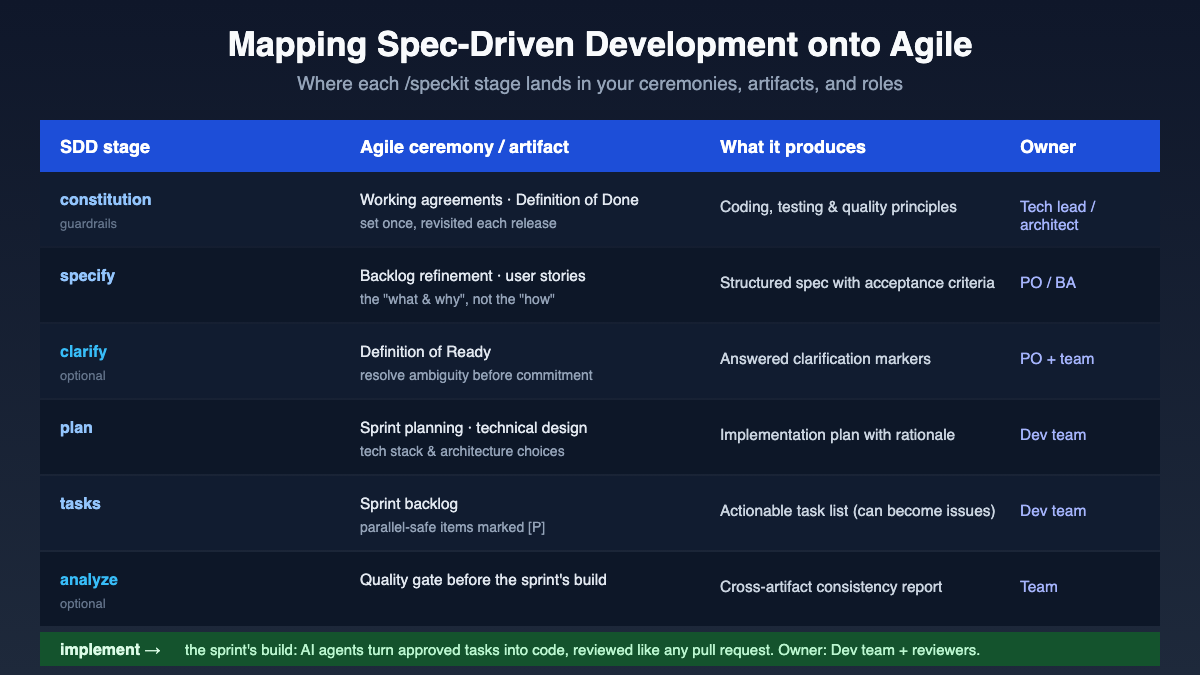
The role interplay is the elegant part. As the methodology describes it: when a product manager updates acceptance criteria, the implementation plans automatically flag affected technical decisions; when an architect discovers a better pattern, the PRD updates to reflect the new possibilities. Your cross-functional roles stay cross-functional, they’re just editing a living spec instead of stale documents. And because org constraints like database standards, auth requirements, and deployment policies integrate into the specs, your compliance and security folks aren’t bolted on at the end.
When SDD Fits, and When to Be Cautious
I’d be doing you a disservice if I sold this as a silver bullet, so let me be honest about both sides.
Where it fits well:
- Greenfield builds, where you’re generating from scratch and want structure from day one.
- Creative exploration, where you generate multiple parallel implementations from the same spec to compare approaches.
- Brownfield modernization, where
/speckit.convergehelps you reconcile an existing codebase back to an intended spec. - Multi-developer, multi-agent environments, which is exactly the enterprise case. Versioned, team-reviewed specs plus a shared constitution are how you keep many hands and many agents pointed the same direction.
Where to be cautious:
- Spec Kit is explicitly experimental. The repo has an “Experimental Goals” section for a reason. Treat it as a promising, fast-moving toolkit, not a settled standard.
- It does not replace developers. The methodology is careful to say it “amplifies their effectiveness.” Your engineers still own architecture, judgment, and review.
- Discipline is required. Practicing SDD today still means assembling tools and maintaining rigor. If your team won’t actually write and review specs, the tool won’t save you. And remember the agents doing the execution aren’t free, so it’s worth understanding the real cost of AI coding agents before you scale this across teams.
- The rapid release cadence is a double-edged sword. Great momentum, but you’ll want a plan for keeping installs and presets current across teams.
Here’s what actually matters: SDD rewards teams that already value clarity and are willing to invest upfront in the spec. If your culture treats documentation as an afterthought, start small, one feature, one team, and see whether the discipline sticks before you roll it out widely.
The Practical Takeaway
Strip away the jargon and spec-driven development is really one honest idea: define what to build before you build it, write that definition precisely enough that an AI agent can execute it, and keep the spec, not the code, as your source of truth.
For an enterprise juggling many developers and many coding agents, that shift is the difference between coordinated velocity and expensive chaos. The constitution keeps everyone architecturally aligned. Presets bend the workflow to your methodology, whether that’s Agile, Kanban, or Waterfall. Extensions wire in tools like Jira. Bundles provision whole roles in a single command. And the seven-step flow (constitution, specify, clarify, plan, tasks, analyze, implement) gives your people a shared, repeatable rhythm.
Start with a single feature. Write a real constitution. Run the flow end to end. Then judge it on your own work, not on anyone’s promises.
Your Turn To Share
I’m genuinely curious: in your team, where does the gap between the spec and the shipped code hurt the most? Is it unclear requirements, drifting architecture, or something else entirely? Drop it in the comments and tell me how you’d want an AI agent to help close it. I read every one.