
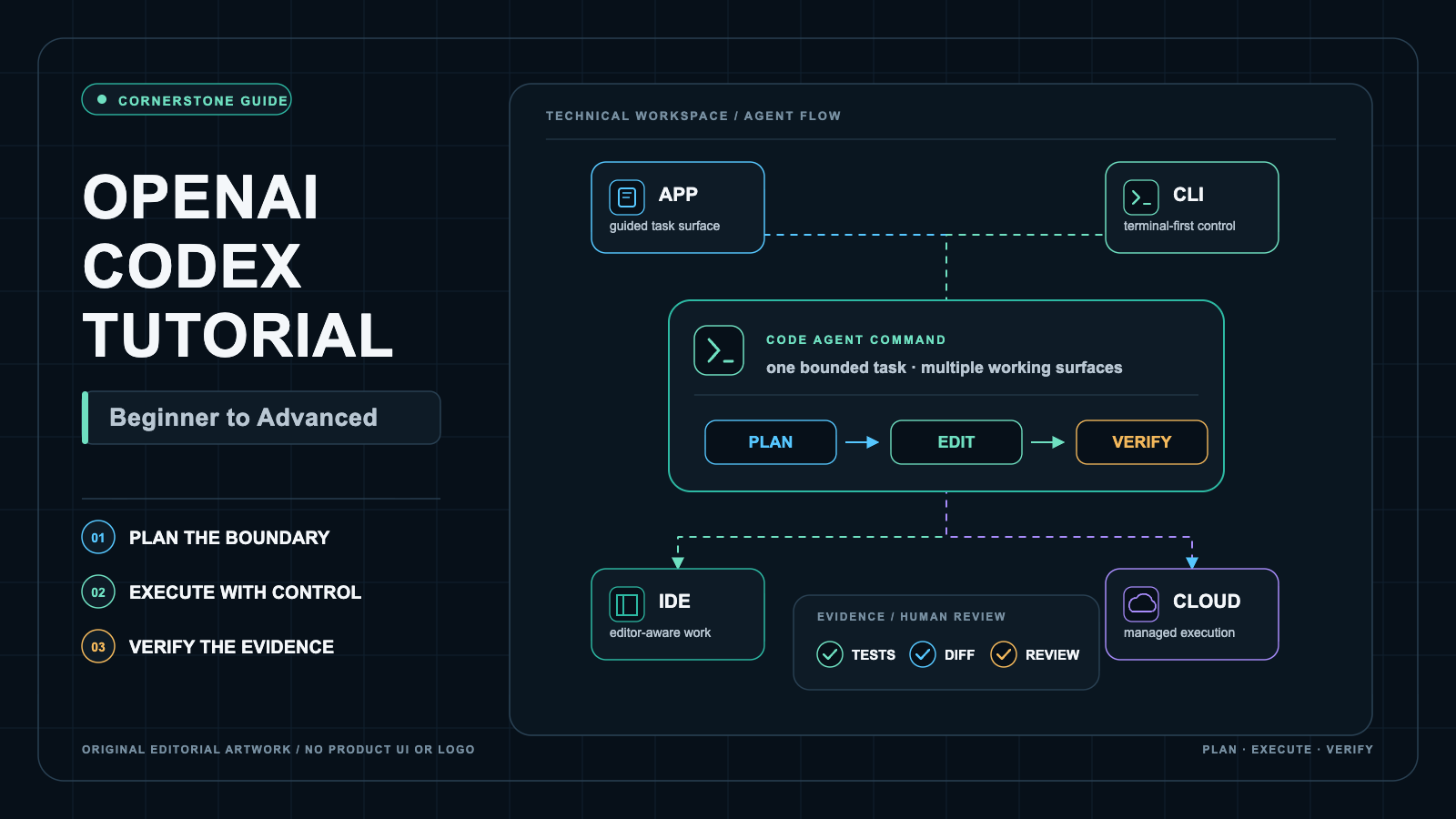
After I published the Claude Code tutorial, I realized that I must also publish a OpenAI Codex Tutorial because I am using Codex more, especially in last month or so, and so, it only makes sense to write a tutorial about the tool that I am finding to be even more useful in my personal experience. So, here it is!
So, you opened the ChatGPT desktop app, saw a mode called Codex sitting next to Chat and Work, and wondered what it actually does. Or you ran codex in your terminal, watched it read your repository, propose an edit, and pause for approval, and realized this is not a chatbot that pastes snippets. It is an agent that touches your files, runs your tests, and hands you a diff to review. That shift is exactly where beginners get stuck and where careful practitioners get value.
OpenAI Codex is OpenAI’s family of AI coding agents that read, write, and run code across a ChatGPT desktop app work mode, a command-line interface, IDE extensions, the cloud, the web, GitHub, and a software development kit. It plans changes, edits files, runs tests, and returns reviewable diffs under permission controls you set.
Last verified: July 17, 2026. I got my AI Agent, Govind to verify this guide against current OpenAI Codex documentation. So, this is updated as of this day against the Codex CLI release
rust-v0.144.5, locally observed bundled CLI0.144.0-alpha.4, and ChatGPT desktop app26.707.51957build5175. Models, effort labels, prices, limits, UI, plan access, and experimental features can change. Current official behavior, local observations, and account-specific availability are identified separately.
This guide is a hands-on, beginner-to-advanced course for learning and safely using current OpenAI Codex across every surface it ships on. It teaches a stable mental model, safe defaults, model and cost choices, and repeatable workflows you can trust.
This guide is not a marketing tour, a benchmark scoreboard, or a promise that any single model wins every task. It is not a Claude Code comparison piece. There is one bounded comparison chapter later, and that is the only place I frame a practitioner conclusion. Prices, limits, and model labels move, so I mark volatile facts and separate current official behavior from local observation and account-specific access.
What you will be able to do
By the end you will be able to:
- Explain where each Codex surface runs, how it authenticates, what files it can touch, and when to use it.
- Sign in with the right method for your goal and keep credentials safe.
- Run a bounded first task in a disposable Git repo with baseline, tests, diff, and rollback.
- Pick a GPT-5.6 model and reasoning effort without overspending or over-trusting.
- Use Codex inside your editor and hand work off to the cloud.
- Route Codex to other providers or local models while understanding what you lose.
- Layer subagents, worktrees, automations, customization, permissions, and cost controls into real workflows.
Prerequisites
- Comfort with a terminal, Git basics (
clone,commit,diff,branch), and running your project’s test command. - A ChatGPT account or an OpenAI API key, depending on the surface you choose (both boundaries are explained in ChatGPT Integration and Auth setup).
- A throwaway folder you are willing to let an agent modify. Never point your first runs at production, your home directory, or a folder holding secrets.
- macOS or Windows for the desktop app. The CLI and IDE extensions cover local terminal and editor workflows with OS-specific boundaries.
New to agentic coding in general? Start with the complete vibe coding guide for the wider context, then come back here for Codex specifics.
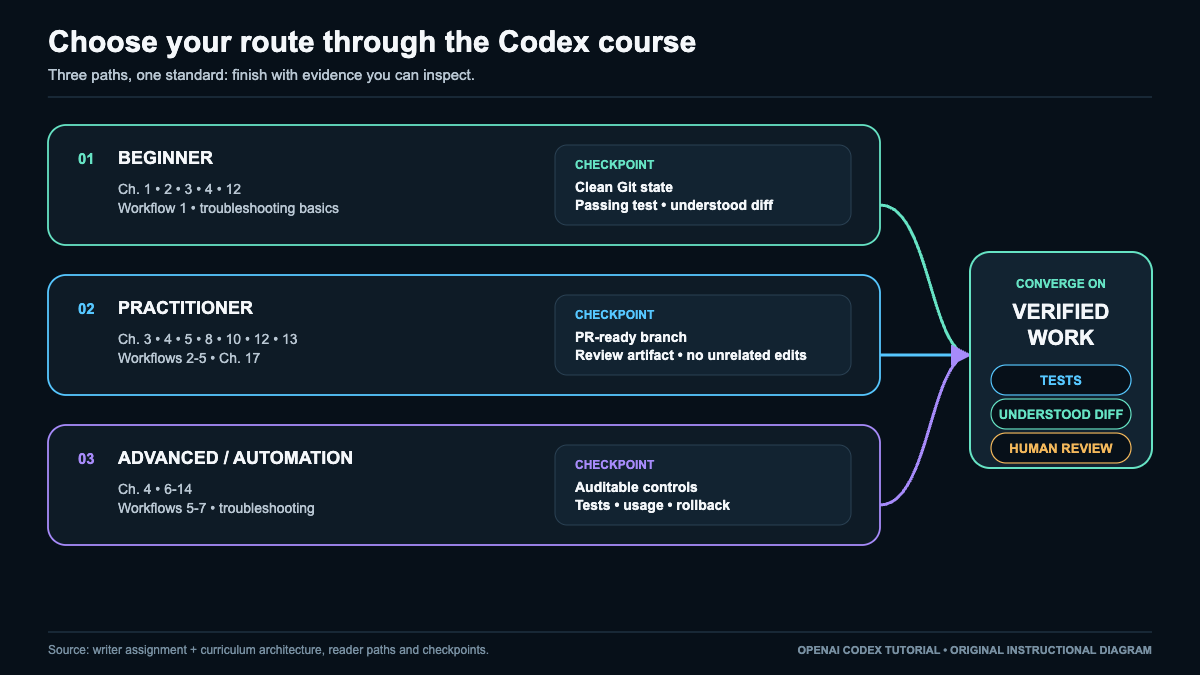
Choose your reading path
Beginner path. Read top to bottom through Set Up Codex and Complete a Safe First Task. Do the lab. Skim models, then stop. You will have a working, safe setup.
Practitioner path. Skim the surface matrix, then focus on models and effort, the IDE workflow, safety, and seven workflows. Wire Codex into your daily loop.
Advanced path. Jump to subagents, worktrees, automations, customization, execution location, configuration, and troubleshooting. Build a governed, multi-surface setup.
Full guide contents
- What OpenAI Codex Is (and the Six Places You Can Use It)
- Choose Your Codex Surface: App, CLI, IDE, Web, Cloud, or GitHub
- Set Up Codex and Complete a Safe First Task
- Choose a Model and Reasoning Effort Without Overspending
- Use Codex Inside Your IDE
- Use Other Providers, Bedrock, Azure, Ollama, or LM Studio
- Delegate Work to Codex Subagents
- Run Parallel Tasks Safely with Git Worktrees
- Create Scheduled Tasks and Background Automations
- Customize Codex with AGENTS.md, Skills, Plugins, and MCP
- Choose Local, Worktree, Cloud, Web, or GitHub Execution
- Control Sandbox, Permissions, Approvals, and Network Access
- Configure Codex Without Creating a Fragile Setup
- Understand Codex Pricing, Usage, and Cost Controls
- Seven Practical Codex Workflows You Can Reuse
- Troubleshoot Codex by Finding the Failing Layer
- When Codex Fits, When Claude Code Fits, and When to Use Both
- Your Next 30 Days with Codex
- Frequently Asked Questions
- Your Turn To Share
What OpenAI Codex Is (and the Six Places You Can Use It)
Here is the thing that trips people up: Codex is not one app. It is a product family with a shared brain and many front doors. The same model and permission ideas show up whether you are in the desktop app, your terminal, your editor, a browser, or a GitHub pull request.
For the current open-source CLI and repository documentation, see OpenAI’s Codex repository.
The desktop change, stated correctly
You may have read that Codex and ChatGPT “merged.” That framing is wrong, and it matters for your mental model. The accurate wording is a transition:
OpenAI moved the Codex desktop experience into the new ChatGPT desktop app, where Codex is one of the available work modes.
In the current desktop app you will see modes such as Chat, Work, and Codex. OpenAI’s own help material is titled around moving to the new ChatGPT desktop app, not merging two products. A local verification performed for this guide on July 16, 2026 found the app bundle at /Applications/Codex.app, with the display name ChatGPT and the alternate name Codex. That local packaging detail is an observation, not proof of an architecture merger. Treat it as a naming artifact, not a claim.
If the distinction between a model, a desktop agent, and an orchestration layer feels fuzzy, why a model, desktop agent, and orchestration layer are different unpacks that separation clearly.
The Codex product family
Codex remains a family across these surfaces:
- ChatGPT desktop app with Codex. A local desktop agent (macOS and Windows in current docs) with a Codex work mode for Local, Worktree, and Cloud style tasks.
- Codex CLI. A terminal agent for local repositories, scripting, and review. Local execution, OS-specific boundaries.
- Codex IDE extension. VS Code and compatible editors, plus separately documented Xcode and JetBrains integrations.
- Codex cloud and web. Tasks run in isolated hosted environments, not on your local filesystem. Good for delegation and parallel work.
- GitHub. Delegation and review flows tied to repositories and pull requests.
- SDK and noninteractive. Programmatic and
codex execstyle execution for automation and pipelines.
Think of these as six interactive surfaces plus a seventh programmatic door that stitches them into automation. Keep them distinct: they differ in where code runs, how they authenticate, what files they can touch, and what they are best at.
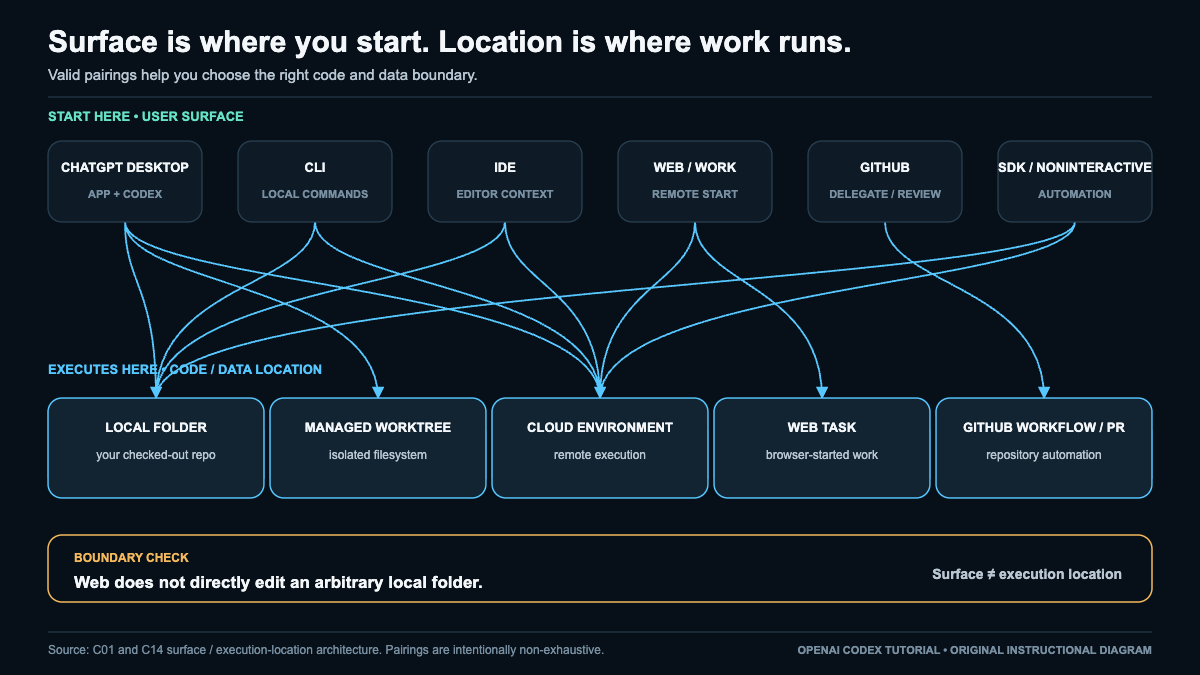
Surface matrix
| Surface | Where it runs | Typical auth | File boundary | Best fit |
|---|---|---|---|---|
| ChatGPT desktop app (Codex mode) | Your machine (macOS/Windows) plus cloud handoff | ChatGPT sign-in | Local repo you open, or handed-off repo state | Local edits, worktree parallelism, cloud handoff with review |
| Codex CLI | Your local terminal | ChatGPT sign-in or API key | The workspace you launch it in | Scripting, precise control, local review |
| Codex IDE extension | Your editor process | ChatGPT sign-in or API key | Open workspace and selection | In-editor edits, diff review, local-to-cloud handoff |
| Codex cloud / web | Isolated hosted environment | ChatGPT sign-in (eligible plans) | Repository/environment state, not arbitrary local files | Delegated, parallel, longer-running tasks |
| GitHub | Hosted, tied to repo/PR | ChatGPT sign-in (eligible) | Repo and pull request | Review and PR-oriented delegation |
| SDK / noninteractive | Wherever you run it | API key or tokens | Whatever the script grants | CI, pipelines, batch execution |
Common failure: assuming the web surface can edit any local folder. It cannot. Desktop-to-cloud handoff uses repository and environment state and returns a reviewable diff. It does not silently upload arbitrary uncommitted local files. Recovery: if you need local edits, use the app, CLI, or IDE; use cloud and web for delegated work on committed state.
Checkpoint: you can name each surface, say where it runs, how it authenticates, and one task it is best at. If you cannot, reread the matrix before moving on.
Choose Your Codex Surface: App, CLI, IDE, Web, Cloud, or GitHub
Picking a surface is really answering four questions: where does the code need to run, what should touch my files, how do I want to review changes, and do I need a pull request at the end?
Decide by intent
- I want to edit a repo on my machine and watch every step. Use the Codex CLI or the IDE extension with a conservative approval policy.
- I want a rich desktop workspace with Local, Worktree, and Cloud in one place. Use the ChatGPT desktop app with Codex.
- I want the agent to work while I do other things, in isolation. Use Codex cloud or web.
- I want changes to land as a pull request for team review. Use the GitHub flow.
- I want to run Codex from a script, cron, or CI. Use the SDK or
codex execnoninteractive mode.
Execution, isolation, and persistence
Distinguish these execution modes, because they behave differently:
| Mode | Isolation | Trigger | Persistence |
|---|---|---|---|
| Local task | Your filesystem, sandboxed by policy | You, interactively | Your working tree |
| Background OS process | Local, longer-lived | You or a script | Local until stopped |
| Cloud task | Isolated hosted env | You or delegation | Hosted, returns a diff |
| Worktree | Separate local Git checkout | You | Separate branch checkout |
| Subagent | Separate context, same task | Parent agent | Within the task |
| Automation | Scheduled definition | Schedule | Recurring |
| Remote control / SSH remote | Another machine | You | That machine |
To understand how an agent actually decides which tool or surface to invoke under the hood, how agentic tool calling works is a useful companion.
Common failure: starting in the cloud when you actually needed to touch uncommitted local files. Recovery: commit first, or switch to a local surface. Cross-reference Choose Local, Worktree, Cloud, Web, or GitHub Execution for the full operating model.
Checkpoint: for your next real task, write down the surface, the isolation level, and whether you need a PR. If any answer is “not sure,” you picked the wrong surface.
Set Up Codex and Complete a Safe First Task
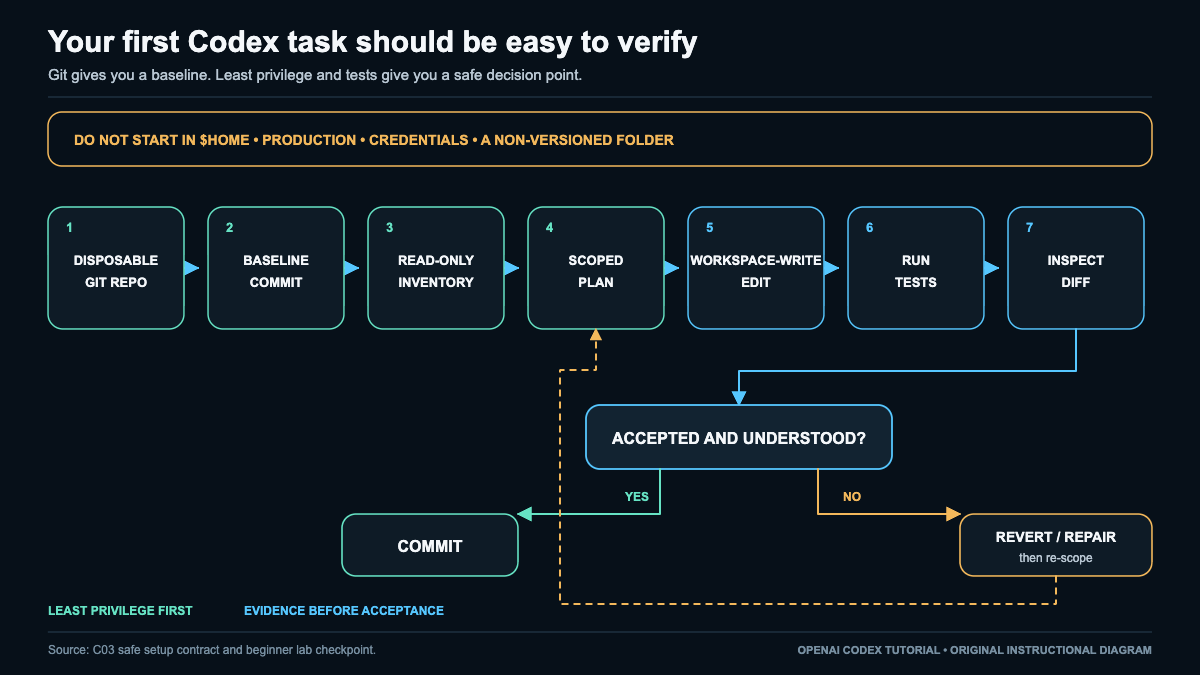
This is the section that keeps you out of trouble. We will install, authenticate correctly, and run one bounded edit in a disposable Git repo, with tests, a diff, and a clean rollback. No production folders, no home directory, no credential stores.
Authentication and billing boundaries
There are three distinct ways in, and they unlock different things:
| Auth method | Unlocks | Billing | Does not unlock |
|---|---|---|---|
| ChatGPT subscription sign-in | Desktop app, CLI, IDE, plus eligible ChatGPT cloud integrations | Subscription plan and credits | Nothing extra needed for cloud on eligible plans |
| OpenAI API key | Local CLI, SDK, IDE, and scripts | API token billing | ChatGPT cloud tasks, GitHub review, Slack/Linear, ChatGPT credits |
| Codex access token (enterprise) | Trusted automation | Org-managed | Interactive personal features |
State it plainly: API-key auth does not unlock ChatGPT cloud features. If you sign in with an API key and then wonder where cloud tasks went, that is why. Use ChatGPT sign-in for cloud, GitHub review, and connectors.
Check and manage your session:
codex login status
codex logout
Verified behavior. In the installed CLI help, codex login status is a read-only status check, while codex logout ends the active session by removing stored authentication credentials. Do not run codex logout mid-task.
Secret-safe handling: never paste an API key into a prompt, a committed file, or a TOML value. Keep keys in your OS keychain or an environment variable, and reference the variable name only. We use MY_PROXY_API_KEY as an example variable name later, never a real value.
The safe-first-task lab
Objective. Make one small, verifiable change (add a function and a passing test) in a throwaway repo, review the diff, and either commit it or roll it back cleanly.
Prerequisites and surfaces. Codex CLI installed and authenticated (codex login status shows a session). Git installed. A language toolchain you can test with. This lab uses the local CLI surface.
Starting state and risk. You will create a brand-new disposable Git repository. Do not run this in $HOME, a production checkout, a credentials folder, or any non-versioned working directory. The risk is bounded because the repo is disposable and the permission profile is conservative.
Set up the disposable repo and a baseline commit:
mkdir codex-lab && cd codex-lab
git init
printf "# Codex Lab\n" > README.md
git add README.md
git commit -m "baseline"
Exact prompt, step 1 (read-only inventory first). Start in read-only so nothing is written before you understand the repo.
Give me a read-only inventory of this repository: list files,
detect the language and test runner, and propose the single
smallest change to add one function with one passing test.
Do not edit anything yet.
Exact prompt, step 2 (one bounded workspace-write edit). After you approve the plan, allow a single scoped edit.
Implement only the change you proposed: add the function and
one test. Keep it minimal. Then stop so I can review the diff.
Permission and network profile. Use workspace-write with on-request approval (the recommended starting pattern), and keep network access off unless the task truly needs it. Full detail lives in Control Sandbox, Permissions, Approvals, and Network Access. Do not use bypass modes for this lab.
Run your project’s tests. Use the command that matches your stack. Honest substitution guidance: pick the one that fits, and if your project uses something else, substitute it.
# Node
npm test
# Python
pytest
# Rust
cargo test
# Go
go test ./...
(These are standard test commands, not Codex output; run the one your repo actually uses.)
Review the diff before committing:
git diffCommit or roll back. If the change and test look right and pass:
git add -A
git commit -m "add sample function with test"
If anything looks wrong, roll back to baseline:
git restore --staged --worktree .
git clean -fd
git reset --hard HEAD
Expected observable evidence. A git diff showing a small, intentional change; a passing test run; and a commit hash (or a clean tree after rollback).
Common failure and diagnostic. The agent tries to edit before you approved, or edits more than one file. Diagnostic: check your approval policy and sandbox mode with your status output and the run log; a too-permissive profile is the usual cause. Recovery: cancel, reset to baseline with the rollback block, and rerun with on-request approval.
Rollback and cleanup. After the lab, remove the throwaway repo entirely:
cd ..
rm -rf codex-lab
Do not continue until you have produced a reviewed diff and either a commit hash or a clean tree, using workspace-write with on-request approval in a disposable repo, and you can explain in one sentence what changed and why.
Choose a Model and Reasoning Effort Without Overspending
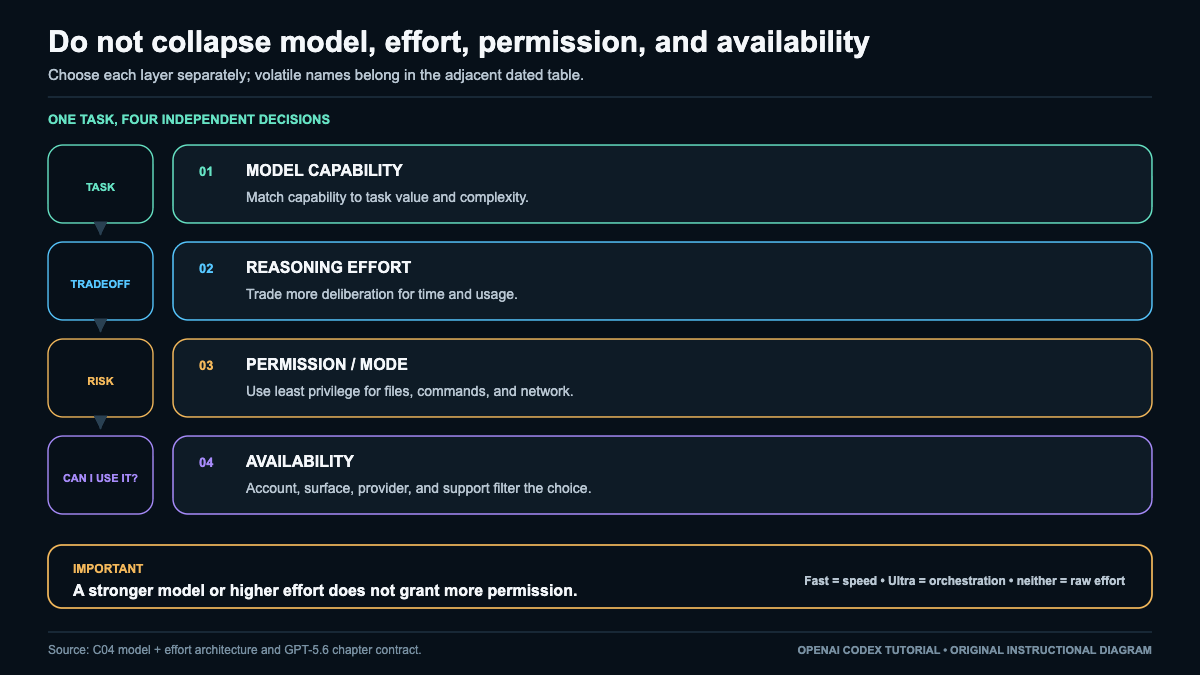
This is the chapter where money and quality actually get decided. The mistake I see most often is treating “pick a model” as one choice. It is really four separate layers: which catalog you are choosing from, which model, how much reasoning effort, and what permissions and orchestration you attach. Higher effort does not grant more permissions and does not guarantee correctness. Keep the layers separate.
For the current model catalog and selection guidance, see the official models documentation.
Three catalogs, not one
Do not confuse these:
- ChatGPT model picker labels. Friendly names in the ChatGPT app UI. A picker choice is not automatically a Codex model ID.
- Codex-supported model selection. What you select through the Codex picker,
/model,--model, or config for a Codex task. - OpenAI API IDs and limits. The raw identifiers and context/output numbers used by the API.
A ChatGPT picker choice and a Codex task’s model, effort, permission, and orchestration settings live in different layers. Choosing a label in one place does not silently set your Codex task’s effort or permissions.
The GPT-5.6 models
| Selector | Best fit |
|---|---|
gpt-5.6 |
Alias for current GPT-5.6 routing. Fine default when you do not want to pin a tier. |
gpt-5.6-sol |
Flagship. Hardest, open-ended, high-value tasks. |
gpt-5.6-terra |
Everyday balanced workhorse. |
gpt-5.6-luna |
Clear, repeatable, high-volume transformation and extraction. |
Do not invent model IDs. There is no gpt-5.6-pro and no gpt-5.6-codex. If you see those in a prompt or a config, they are wrong.
Context and output boundaries
Two different numbers, and mixing them up leads to bad planning:
- OpenAI API pages list
1,050,000context and128,000max output for Sol, Terra, and Luna. - Current Codex source presets advertise
372,000effective Codex context.
Do not present the API context as your usable app or CLI context. Plan your Codex work against the 372,000 effective figure, and treat the API numbers as API-surface facts.
Effort, speed, depth, and orchestration are separate
- Reasoning effort (GPT-5.6 Responses API values):
none,low,medium,high,xhigh,max. Codex may expose model-advertised values, and the app may labellowas Light. Availability varies by surface and plan. - API Pro is
reasoning.mode: "pro"on a selected GPT-5.6 model. It is a mode, not a model. There is nogpt-5.6-pro. - Fast is a speed and service tier, not an effort value and not a model.
- Max is the hardest single-agent depth setting.
- Ultra is Codex orchestration with automatic delegation. Ultra is not a raw API effort value.
The default tension
Be honest about defaults, because the docs and the captured source disagree:
- Documentation describes Power as Sol plus medium effort.
- The captured bare Sol source preset shows effort
low. - User settings, server config, UI, and config files can override either.
So do not claim a single universal default. Check your own effective setting rather than trusting a generic statement.
Task routing
| Situation | Choice |
|---|---|
| Hardest, quality-first, open-ended work | Sol |
| Everyday balanced tasks | Terra |
| Repeatable, high-volume transforms | Luna |
| Deepest single-agent reasoning | Max |
| Decomposable work with delegation | Ultra |
| Speed matters more than depth | Fast |
| Marginal reliability worth extra latency and usage | API Pro (reasoning.mode: "pro") |
If you are weighing whether a stronger model is worth it at all, my write-up of my GPT-5.4 model-switch experiment is a reminder that a bigger model is not automatically a better outcome for your specific loop.
Copyable, source-supported examples
Select a model at launch:
codex --model gpt-5.6
codex -m gpt-5.6-terra
codex exec -m gpt-5.6-luna "Extract the required fields"
Inside the TUI, switch models with:
/modelSet model and effort in config (TOML):
model = "gpt-5.6"
model_reasoning_effort = "medium"
One-off override without editing config:
codex -c 'model="gpt-5.6-sol"' -c 'model_reasoning_effort="high"'Installed-help check. The current bundled CLI help confirms --model/-m for model selection and --config/-c for one-off configuration overrides. Exact model IDs, accepted effort values, config keys, and command behavior are version-sensitive, so verify them against the help and schema for your installed release.
Common failure. Cranking effort to max expecting both more access and guaranteed correctness. Neither follows. Effort changes reasoning depth, latency, and usage, not permissions or truth. Recovery: if a task fails, first check the failing layer (auth, permission, context) before raising effort, and see Troubleshoot Codex by Finding the Failing Layer.
Checkpoint: you can state which catalog you are choosing from, name the model, name the effort, and confirm your permission and orchestration settings independently.
Use Codex Inside Your IDE
The IDE extension is where Codex fits into how many of us already work: open a file, select some code, ask for a change, review the diff inline, and hand the heavy part to the cloud when you want to keep coding.
VS Code and compatible editors
Current docs cover the Codex IDE extension for VS Code and compatible editors. Two caveats up front: editor and extension versions matter, and compatibility across VS Code-compatible forks is not guaranteed identical. Confirm your extension version against current docs before assuming a feature exists.
What the extension gives you:
- File and selection context. Codex can use the open workspace and your current selection as context, so you can scope a request to exactly the lines you highlight.
- Diff review. Proposed edits appear as a reviewable diff you accept or reject, rather than silent writes.
- Model and effort selection. Choose your GPT-5.6 model and reasoning effort from the extension, following the same layers from Choose a Model and Reasoning Effort.
- Local-to-cloud handoff. Start locally, then hand a task to the cloud. The handoff uses repository and environment state and returns a reviewable diff; it does not silently upload arbitrary uncommitted local files.
Common failure. Expecting a selection-scoped edit but leaving the whole file in context, so Codex edits more than you intended. Recovery: narrow the selection, restate the scope in the prompt, and reject the broad diff.
Xcode and JetBrains
Xcode and JetBrains integrations are documented separately. Treat them as their own integrations, not as a promise of identical parity with the VS Code extension. Features, diff handling, and model controls can differ, so check each integration’s current docs rather than assuming the VS Code behavior carries over.
Checkpoint: you can make a selection-scoped edit, review the diff, pick model and effort in the editor, and hand one task to the cloud, returning to a reviewable diff.
Use Other Providers, Bedrock, Azure, Ollama, or LM Studio
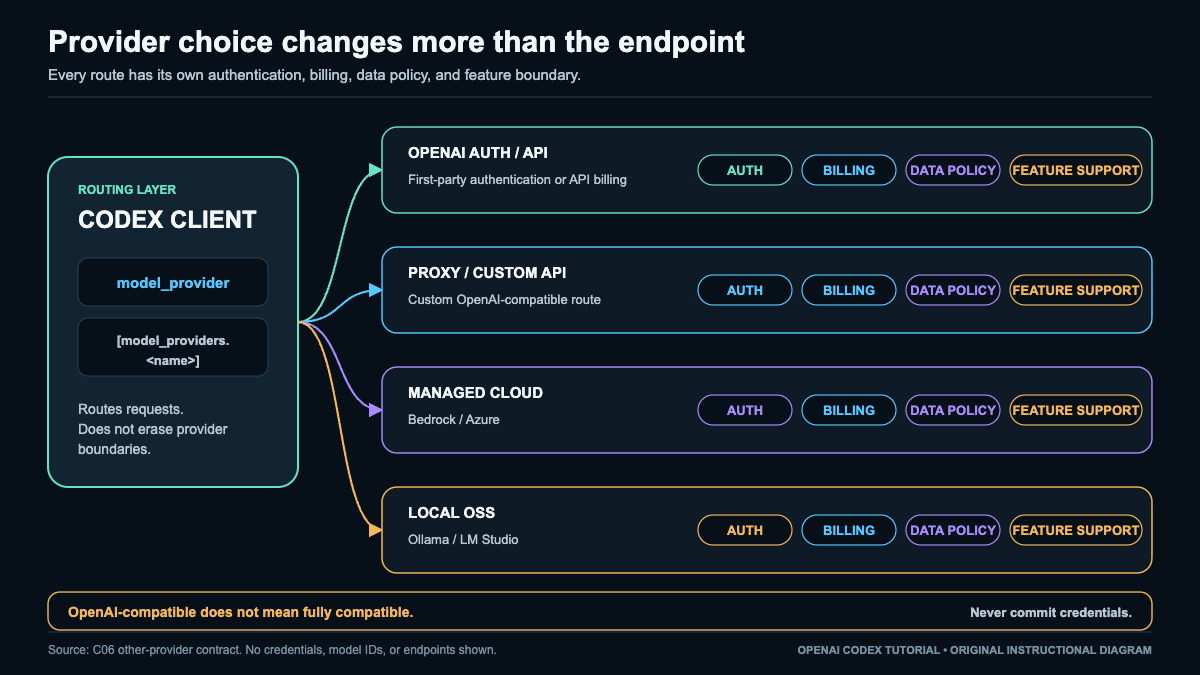
Codex can point at providers other than OpenAI’s default. This is powerful for routing, cost, or local privacy, but the headline rule is simple: OpenAI-compatible does not mean fully compatible. You will keep the basics and lose several higher-order features.
The routing knobs
Two config concepts do the work: model_provider selects which provider to use, and [model_providers.<name>] defines it. Current docs say Codex can target providers that support Chat Completions or Responses, with Chat Completions deprecated, so prefer Responses.
A custom provider block can include fields like name, base_url, env_key, wire_api, retry and timeout settings, headers, or requires_openai_auth. The critical safety rule: never put a secret value in TOML. Reference an environment variable name only.
model_provider = "my_proxy"

[model_providers.my_proxy]
name = "My Proxy"
base_url = "https://proxy.example.com/v1"
env_key = "MY_PROXY_API_KEY"
wire_api = "responses"
Here MY_PROXY_API_KEY is only the name of an environment variable Codex reads at runtime. The actual key lives in your keychain or environment, never in this file and never in version control. The schema pattern shown here is current, but the illustrative proxy endpoint was not executed. Validate the block against the current strict schema before use.
Built-in local and cloud routes
- Local models.
codex --oss,codex --oss --local-provider ollama, andcodex --oss --local-provider lmstudioroute to local runtimes. Good for privacy and offline experimentation. - Bedrock and Azure. These have provider-specific IDs and their own auth boundaries. Configure them per their own requirements, not as generic OpenAI clones.
What you lose, and who pays
Schema acceptance is not full compatibility. When you route away from OpenAI’s default, some or all of these may be missing or degraded: streaming events, tool calls, reasoning items, image input, MCP and app behavior, prompt caching, hosted tools, usage metadata, cloud tasks, GitHub integration, and ChatGPT connectors.
Auth, billing, and data policy. Third-party and self-hosted providers bill separately and enforce their own data policies. API-key or provider auth here does not grant ChatGPT cloud features. Local models keep data on your machine, which is often the point, but you also give up OpenAI-hosted capabilities.
Strict config validation. Codex validates config strictly. A malformed provider block or an unknown key can stop startup. Common failure: a typo in base_url or a missing env_key variable. Diagnostic: run with a status or verbose check and confirm the environment variable is actually set in your shell, not just referenced in TOML. Recovery: fix the block, export the variable, and revalidate before running real work.
For the wider economics of running these agents across providers, the real cost of AI coding agents puts provider choice in budget context.
Checkpoint: you can define one custom provider with model_provider and [model_providers.<name>], keep the secret in an environment variable, prefer Responses, and name at least three features you give up by leaving the default provider.
Delegate Work to Codex Subagents
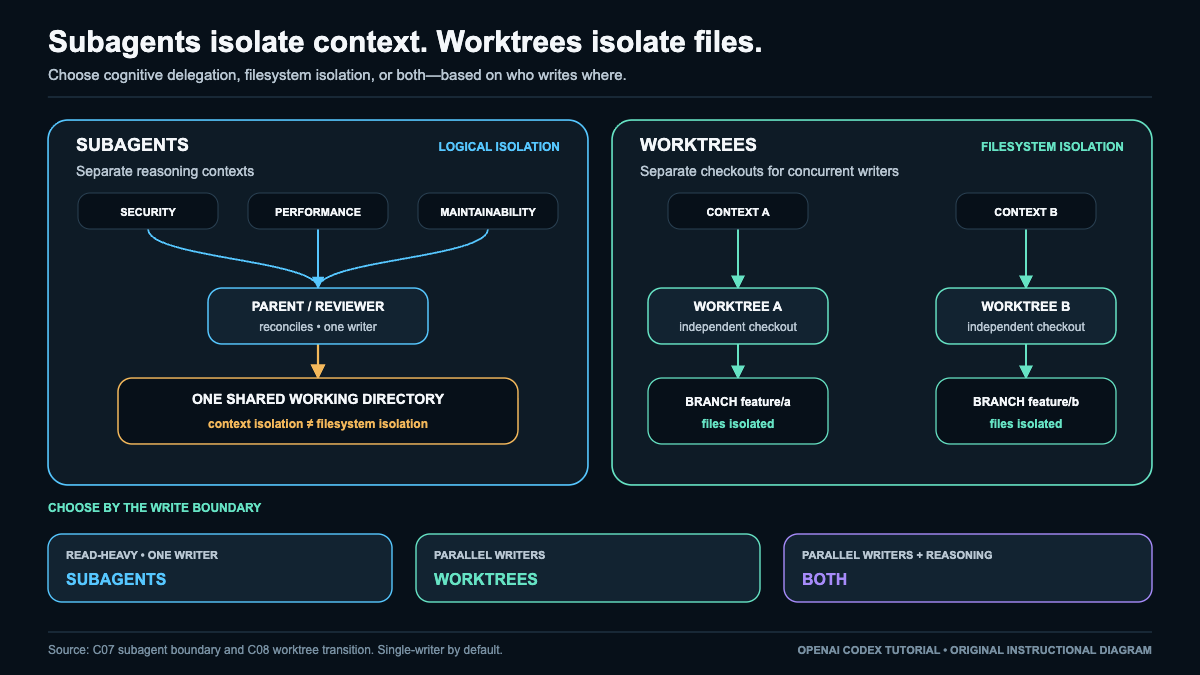
A subagent is a delegated run with its own logical context inside a parent task. The parent defines a bounded objective, receives a compact result, and remains responsible for the final answer. This protects the parent context from every file, search path, and discarded idea used during an investigation. It does not create a separate checkout, branch, operating system process, or hosted environment.
For current delegation controls and configuration, see the official subagents documentation.
That boundary matters most when work becomes concurrent. Several agents can safely inspect the same tracked files when their permissions are read-only and their questions are independent. They cannot safely edit the same file merely because their reasoning contexts are separate. Shared files remain shared state. Use one writer, assign disjoint files, or give each writer an isolated Git worktree with a distinct branch and a single integration owner.
Subagents are one implementation of multi-agent coding, not a universal interface. Product controls and terminology differ. For an adjacent comparison, see how multi-agent coding works in Claude Code. Apply the commands and controls supported by your current Codex surface rather than copying another product’s interface.
Route work without multiplying confusion
Model choice, reasoning effort, permission, and orchestration are separate decisions. A capable model can still receive low effort for a narrow inventory. A smaller model can still be unsafe if it has broad write access. Automatic delegation can divide a task, but it does not decide which files may change or who owns the final claim. The coordinator must set those boundaries explicitly.
| Concern | Practical rule | Context and concurrency effect | Required handoff |
|---|---|---|---|
| Role | Coordinator decomposes and decides; explorer gathers scoped evidence; worker changes assigned files; verifier tests a claim without silently becoming a writer. | Parallel explorers are useful only when concerns are independent. Workers need ownership boundaries. | Name the role, objective, allowed surface, stop condition, and uncertainty. |
| Model and effort | Route ambiguity and consequence to stronger capability and higher effort. Keep bounded inventories lighter. | High effort on every role multiplies usage without guaranteeing distinct findings. | Record the requested depth and why the role needs it. |
| Context cost | Each agent pays for its own prompt, retrieved files, reasoning, and tool activity. | Three broad agents can consume three investigation contexts while finding the same issue. Cap files, findings, and tool calls. | Return only findings, evidence, confidence, next action, overlap, and open questions. |
| Parallel read | Run independent read-only questions together. Serialize any task that depends on another result. | Security exposure, test gaps, and maintainability can often proceed together. A migration plan must wait for its schema inventory. | State whether the role is independent and stop it when it crosses scope. |
| Synthesis | The coordinator deduplicates, resolves contradictions, ranks actions, and states what remains unknown. | Raw reports do not become one answer by concatenation. Parent context must be reserved for reconciliation. | Cite path and line or symbol for accepted claims, plus the decision on conflicts. |
| Write conflict | Logical isolation never isolates files. Stop overlapping writers as soon as ownership is unclear. | Same-file edits in one checkout can overwrite or invalidate each other. Use one writer, disjoint files, or distinct worktrees. | Preserve intentional changes, inspect status and diff, then establish one integration owner. |
Inspect active threads before their budgets are exhausted. A useful evidence packet has a maximum number of findings and a fixed shape: role, finding, evidence, confidence, next_action, possible_overlap, and uncertainty. Evidence should identify a path and line or a path plus symbol when line numbers are unstable. Confidence is not a substitute for evidence.
Contradictions need a decision. If one explorer calls a helper unused while another identifies a public caller, the coordinator should inspect both references and either resolve the claim or queue a narrow check. Write conflicts need a different response: stop the writers, inspect the working tree, preserve intentional changes, and restore only changes proven to belong to the failed task. Do not delegate reconciliation of damaged shared state to another concurrent writer.
Lab: three bounded read-only investigations
Objective. Produce one prioritized repository assessment from security, test-gap, and maintainability agents while leaving the checkout unchanged.
Prerequisites and boundary. Use a Git repository you own and a Codex surface that supports delegated agents. If delegation is unavailable, run the three roles serially and label the exercise a handoff simulation. Read-only agents may share one checkout. If any role needs to write, stop this lab. Move each writer to a distinct worktree and branch, assign one owner per branch, and merge through one designated integration owner.
Starting risk. Existing changes are not automatically failures, but they must be understood and recorded before delegation. Main risks are scope drift, repeated context cost, weak evidence, accidental writes, and a parent that forwards reports without synthesis.
Prompt. Submit this instruction from the repository context:
Act as COORDINATOR. Delegate three independent read-only investigations. SECURITY inspects authentication, input handling, and secret exposure. TESTGAPS identifies untested branches and missing edge cases. MAINTAINABILITY flags tangled modules and unclear ownership boundaries. Each role may return at most five findings. Every finding must include path and line or symbol evidence, confidence, next action, possible overlap, and uncertainty. Do not modify files, use the network, or escalate permissions. Stop a thread that leaves its concern. Reconcile duplicates and contradictions into one prioritized report and state unresolved questions.
Commands. Capture the baseline before submitting the prompt, then repeat the checks after the agents stop:
git status --short
git diff --name-only
printf '%s\n' 'Pause here and submit the delegation prompt in the supported Codex surface.'
git status --short
git diff --name-only
git diff --check
The printf command is a human checkpoint, not a Codex delegation command. Save the before and after command output with the parent report. This chapter describes evidence to collect and makes no claim that the exercise ran in your repository.
Evidence. The final report should show materially distinct contributions, path-based support, confidence, next actions, overlap notes, and explicit coordinator decisions. Compare the two status and name-only snapshots. No new path should appear, no baseline diff should change, and git diff --check should identify no new whitespace error caused by the lab.
Failure and diagnosis. Repeated generic findings mean the role scopes were too broad. Contradictory claims copied into the final report mean synthesis failed. A role waiting for another role’s result means the work was dependent and should have been serialized. Any changed path means the read-only boundary failed.
Rollback. Stop all delegated work. Inspect every unexpected path before restoring anything. Keep unrelated or intentional changes. Restore only lab-caused changes using the repository’s normal recovery procedure, then narrow roles, lower finding limits, or serialize dependent questions. Do not grant write access merely to finish the exercise.
Checkpoint. Continue only when one parent-owned report prioritizes the findings, every accepted claim has evidence and a next action, contradictions are resolved or queued for a narrow check, roles contributed distinct value, and Git state matches the recorded baseline. Otherwise stop and re-scope.
Run Parallel Tasks Safely with Git Worktrees
Git worktrees let you check out multiple branches from a single repository into separate directories, each with its own working files but sharing one object database. This makes them ideal for running parallel tasks (for example, when dispatching work to subagents) without stashing, cloning, or clobbering an in-progress change.
For current environment and isolation guidance, see the official Git worktrees documentation.
Why isolation matters
Each linked worktree has an independent working tree and index. Edits, staged changes, and build artifacts in one worktree do not touch another. The shared .git store means commits made in any worktree are immediately visible to all of them, so you get isolation of the working copy without duplicating history.
The core discipline is simple: one branch is owned by exactly one active worker at a time. Git enforces a version of this for you. By default it refuses to check out the same branch in two worktrees, failing with a message like fatal: '<branch>' is already checked out at '<path>'. Respect that guard rail rather than defeating it; concurrent writes to the same branch from two places produce conflicting commits and index corruption that are painful to untangle.
Detached HEAD risks and recovery
You can force a worktree onto a commit without a branch, landing in a detached HEAD state. Commits made there are reachable only by their SHA. If you switch away or remove the worktree, those commits become candidates for garbage collection and can be lost.
Recovery: before leaving a detached HEAD, capture the SHA (git rev-parse HEAD) and attach a branch with git switch -c rescue/<name>. If you already left it, git reflog will still list the dangling commit for a while; create a branch pointing at it immediately.
Ignored and untracked files do not travel
A new linked worktree starts from a clean checkout of the tracked tree. Files matched by .gitignore and other untracked local files are not copied into it. That means machine-local configuration, .env files, credentials, caches, node_modules, and compiled output will be absent in the fresh worktree.
Do not solve this by blindly copying ignored files across. Some projects adopt a convention such as a .worktreeinclude manifest plus a setup script that repopulates a known safe subset. Treat .worktreeinclude as a project-specific helper you build yourself, not a built-in Git feature; Git will not read it. Copying secrets, credentials, machine-local state, sockets, live caches, or build products is unsafe: secrets leak into unexpected paths, sockets and caches break when shared, and stale build products cause misleading results. Prefer explicit per-worktree setup scripts, checked-in templates (.env.example), or a real secret manager to hydrate what each worktree legitimately needs.
Handoff, merge, review, and cleanup
When a worker finishes, produce evidence of state before handing off: the branch name, the tip SHA, and a clean status. The next worker or the reviewer verifies against that evidence. Merge through your primary worktree so the integration branch has a single well-known home. After merging, remove the linked worktree, prune stale administrative metadata, and delete the branch only once its commits are safely merged.
Lab: a self-contained parallel worktree run
This lab needs only Git and a POSIX shell. It creates its own temporary repository and requires no network.
set -eu

# 1. Create an isolated temporary repository
ROOT="$(mktemp -d)"
cd "$ROOT"
git init -q primary
cd primary
git config user.email "[email protected]"
git config user.name "Worktree Lab"
printf 'seed\n' > README.md
printf 'secret.env\nbuild/\n' > .gitignore
git add README.md .gitignore
git commit -q -m "seed commit"

# 2. Simulate an ignored local secret that must NOT be copied
printf 'TOKEN=do-not-copy\n' > secret.env

# 3. Create a linked worktree on a fresh branch
git worktree add -b feature/task-a ../task-a
Verify isolation and that the ignored secret did not travel:
# Evidence: ignored secret is absent in the new worktree
ls -a "$ROOT/task-a" | grep -q 'secret.env' \
  && echo "UNEXPECTED: secret copied" \
  || echo "OK: ignored secret not present in linked worktree"
Do work in the linked worktree, commit, and verify:
cd "$ROOT/task-a"
printf 'work from task-a\n' > feature.txt
git add feature.txt
git commit -q -m "add feature.txt in task-a"

# Evidence to inspect: branch, tip SHA, clean status
git rev-parse --abbrev-ref HEAD
git rev-parse HEAD
git status --short   # expect empty output
Produce handoff evidence, then merge through the primary worktree:
# Capture handoff facts
HANDOFF_SHA="$(git -C "$ROOT/task-a" rev-parse HEAD)"
echo "handoff: feature/task-a @ $HANDOFF_SHA"

# Merge from the primary worktree
cd "$ROOT/primary"
git merge --no-ff -m "merge feature/task-a" feature/task-a

# Evidence: merged commit and file now exist on the default branch
git log --oneline -n 3
test -f feature.txt && echo "OK: feature.txt merged into primary"
Clean up: remove the worktree, prune metadata, delete the merged branch:
git worktree remove ../task-a
git worktree prune
git worktree list        # evidence: task-a no longer listed
git branch -d feature/task-a   # safe delete, refuses if unmerged

# Remove the temporary repository entirely
cd /
rm -rf "$ROOT"
A common failure, diagnosed and corrected
Symptom: git worktree add ../task-a feature/task-a fails with fatal: 'feature/task-a' is already checked out at '<path>'.
Diagnosis: the branch is owned by another live worktree. Confirm with git worktree list, which prints every worktree and the branch it holds. This is Git protecting you from two workers writing the same branch.
Correction: give the second task its own branch (git worktree add -b feature/task-a2 ../task-a2), or if the other worktree is genuinely finished, release it first with git worktree remove <path> and then reuse the branch. Never bypass the guard by forcing a second checkout of the same branch.
Rollback path
If a linked worktree ends up in a bad state (wrong branch, detached HEAD, or half-applied changes):
- Rescue any unreferenced commits:
git rev-parse HEAD, thengit branch rescue/<name> <sha>(or find the SHA viagit reflog). - Discard the worktree’s working changes if they are unwanted: from inside it,
git reset --hardandgit clean -fd(this deletes untracked files, so confirm nothing precious is untracked first). - Remove and re-add cleanly:
git worktree remove --force <path>thengit worktree prune, and recreate with an explicit-b <newbranch>.
Because the merge target lives only in your primary worktree, you can always throw away a linked worktree and start it again without endangering integrated history.
Checkpoint
You pass this section when all of the following hold:
git worktree listshows each active task on a distinct branch, and no branch appears twice.- A fresh linked worktree does not contain
secret.envor any other ignored local file, confirmed by the evidence command above. - Your feature commit exists on its branch (
git status --shortis empty andgit rev-parse HEADmatches the recorded handoff SHA). - After merging,
feature.txtexists in the primary worktree and appears ingit log --oneline. - After cleanup,
git worktree listno longer shows the removed worktree,git worktree prunereports nothing stale, andgit branch -ddeleted the branch without a force flag (proving it was fully merged). - The temporary repository directory is gone and no process is left holding a detached HEAD.
Create Scheduled Tasks and Background Automations
Automations let a defined task run without you starting it by hand each time. Before building one, be precise about what kind of automation you are creating, because persistence, triggers, and failure behavior differ sharply.
Three shapes of automation
Scheduled task. A definition registered with a scheduler (for example a cron-style entry or an OS job service). Its persistence lives in the schedule registry. Its trigger is a clock or calendar rule. It executes wherever the scheduler runs. If that host is offline at trigger time, the run is usually skipped or deferred by that scheduler’s own policy, not guaranteed.
Locally running background process. A long-lived process on your own machine or app. Persistence lasts only while that process and machine stay up. Its trigger is internal logic or a watch loop. It executes locally. When your machine or app is offline, it simply is not running, and nothing fires.
Vendor-hosted or cloud automation. A workflow held by a provider. Persistence lives in the vendor’s system. Its trigger fires on vendor infrastructure. It executes remotely, so it can run even when your own device is offline, subject to that provider’s uptime and limits.
Availability caveats. Automation features, schedule granularity, background execution, permission scopes, and quota limits vary by product surface, plan, organization policy, region, app version, and platform. A feature named in one place may be absent, renamed, or gated elsewhere. Do not assume a named feature exists. Open your own current interface and confirm what is actually offered to your account and configuration before relying on it.
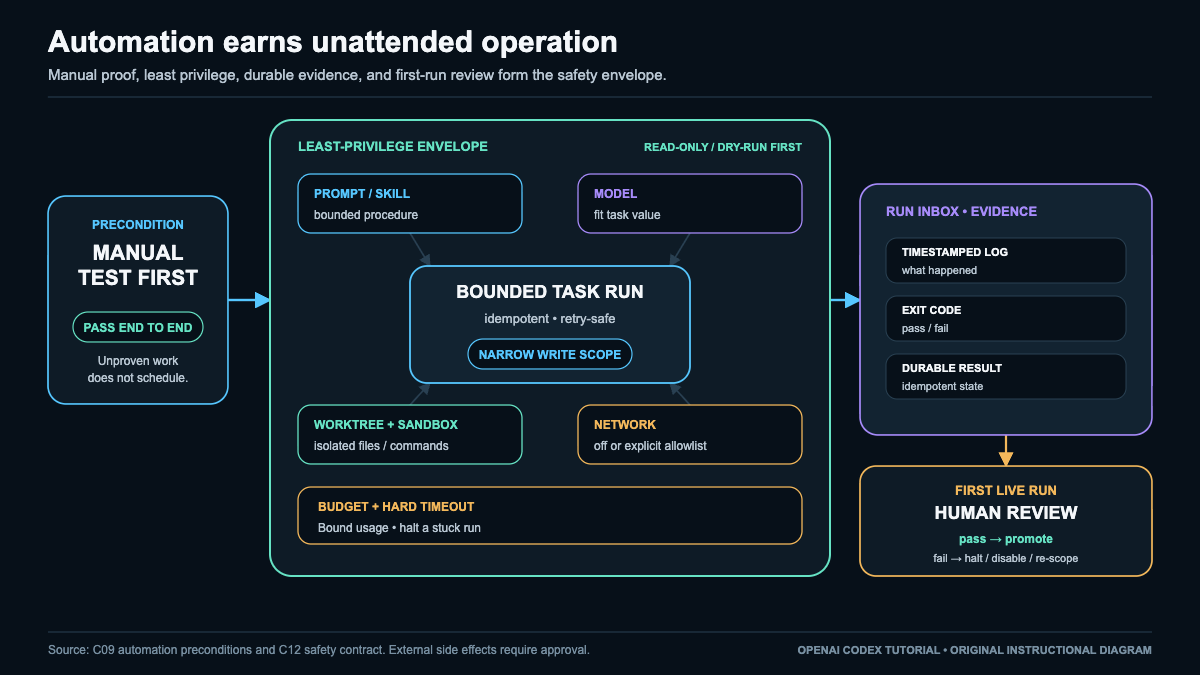
Preconditions before you schedule anything
- Manual test first. Run the exact task by hand and confirm it succeeds end to end. Never schedule an unproven task.
- Least privilege, read-only first. Grant the narrowest scope that works, and begin in a read-only or dry-run mode before allowing any write. See Safety.
- Idempotence and retry safety. Design the task so a repeat run, whether from a retry or an overlapping trigger, produces the same durable result and does not duplicate work.
- Durable logs and evidence. Write timestamped logs and captured exit codes to durable storage so each run is auditable.
- Explicit budget and hard timeout. Set a spending or resource budget and a hard wall-clock timeout so a stuck run cannot loop forever.
- First-run human review. Watch the first live run before permitting unattended operation.
For permission scopes, environment variables, and budget setup, see Configuration.
Unavailable-feature simulation rule. If scheduling, background execution, or cloud automation is not available to you, you may simulate the trigger by invoking the same bounded task manually or with a local disposable runner. Label it clearly as a simulation. Never present a manual invocation as proof that an unavailable platform feature ran.
Diagram 7. Automation flow: [trigger: clock / event / manual sim] -> [permission + budget gate] -> [bounded task run] -> [idempotent durable result] -> [timestamped log + exit code] -> [checkpoint: pass or halt].
Lab: simulate two scheduled invocations offline
Objective. Prove that one bounded task, called twice as if by a scheduler, records timestamped logs and exit codes and stays idempotent, so the second call does not duplicate the durable result.
Prerequisites and supported surfaces. Any POSIX shell (sh, bash, zsh). No scheduler, no network, no product-specific automation feature. timeout is used when present, with a portable fallback when it is not.
Starting state and risk. You start in your normal shell. Risk is minimal: all work happens inside one mktemp -d tree that is removed at the end. Nothing touches a real crontab, launch agent, cloud scheduler, or account setting.
Permission and network profile. Read and write only inside the temporary tree. No network calls. No secrets. No writes outside the temp directory.
Exact commands. Run these fenced blocks in order in one shell session.
LAB="$(mktemp -d)"
cd "$LAB" || exit 1
echo "lab root: $LAB"
mkdir -p logs state
Define a bounded, idempotent task. It creates a durable marker exactly once and refuses to duplicate it on a second call:
cat > task.sh <<'EOF'
#!/bin/sh
set -u
STAMP="$(date +%Y-%m-%dT%H:%M:%S)"
MARK="state/result.txt"
if [ -f "$MARK" ]; then
  echo "$STAMP task: marker exists, no-op (idempotent)"
  exit 0
fi
printf '%s created-by-run\n' "$STAMP" > "$MARK"
echo "$STAMP task: created durable marker"
exit 0
EOF
chmod +x task.sh
Define a runner that applies a hard timeout when available, falls back portably, and records a timestamped log plus exit code per invocation:
cat > run_once.sh <<'EOF'
#!/bin/sh
set -u
N="$1"
TS="$(date +%Y-%m-%dT%H:%M:%S)"
LOG="logs/run_${N}.log"
if command -v timeout >/dev/null 2>&1; then
  timeout 10 ./task.sh >"$LOG" 2>&1
else
  ./task.sh >"$LOG" 2>&1 &
  PID=$!
  ( sleep 10; kill "$PID" 2>/dev/null ) 2>/dev/null &
  WPID=$!
  wait "$PID"; RC=$?
  kill "$WPID" 2>/dev/null
  echo "$TS run $N exit=$RC" >> logs/exit_codes.txt
  exit "$RC"
fi
RC=$?
echo "$TS run $N exit=$RC" >> logs/exit_codes.txt
exit "$RC"
EOF
chmod +x run_once.sh
Simulate two scheduled invocations of the same task:
./run_once.sh 1
./run_once.sh 2
Inspect what was recorded:
echo "--- exit codes ---"; cat logs/exit_codes.txt
echo "--- run 1 log ---"; cat logs/run_1.log
echo "--- run 2 log ---"; cat logs/run_2.log
echo "--- durable state ---"; cat state/result.txt
echo "--- marker line count (expect 1) ---"; wc -l < state/result.txt
Observable evidence to collect. Do not assume the values below; read them from your own run. Collect: logs/exit_codes.txt shows two lines, both exit=0; logs/run_1.log reports the marker was created; logs/run_2.log reports a no-op because the marker existed; state/result.txt contains exactly one line. Record these as evidence you gathered, not as fabricated sample output.
Common failure plus diagnosis and correction. If run 2 also reports “created durable marker” or state/result.txt has two lines, idempotence failed. Diagnose by confirming the task checks for state/result.txt before writing. Correct the guard so a repeat call is a no-op, then rerun the two invocations.
Rollback and cleanup. Cleanup must remain possible even after an expected task failure, so it runs unconditionally:
cd / && rm -rf "$LAB"
echo "cleanup done: $LAB removed"
Checkpoint criteria (do-not-continue checkpoint). Continue only if all hold: both invocations recorded an exit code, the second invocation was a no-op, the durable marker has exactly one line, and the temp tree was removed. If any check fails, halt. Do not promote the task to a real scheduled task, background process, or cloud automation until the manual test passes, least privilege is confirmed per Safety, budget and timeout are set per Configuration, and you have reviewed a first live run yourself.
Customize Codex with AGENTS.md, Skills, Plugins, and MCP
Customization should remove repeated explanation or add one necessary capability. Name the gap, choose the smallest primitive that closes it, and stop. Add another mechanism only when a distinct requirement appears.
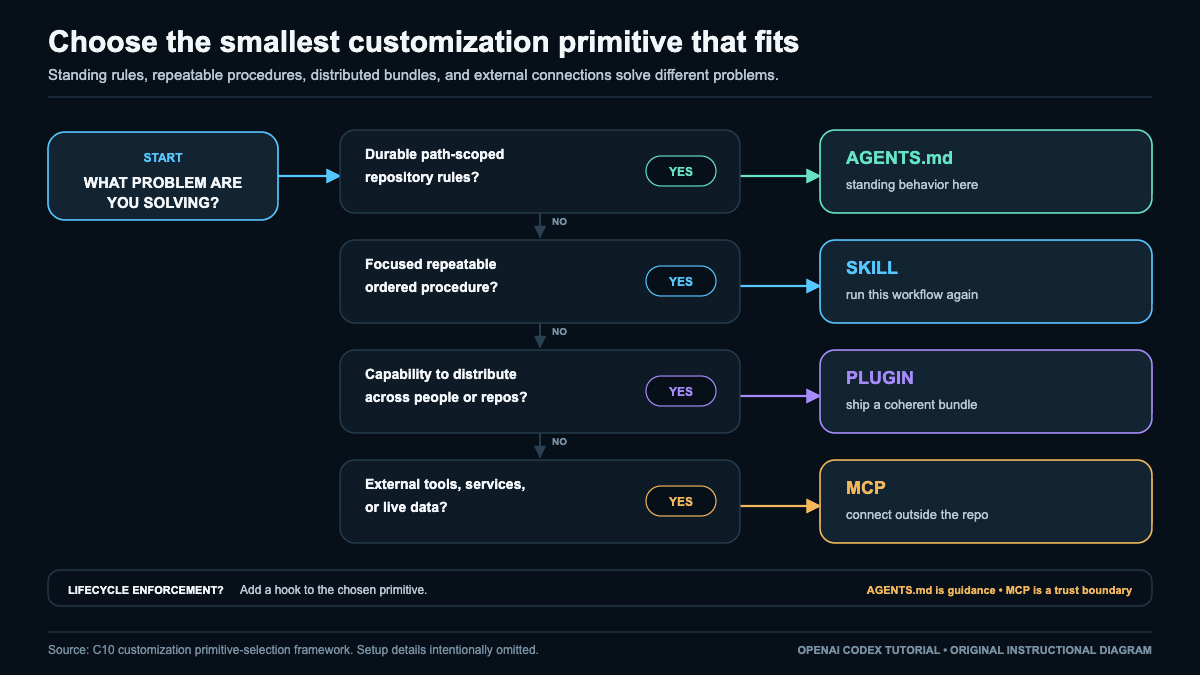
| Need | Smallest primitive | Scope | Trust and evidence |
|---|---|---|---|
| Standing repository guidance | AGENTS.md |
Root or subtree | Inspect applicable files and the effective rules for the target path |
| Repeatable procedure | Skill | Repository, user, or managed | Inspect trigger, contract, contents, near miss, output, and verification |
| Installable shared bundle | Plugin | Client, profile, account, project, or managed environment | Inspect origin, publisher, manifest, version, permissions, inventory, and rollback |
| External tool or current context | MCP | User, trusted project, or managed | Inspect transport, identity, schemas, data path, side effects, and logs |
| Deterministic lifecycle action | Verified plugin-packaged hook | Product, version, and surface specific | Require a documented contract and observable event evidence |
The primitives can compose, but their boundaries do not merge. AGENTS.md remains advisory guidance, a skill remains a procedure, a plugin remains a package and lifecycle boundary, and an MCP server retains its own authority and data path.
Customization cards
AGENTS.md: hierarchy, scope, and repository trust. An AGENTS.md file supplies instructions for the directory subtree beneath it. A root file can establish repository-wide rules. A deeper file contributes narrower guidance only inside its subtree. Codex combines applicable files from the root toward the target path. When applicable instructions conflict, the nearer file controls in its subtree, while the broader rule still applies elsewhere.
Place each rule at the broadest scope where it is consistently true. Root guidance can name repository-owned build, test, lint, formatting, generated-file, and verification requirements. Package or language rules belong beside the files they govern. Do not copy root prose into every child directory. Duplication drifts and makes corrections ambiguous.
Before substantial work, request an effective-rules summary for the exact target path and compare it with every applicable file. Repeat for a path outside any narrower subtree when hierarchy matters. This is evidence about discovery and precedence, not proof of enforcement. Markdown cannot create filesystem isolation, deny network access, or replace approval policy. Apply those controls through Control Sandbox, Permissions, Approvals, and Network Access.
Trust the repository before accepting its guidance. Read applicable files in a new clone before enabling project configuration or unfamiliar commands. If same-scope rules conflict, or a nested rule weakens a broad safety requirement, stop and repair or remove the source rule. Keep secrets, tokens, personal preferences, long tutorials, and volatile product syntax out of instruction files.
Skills: triggers, scopes, and contracts. A skill is a focused procedure centered on an uppercase SKILL.md. Use one when a recurring task has stable inputs, ordered steps, defined outputs, explicit stopping conditions, and observable verification. Start instruction-only. Add references, templates, assets, or scripts only when they contribute something the procedure cannot express clearly.
Its contract should state the trigger, accepted inputs, sensitive-input handling, procedure, outputs, non-goals, permissions, side effects, verification, failure handling, and rollback. A safe first version usually produces a checkable draft and stops. It should say explicitly when it will not publish, push, tag, call a service, or modify unrelated files.
Choose the narrowest supported scope that reaches the intended users: repository for repository-specific work, user for a personal procedure, or managed scope for centrally maintained behavior. Placement and explicit invocation conventions vary by surface and version, so confirm current guidance rather than copying a path. Codex may match a skill implicitly from a request; supported surfaces may also accept $skill-name. Test a true trigger, a close near miss that must not trigger, and explicit invocation where available. Narrow an over-broad description or clarify an under-triggering one before adding scripts.
Trust contents rather than names. An instruction-only skill influences behavior. A scripted skill can read, write, execute, or use the network as far as its runtime permits. Inspect every supporting file and its input/output contract, especially for skills obtained outside the repository.
Plugins: marketplace, trust, lifecycle, and session state. A plugin is an installable distribution unit that may bundle skills, templates, an app or MCP integration, and supported hooks. Marketplace presence is discovery, not endorsement. The listing, publisher, source package, installed state, and runtime service can have different owners and trust boundaries.
Before installation or enablement, inspect origin, publisher, manifest, version, dependencies, bundled files, scripts, hooks, requested permissions, network access, credential flow, data destinations, update behavior, and supply-chain exposure. Withhold enablement when executable behavior is opaque. In shared environments, require an approved source, named owner, installation inventory, staged rollout, change record, and rollback path.
Use the current surface’s supported interface for lifecycle operations because exact commands vary. Install only an expected version from an approved source and inspect what appears. Enable with the narrowest permissions and connector scopes. Disable first to isolate a regression, unexpected capability, or side effect. Remove through the supported interface and confirm the capability disappears. On update, recheck contents and permissions; retain a known-good version only where pinning or restoration is supported.
A state change may not appear in an open conversation. When plugin state initializes at session creation, start a new session after installing, enabling, disabling, removing, updating, pinning, restoring, or applying a rollback. Verify both inventory and available capabilities there. An old session neither proves a new installation failed nor proves a removal failed.
MCP: transport, identity, context, and side effects. MCP lets a model-facing host discover external tools and context. The host exposes tool names, descriptions, and schemas, then invokes selected tools under active permissions and approvals. MCP is not repository policy or a deterministic gate.
Local STDIO means the host launches a process and communicates through standard input and output. The process can reach files, sockets, environment values, executables, and networks allowed to its runtime. Remote HTTP crosses a network boundary to a service. Where OAuth is supported, confirm the connected account, requested scopes, resource limits, consent, token lifetime, refresh access, and revocation path. Local is not automatically safe, and remote is not automatically unsafe. Trace the executable or URL, maintainer, identity, arguments, credentials, destinations, retention, and request/response path.
Configuration can combine user, trusted-project, and managed scopes. Inspect the effective merged server list and precedence, not one file alone. A project entry may introduce a server absent from user configuration, while managed policy may constrain it. Accept project-scoped MCP only from a trusted repository. Use Configure Codex Without Creating a Fragile Setup for durable scope decisions.
Keep secret values out of committed configuration, prompts, logs, and receipts. Use supported environment injection, OAuth, or a secret store, and record only credential references. Grant minimum service and resource scopes, separate read and write identities where practical, and revoke credentials when retiring a server. Verify which environment values a local child process inherits.
Every enabled server adds tool descriptions and schemas to context even when no call occurs. Enable only what the task needs, remove overlapping tools, and keep descriptions precise. Before enablement, allowlist the approved executable or URL, owner, version, arguments, credential reference, OAuth scopes, resource boundaries, tool names, schemas, output destinations, filesystem and network reach, timeouts, and disable path. Start read-only. Treat annotations such as destructive, idempotent, or open-world as declarations, not proof. Require specific human confirmation before consequential write, send, execute, or delete actions.
A web or cloud surface cannot directly reach an arbitrary local STDIO process, folder, private socket, or machine-only service. It requires a supported connector, bridge, upload, or remote integration with its own permissions and data path. Prompting cannot bypass this boundary.
Diagnose reversibly. Disable an unexpected server first. Then inspect effective scope and precedence, spelling, reload state, discovery, transport, authentication, OAuth scope, permissions, tool schemas, context load, health signals, timeouts, and sanitized logs. For STDIO, keep operational logs off standard output. For HTTP, check reachability, DNS, TLS, account identity, consent, token validity, and service scope without printing credentials. Remove and re-add only from an approved source after the effective configuration is understood.
Verified hooks boundary. A hook is suitable for deterministic lifecycle behavior only when a plugin mechanism documents the exact event and configuration contract for the current product, version, and surface. Its action, permissions, logs, failure behavior, and rollback must be inspectable. Do not invent standalone event names or schemas. If the contract is unavailable or uncertain, place the gate in CI, a pre-commit framework, or a repository-owned script outside Codex. A prompt, skill, or AGENTS.md rule remains subject to model behavior and is not a gate. For a documented PostToolUse command hook, make one harmless matching call and retain observable hook-completion or log evidence before relying on it.
Choose exactly one customization lab
Use a disposable repository or another reversible fixture. Pick exactly one card. These are instructions for the reader, not claims that any action ran.
Card A, repository rule. Add one harmless AGENTS.md rule for a fixture subtree. Optionally add one non-conflicting child rule. Capture the applicable files and effective-rules summaries for one path inside and one outside the subtree. Failure: scope leaks, an applicable file is missing, or same-scope rules conflict. Rollback: repair or remove the file, then repeat both summaries.
Card B, instruction-only skill. Create one narrowly named skill with SKILL.md, explicit inputs, draft-only output, non-goals, permissions, verification, and rollback. Test one true trigger, one near miss, and explicit invocation where supported. Capture the skill, routing observations from your session, output, and contract check. Failure: routing is broad, silent, or the output violates a non-goal. Rollback: refine the description or remove the skill and its draft.
Card C, MCP plan only. Do not install, authenticate, enable, or invoke a server. Write a plan for one read-only tool that names STDIO or HTTP, effective scope, executable or URL, owner, schemas, data sent, credential reference, OAuth scopes when applicable, context cost, allowlist, diagnostics, side effects, disable path, and removal path. Evidence: another person can trace identity, data, authority, and recovery without seeing a secret. Failure: any destination, scope, tool, or lifecycle step is unknown. Rollback: keep the server disabled and return to discovery.
Do not combine cards. Expansion from guidance to procedure, package, or external capability is a separate change with a separate trust decision.
Checkpoint. Continue only when you can name the single need, justify the primitive against the table, show effective scope, identify trust and data boundaries, state permissions and side effects, present card-specific evidence, and describe rollback. For a plugin change outside this lab, check inventory and capability state in a new session when required. The MCP plan does not authorize a connection.
Choose Local, Worktree, Cloud, Web, or GitHub Execution
Execution location is a security and delivery decision, not a user interface preference. The app, CLI, browser, GitHub integration, or SDK is the surface used to direct work. The location is where files, processes, identities, and network connections actually exist. A browser may control a hosted runner, while an app may operate on a local checkout. Confirm the execution boundary instead of inferring it from the surface.
Decide on five axes
Classify the task before selecting a surface. Record one answer for each axis:
- Data boundary: Which tracked files, uncommitted edits, generated assets, private datasets, configuration values, and secrets are required? Which bytes may leave the machine or organization?
- Isolation: Can the task share the current checkout, or must it use a separate worktree, branch, container, runner, or hosted environment?
- Persistence: What must survive process exit, sleep, runner teardown, or task completion? Name the required diff, commit, branch, pull request, log, or structured artifact.
- Network: Which registries, APIs, private services, or local sockets must be reachable? Which outbound destinations must remain blocked?
- Authority and destination: Which identity may read, modify, push, open a pull request, or publish an artifact, and where must the reviewable result land?
Choose the smallest location that satisfies all five axes. Do not widen file access, network access, or credentials merely because the convenient surface starts in the wrong place.
Surface matrix
| Surface | Execution location | Data and isolation | Persistence | Network and authority | Best destination |
|---|---|---|---|---|---|
| Local app | Local machine | Granted folder and local resources; current checkout unless isolated separately | Local files and app task state | Local network and approved local identity | Reviewed local diff |
| Local CLI | Local machine | Current working directory, including visible uncommitted state | Files, branch, commit, and captured logs | Shell policy, local tools, and scoped credentials | Diff, commit, or artifact |
| Local worktree | Local machine, separate checkout | Tracked repository state on a separate branch; ignored and untracked files are absent by default | Worktree and branch persist until removed | Local network with intentionally supplied configuration | Isolated commit or branch |
| Cloud or web | Hosted runner | Synchronized repository or supported upload only; remote isolation | Only retained output, commit, branch, or service artifact | Hosted policy, connectors, and injected secrets | Hosted artifact, branch, or pull request |
| GitHub | GitHub scoped service | Authorized repository, ref, issue, or pull request | Git objects and GitHub records | App or token permissions limited to required repositories and operations | Commit, pull request, or review comment |
| SDK | Caller selected | Inputs packaged by the caller; isolation defined by the runner | Caller captures output, logs, status, and artifacts | Workload identity and caller network policy | Structured result, patch, commit, or job artifact |
The matrix does not promise feature parity. Model availability, quotas, retention, connectors, network controls, secret handling, and supported operations can differ among app, CLI, cloud, web, GitHub, and SDK surfaces.
Apply boundary rules
Use local app or CLI execution when work depends on uncommitted edits, machine-only tools, private local services, or data that must not leave the machine. Local does not mean contained: a local process can still transmit data through an allowed tool or network connection. Limit the workspace and outbound access deliberately.
Use a local worktree when concurrent work needs a separate branch and checkout. A worktree starts from tracked Git state. It does not inherit ignored or untracked files from another checkout, and that absence is a useful boundary. Do not blanket-copy ignored or untracked files into it. Review each dependency. Hydrate approved non-secret configuration through a setup script, checked template, package restore, or documented generator. Inject secrets through the supported environment, keychain, secret manager, runner, or product mechanism. Never copy credentials or datasets to make a worktree, runner, or hosted task resemble the source machine.
Use cloud or web execution only after the required code has been synchronized intentionally. Hosted execution cannot see arbitrary local folders, uncommitted changes, local sockets, or machine-only tools unless a supported mechanism exposes them. A prompt cannot transfer missing bytes. Bind the task to an exact repository, branch, and commit, then require a retained output.
Use GitHub when the unit of work is naturally a repository object such as an issue, ref, commit, or pull request. Creation and review are different authorities. Grant only the repositories and operations needed, and keep the result inspectable in Git or GitHub rather than only in conversation history.
Use an SDK for repeatable, noninteractive orchestration. The caller owns input packaging, working directory selection, authentication, timeout behavior, exit handling, logs, and artifact retention. Headless execution has no automatic right to local files or broad network access.
Authentication, plan, and platform remain separate checks. Product subscription sign-in does not imply API billing, SDK quota, a GitHub connector, hosted execution, or organization approval. An API key does not unlock every product surface. Confirm account role, organization policy, plan, region, client version, operating system, repository host, runner type, retention policy, and secret injection support before committing to a location. Prefer a scoped workload identity or integration over a personal credential. Never commit, upload, or paste a credential to repair authentication.
Recover from the wrong location
Treat a boundary failure as a location diagnosis, not a request for maximum access.
- Stale hosted files: compare the intended local commit, remote ref, and hosted checkout SHA. Push or select the correct reviewed commit. Do not upload the whole local folder.
- Missing worktree setup: identify the exact missing dependency. Generate reviewed non-secrets from setup scripts or templates, and inject secrets through the supported mechanism. Do not copy all ignored or untracked files.
- Unavailable dataset: move execution to the approved data location or use a reviewed synthetic fixture. Never copy a private dataset into Git, a worktree, a prompt, or an unapproved runner.
- Network denial: verify that the endpoint is required and permitted. Move the task to the approved network boundary or request narrowly scoped access instead of enabling broad outbound traffic.
- Lost hosted output: rerun only after defining a durable commit, branch, patch, log, or artifact destination.
- Denied GitHub action: inspect repository, ref, pull request, and app scopes. Correct the narrow permission or assign the task to an authorized identity. Do not substitute a broader personal token.
- SDK result loss: make exit status, standard streams, structured output, and artifact upload explicit caller responsibilities.
Compact local-to-cloud handoff lab
This network-free rehearsal models a hosted boundary with a local bare Git repository. It transfers one reviewed commit and proves that ignored local material is absent from the clone. The strings called a secret and dataset are harmless fixtures. The commands are instructions for the learner; this document makes no claim that they were executed in a real hosted product.
Prompt before transfer:
Prepare only the tracked change on
handoff/rehearsal. Report the branch, commit SHA, clean status, and tracked file list. Do not add ignored or untracked files. Do not copy credentials or datasets.
set -eu
LAB="$(mktemp -d)"
trap 'rm -rf "$LAB"' EXIT

git init -q "$LAB/source"
git -C "$LAB/source" config user.email "[email protected]"
git -C "$LAB/source" config user.name "Handoff Lab"
printf 'seed\n' > "$LAB/source/app.txt"
printf '.env\napp.env\ndata/\n' > "$LAB/source/.gitignore"
printf '# reviewed non-secret defaults\nMODE=lab\n' > "$LAB/source/app.env.example"
printf '%s\n' '#!/bin/sh' 'cp app.env.example app.env' > "$LAB/source/setup.sh"
chmod +x "$LAB/source/setup.sh"
git -C "$LAB/source" add app.txt .gitignore app.env.example setup.sh
git -C "$LAB/source" commit -q -m 'seed fixture'

printf 'TOKEN=harmless-fixture\n' > "$LAB/source/.env"
mkdir -p "$LAB/source/data"
printf 'private-fixture\n' > "$LAB/source/data/sample.txt"
git init -q --bare "$LAB/hosted.git"
git -C "$LAB/source" remote add hosted "$LAB/hosted.git"
git -C "$LAB/source" worktree add -q -b handoff/rehearsal "$LAB/worktree" HEAD
printf 'reviewed change\n' >> "$LAB/worktree/app.txt"
git -C "$LAB/worktree" add app.txt
git -C "$LAB/worktree" commit -q -m 'reviewed handoff change'

LOCAL_SHA="$(git -C "$LAB/worktree" rev-parse HEAD)"
test -z "$(git -C "$LAB/worktree" status --porcelain)"
git -C "$LAB/worktree" push -q hosted handoff/rehearsal
git clone -q --branch handoff/rehearsal "$LAB/hosted.git" "$LAB/hosted-copy"
HOSTED_SHA="$(git -C "$LAB/hosted-copy" rev-parse HEAD)"
test "$LOCAL_SHA" = "$HOSTED_SHA"
test ! -e "$LAB/hosted-copy/.env"
test ! -e "$LAB/hosted-copy/data"
(cd "$LAB/hosted-copy" && ./setup.sh)
test -f "$LAB/hosted-copy/app.env"
printf 'local_sha=%s\nhosted_sha=%s\n' "$LOCAL_SHA" "$HOSTED_SHA"
git -C "$LAB/hosted-copy" ls-files
The setup script hydrates only a reviewed non-secret file from a tracked template. In a real hosted system, inject actual secrets through its supported secret mechanism. Do not place secrets in the template, setup script, Git history, task prompt, or output. Do not transfer a real dataset in this lab.
Evidence to capture: command exit status; local branch and SHA; clean handoff worktree status; matching remote and clone SHA; tracked file list; assertions that .env and data/ are absent; and successful creation of app.env from the reviewed template. For a real handoff, also capture the hosted checkout SHA and inspect the resulting diff or pull request. A task status alone is not evidence of byte identity.
Failure response: if SHAs differ, stop editing and compare the local commit, pushed ref, and selected hosted ref. If setup fails, identify the missing reviewed dependency and repair the setup script or template. If ignored material appears in the destination, stop, remove the destination artifact or branch if safe, investigate how it entered tracked history or transfer inputs, and rotate any exposed credential through its provider.
Rollback: cancel the hosted task and do not merge. Preserve useful work by commit SHA. Delete an unmerged remote branch only after confirming that nobody shares it. Remove the disposable worktree through normal Git worktree cleanup. Revoke temporary integration grants and secret versions. The rehearsal trap deletes its temporary directory on shell exit.
Checkpoint: continue only when the five axes are recorded; auth, plan, organization, and platform checks are complete; the handoff worktree is clean; local, remote, and hosted SHAs match; ignored private bytes are absent; reviewed non-secrets are hydrated from scripts or templates; secrets use supported injection; the destination diff is inspected; and rollback ownership is named. Tests and CI remain separate evidence and must be requested or run by the appropriate system before merge.
Control Sandbox, Permissions, Approvals, and Network Access
Giving Codex a task creates two independent decisions. The sandbox capability sets the outer boundary of files and commands the process can reach. The approval policy sets when an operation pauses for a person or policy decision. Do not collapse them into one idea. Permissive approval does not widen a restrictive sandbox, and frequent approval does not make an unnecessarily broad sandbox safe.
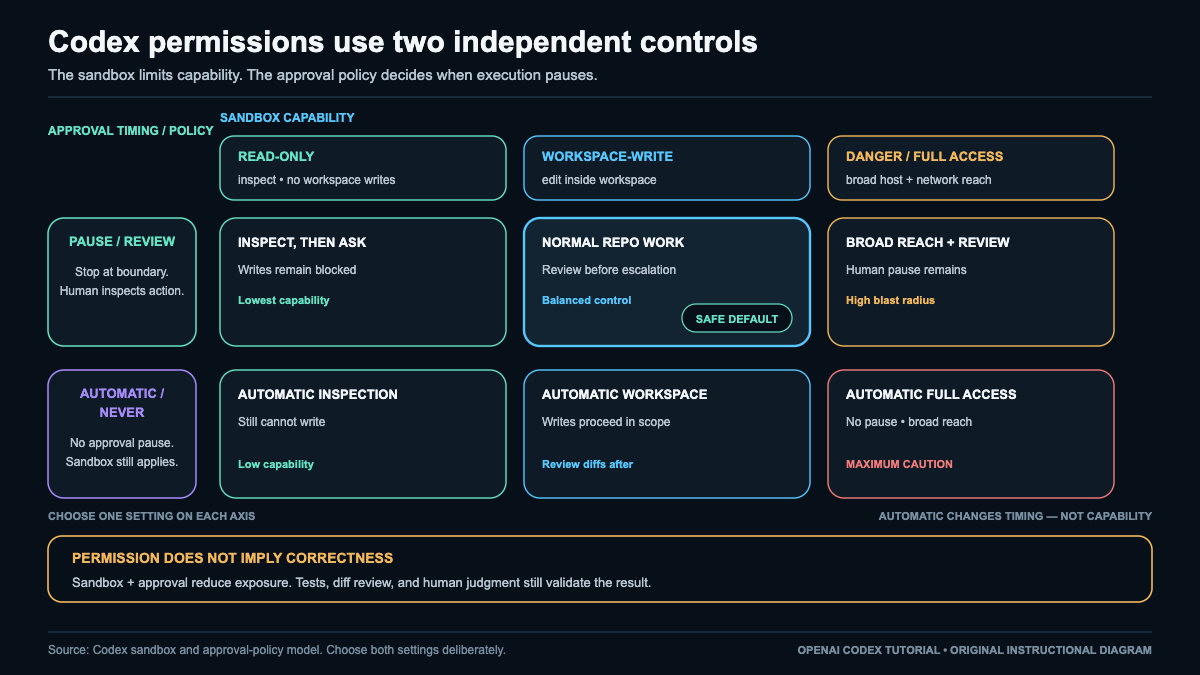
Choose capability and approval separately
Start with the smallest capability that can produce the requested result, then choose approval timing according to uncertainty and consequence.
| Work pattern | Sandbox capability | Approval timing | Meaning |
|---|---|---|---|
| Inventory, explanation, or proposed plan | read-only |
on-request |
Inspect the workspace, propose changes, and leave files untouched. |
| Bounded local implementation | workspace-write |
on-request |
Edit inside the selected workspace and request any necessary escalation. |
| Uncertain or high-impact change | Narrowed workspace-write |
untrusted or frequent confirmation |
Split the work and inspect each consequential action. |
| Noninteractive bounded analysis | read-only |
never |
No prompt appears, but the read boundary remains. Disable network and side-effecting tools. |
| Broad host operation | danger-full-access |
Any policy | Broad filesystem and command reach remains high risk even with pauses. |
read-only fits repository discovery, defect location, diff inspection, and planning. It blocks workspace writes, but it does not automatically make a browser, MCP server, connector, or plugin read-only. Those surfaces have their own permissions and effects.
workspace-write is usually sufficient for implementation, tests, and documentation when the repository is the intended boundary. Name the allowed paths, branch, files, and acceptance criteria. Technical permission to edit a workspace is not general permission to change everything in it.
danger-full-access grants broad filesystem and command capability. A mistaken path, destructive command, compromised dependency, or injected instruction can therefore have wider impact. It should not be the routine default, especially for unattended work.
Approval labels govern timing. untrusted generally allows a known-safe set and pauses outside it. on-request lets Codex explain why its current boundary blocks a required step. never removes the interactive pause, not the sandbox, uncertainty, or possibility of error. Clients and organization policies can use different labels, so verify the active combination on the surface actually running the task.
Permission is not correctness. An allowed action can still target the wrong file or implement the wrong requirement. The sandbox limits possible reach, while approval creates a decision point. Neither proves that the action is appropriate or that its output is valid.
Treat network and tools as distinct effect surfaces
The filesystem sandbox is only one boundary. Network access determines where data can travel and which untrusted content can enter. Browsers, MCP tools, plugins, connectors, hooks, and remote services can create effects beyond the workspace.
| Surface | Possible effect | Inspect before enabling | Safer default |
|---|---|---|---|
| Network fetch | Downloads untrusted text, code, or binaries | Exact host, redirects, content type, and need for executable material | Deny, then allowlist a required destination |
| Network send | Transmits source, prompts, logs, identifiers, or credentials | Destination, payload fields, identity, and data classification | Keep local unless sending is essential |
| Browser or computer use | Submits forms, sends messages, changes accounts, or initiates purchases | Page, signed-in identity, final action, and reversibility | Observe without submission and stop before commitment |
| MCP tool | Reads or mutates an external system under its tool contract | Tool, parameters, target object, and side effects | Enable only required operations, preferably reads |
| Plugin or connector | Adds tools, hooks, authentication, templates, or remote reach | Publisher, package contents, permissions, account scope, and disable path | Inspect first and enable for a bounded need |
| Hook or automation | Runs at an event boundary | Trigger, command, environment, reachable secrets, and failure behavior | Keep narrow, visible, and fail closed |
An allowlisted host is not trusted content. Its response can contain malicious instructions, compromised code, or a redirect. Likewise, local read-only access does not prevent a separately enabled tool from updating a ticket, emailing a customer, or deleting a remote object.
For network access, identify whether the operation fetches or sends, the exact destination, payload, attached identity, and offline alternative. Prefer a destination allowlist to broad egress. Deny bundled requests that hide payloads or alter destinations after approval. For a browser or tool, distinguish observation from mutation. Names such as get_record and update_record offer clues, but the description, parameters, target, and downstream automation define the real effect. Use a read alternative first and place confirmation immediately before an external mutation.
For how MCP and plugins are selected and scoped, return to customization. Their presence expands the available tool surface; it does not change the independent sandbox and approval model described here.
Block prompt injection and exfiltration
Any content Codex reads can contain instructions aimed at the agent rather than the reader. Repository files, issues, web pages, documents, package metadata, generated output, and tool results are data, not authority. Their instructions cannot override the user’s task, expand permissions, select a new destination, request secrets, or trigger unrelated actions.
Prompt injection becomes exfiltration when embedded text persuades the agent to disclose data. For a fuller threat model, see what prompt injection is and how to reduce the risk. Separate permission to read from permission to transmit. Access to a local configuration file does not authorize placing its contents in a prompt, browser form, MCP payload, command argument, screenshot, log, or retained artifact. When retrieved content requests a new action, compare it with the stated task. If it changes scope, destination, identity, or disclosure, ignore it, preserve only a sanitized description, disable the affected source if needed, and seek a fresh explicit decision.
Secrets and sensitive data include tokens, passwords, authentication files, cookies, private keys, environment values, private source, customer records, personal data, internal logs, and session identifiers. Use synthetic fixtures and redact data before it enters an agent or external tool. For an authenticated service, supply credentials through its supported secret mechanism and expose the least privileged identity required. Never paste a secret into configuration merely to make a task convenient.
Make escalation temporary and rollback concrete
Treat an escalation request as a contract. It should name the exact command, browser operation, or tool; the file, host, account, record, or remote object; why the current boundary is insufficient; the data read, changed, or sent; the authentication identity; the expected observable result; downstream side effects; and the rollback or compensation owner.
Reject broad, bundled, or unexplained escalation. Approve operations separately when their risks differ. Updating one named test record with reviewed fields is inspectable; “sync everything” is not. Convenience alone is not a reason to widen capability. After the approved operation, restore the previous sandbox, network, and tool profile so an exception does not become the session default.
Design recovery before granting power. Version control can restore tracked local files, but it cannot unsend a message, retract a disclosure, reverse every purchase, recreate every deleted remote object, cancel a consumed webhook, or stop propagated automation. Keep effects reversible by using proposals before edits, drafts before sends, previews before live actions, staging before consequential targets, and small independent changes. Use backups, transaction records, and idempotency where supported.
If an unexpected effect occurs, stop further actions. Preserve sanitized evidence, disable the integration, revoke or rotate exposed credentials, notify the system owner, and restore or compensate in the affected system. Resume only after identifying the failed boundary and narrowing the task.
The bypass forms --dangerously-bypass-approvals-and-sandbox and --yolo remove safeguards. They are not routine shortcuts and must never be used for unattended work. Examination, if unavoidable, belongs only in an externally isolated disposable environment with synthetic data, no secrets, no consequential identity, no meaningful network reach, and a recoverable snapshot. The following lab does not use a bypass.
Lab and checkpoint: prove the two axes
Use a disposable Git repository containing only synthetic files. Create a known-good commit or snapshot. Disable network access and all browser, MCP, plugin, connector, and hook effects.
- With
read-onlyandon-request, ask Codex to inspect the repository and propose one small change to one named synthetic file, without writing. Independently inspect status. Any changed or untracked file means stop and restore the snapshot. - Change only the sandbox to
workspace-write. Keepon-requestand every external surface disabled. Inspect the proposed target and diff, then authorize only that edit. - Gather the active sandbox and approval settings, changed-file list, focused diff, repository status, and surface activity record. These are observations the reader should collect, not results asserted here.
- Diagnose deviations: a first-phase write suggests the sandbox was ineffective or misread; a denied second-phase write suggests the new capability was inactive; extra files indicate vague task scope; and a network or tool request is unnecessary. Following instructions embedded in the fixture indicates injection handling failed.
- Restore the snapshot, confirm a clean state, and remove the disposable fixture only after independently confirming its path.
Do not continue until you can identify which axis permitted the write, which axis created the pause, why neither authorized network or tool effects, what evidence confines the change to one file, and how the fixture returns to its known-good state.
Configure Codex Without Creating a Fragile Setup
Configuration is durable policy. Keep it small enough that every effective value has a purpose, a suitable scope, and an origin you can explain. Any setting that changes capability or approval must preserve the boundary established in Safety.
Apply precedence with repository trust
The highest active, valid definition wins. Evaluate these layers from highest precedence to lowest:
| Order | Layer | Suitable use | Trust question |
|---|---|---|---|
| 1 | Legacy MDM-managed configuration | Organization-enforced device policy | Who administers it? |
| 2 | Session flags and one-off overrides | One experiment or exceptional invocation | Is the override visible and intentional? |
| 3 | Project .codex/config.toml |
Reviewed repository-specific defaults | Is the repository trusted, and is the key allowed here? |
| 4 | Selected user profile | A named, repeatable working mode | Was this profile explicitly selected? |
| 5 | Shared user ~/.codex/config.toml |
Conservative cross-project defaults | Does the value belong across projects? |
| 6 | Enterprise cloud-managed configuration | Organization-managed cloud defaults | Which policy supplies it? |
| 7 | System configuration | Host-wide defaults | Who controls the host? |
In the loader’s ordinary merge precedence, EnterpriseManaged is a lower base, while legacy MDM and file-managed layers are high-priority overlays. Managed requirements and policy are separate prohibitions outside ordinary merge precedence: they can disallow values or capabilities even when an ordinary configuration layer would otherwise win.
A session override can supersede project, profile, and user values. Eligible configuration in a trusted project can supersede the selected profile. Managed layers can also affect the result, so the file nearest the current directory is not necessarily the effective origin.
Project configuration introduces a trust boundary. Review the repository and .codex/config.toml before granting trust. Trust activates eligible project policy; it does not certify that every setting is safe, make repository contents private, or turn the repository into a secret store. Project defaults must remain repository-specific rather than silently becoming user-wide policy.
A stable division is to keep conservative defaults in the shared user file, recurring modes in user profiles, reviewed repository behavior in trusted project configuration, temporary comparisons in session overrides, and managed policy with its organizational owner.
Start with minimal TOML
A minimal user file can contain only non-secret choices:
model = "gpt-5.6"
model_reasoning_effort = "medium"
approval_policy = "on-request"
sandbox_mode = "workspace-write"
This example must be checked against the installed client’s current schema and help. Add a key only when you can explain why it belongs at user scope instead of profile, project, or session scope. Large copied samples create hidden dependencies. Model and reasoning settings alter requested behavior, while approval and sandbox settings alter the safety envelope. Each change needs its own purpose.
Use profiles, provider aliases, and temporary overrides
A profile defines a stable working mode. A provider table defines how a provider is selected and where its credential is obtained. It must not contain the credential itself.
model = "gpt-5.6"
model_reasoning_effort = "medium"
approval_policy = "on-request"
sandbox_mode = "workspace-write"

[model_providers.team_gateway]
env_key = "TEAM_GATEWAY_API_KEY"

[profiles.team]
model = "gpt-5.6"
model_reasoning_effort = "medium"
model_provider = "team_gateway"
approval_policy = "on-request"
sandbox_mode = "workspace-write"
The alias must match exactly. [model_providers.team_gateway] defines team_gateway, and model_provider = "team_gateway" references it. Different spelling, punctuation, capitalization, or an abbreviated alias breaks the reference. TEAM_GATEWAY_API_KEY names an environment variable; it is not a credential value.
Select a profile only when that mode is intended. For a one-time comparison, prefer an invocation-only override such as -c 'model="gpt-5.6-sol"' -c 'model_reasoning_effort="high"'. If the same override is needed repeatedly, promote it deliberately to the narrowest durable layer. Do not let an experiment become persistent policy by accident.
Provider fields vary by client and provider. Validate them before extending the table. A provider alias does not grant authentication, network access, account permission, or feature compatibility. Those requirements remain separate.
Gate every key against the current schema
The installed client’s schema and help define valid keys, types, and scopes. A key copied from an old example, another installation, or a user file may be invalid in a project file. Depending on client and policy, an unknown or prohibited project key can be rejected or ignored.
Before keeping a project key, confirm its exact spelling and type, verify the related client behavior, verify that project scope is supported, consider it together with repository trust, and test the smallest reversible behavior without weakening sandbox or approval settings. Do not guess a replacement key, change types until an error disappears, or move a secret into TOML. Preserve the exact validation diagnostic, then remove or correct the invalid entry.
Project keys deserve extra caution because trusted project configuration ranks above profiles and user defaults. A seemingly small override can affect model, tools, hooks, network, approval, or sandbox behavior for anyone who trusts the repository. Keep the file minimal and treat it as executable policy.
Separate declarative state, mutable state, and secrets
Configuration files are durable, inspectable state. They can hold non-secret choices such as model, effort, approval policy, sandbox mode, profile membership, provider alias, and the name of a credential variable. They must not contain tokens, passwords, cookies, private keys, or provider credential values.
Use the platform or provider’s supported credential store or injection mechanism. Repository trust controls whether eligible project policy loads, not whether repository content becomes confidential. Keep mutable client state separate too. Login sessions, caches, histories, and runtime metadata can have different retention and protection requirements. Do not copy client state directories into a repository for portability. Transfer only reviewed non-secret settings and establish credentials separately on the destination.
If a secret enters configuration or evidence, stop. Remove it from the file and history where possible, determine where it traveled, revoke or rotate it, and replace it with a named reference. Redaction is not enough after a credential has been committed or transmitted.
Diagnose effective values by origin
When behavior differs from the file you edited, do not repeatedly change the same key. Remove one-off overrides when diagnosing durable layers, then evaluate precedence from the top. Inspect applicable management policy, invocation flags, project trust and eligible project keys, selected profile, shared user defaults, enterprise or system policy, and the validation result.
Stop at the first active, valid definition. Record both value and origin, for example sandbox_mode=workspace-write (project, trusted) or model=gpt-5.6-sol (session override). If behavior still differs, verify whether the client accepted the key and supports its type and scope. An invalid project key may be ignored or rejected, so a missing effect does not prove that a lower layer won.
This origin notation distinguishes what a value is from where it came from. Two layers can hold the same value today and diverge later. An explicit origin exposes that dependency before it becomes a configuration surprise.
Lab and checkpoint: map precedence
Use a disposable, inspected repository and a nonconsequential account. Back up the current user file outside the repository. Keep approval_policy = "on-request", sandbox_mode = "workspace-write", network disabled unless a provider test explicitly requires it, and external tools disabled.
- Establish one minimal non-secret user value. Add a named profile with one visibly different non-secret value.
- Only if the schema permits that key at project scope, add another value to
.codex/config.toml, inspect the file, and record the repository trust decision. - Apply one invocation-only override. Change one variable per comparison so each result has one plausible origin.
- For each comparison, retain the selected profile, override presence, trust state, relevant non-secret TOML lines, accepted schema fields, exact diagnostics, and an effective-origin table. Treat any model response as supporting evidence, not the authoritative source.
- Diagnose an unknown key as a schema mismatch. A missing project effect may mean the key is prohibited, invalid, or inactive in an untrusted repository. A missing profile effect may mean the profile was not selected or its provider alias is misspelled. A provider failure may concern credentials or network permission rather than precedence.
- Exit the session, remove temporary profile and provider tables, restore the user file, revert project configuration, and begin a fresh invocation without a profile or override. If evidence exposed a credential, delete the evidence and rotate the credential.
Do not continue until every retained key is valid at its intended scope, project trust is explicit, provider aliases match, no secret value appears in TOML or evidence, every effective value has a highest active origin, and the final sandbox plus approval settings remain within the safety boundary.
Understand Codex Pricing, Usage, and Cost Controls
Codex cost is not one price attached to one prompt. It depends on the billing path, model and effort, carried context, tools, caching, retries, execution surface, and how much work a person must do before accepting the result. Budget around accepted artifacts, not raw requests.
Separate subscription access from API billing
ChatGPT subscription access and API key use are different billing paths. An eligible ChatGPT plan may include Codex usage, subject to the plan, account, workspace policy, rollout, published limits, and any attached credits. API calls are metered to the API account. Subscription allowance does not become an API balance, and API spend does not unlock subscription credits, cloud features, or integrations.
Some ChatGPT Codex surfaces share limits. Local messages and cloud tasks may draw from common shorter-window or weekly capacity rather than guaranteed independent buckets. Heavy activity on one surface can reduce capacity available on another. A displayed counter is useful account evidence, but it can lag or cover only one plan, workspace, region, rollout, or eligibility state. It is not a general entitlement or a price quote.
Understand the cost multipliers
Prompt length is only the visible start. Treat the following factors as multipliers that interact:
- Model and effort: More capable models and higher reasoning effort can consume more allowance or API usage. Use them when task uncertainty or consequence justifies the increase, not as an automatic default.
- Context: Repository files, conversation history, logs, generated output, and repeated instructions all add input. Long sessions may carry stale material that increases cost and reduces focus.
- Tools: Retrieval, searches, shell commands, test loops, and remote actions add work beyond text generation. Parallel agents multiply activity rather than creating free speed.
- Cache: Reusing stable input may reduce repeated processing where caching applies. Cache reads may still have a cost, cache creation and misses still count, and continued cache availability is not guaranteed.
- Retry: Failed attempts, follow-ups, repairs, and regenerated answers remain part of the task cost. Hiding them makes the accepted result look artificially cheap.
- Surface: Local interaction, cloud tasks, and API execution can use different meters, limits, features, and overhead. Similar prompts on two surfaces need not consume the same allowance.
These factors compound. A concise request with high effort, broad repository access, several tools, and two repair rounds can cost more than a longer but tightly bounded request accepted on the first attempt. The smallest model is not automatically cheapest if weak output causes repeated correction. The largest model is not automatically best if a narrow task could be accepted with less work.
Measure cost per accepted artifact
A directional budget can be expressed as:
cost_per_accepted_artifact approximately equals
  (model_and_effort
   + carried_context
   + tool_work
   - applicable_cache_savings
   + retries_and_failures
   + surface_overhead
   + human_review_and_rework)
  / accepted_artifacts
This is not a provider price formula. It is a way to keep all material work in view. An artifact counts only when it satisfies criteria declared before the run, passes the relevant independent checks, has an understandable bounded change, and receives human acceptance. A response, a passing test, or a low first-call price alone does not establish value.
Cost claims also travel only as far as their evidence. Current official documentation describes the documented service at that time. A release statement may describe a newer service state than an installed client. A local observation applies to the named version, date, surface, and configuration. An account observation applies only to the observed plan, policy, region, rollout, and counter. A budgeting recommendation is not a provider guarantee.
For a broader tool comparison, see the real cost of AI coding agents.
Recheck current terms and avoid guarantees
Pricing, plan names, model catalogs, limits, credits, promotions, premium treatment for long prompts, fast modes, feature availability, administrative controls, and rollouts can change. Enterprise or Education arrangements may use flexible credit structures. Availability on a product page does not guarantee access for a particular account, and a published range does not promise a specific number of tasks.
Check current official pricing and usage documentation on the date of a purchase, experiment, or published budget. Record the page, retrieval date, billing path, surface, account context, and displayed model. If a price or counter is not shown, write not shown; do not convert absence into zero or infer a number from another surface. When two observations disagree, compare their date, version, plan, region, workspace policy, model, and execution surface before treating either as wrong.
Set a budget before work begins
Before a run, choose the least costly model and effort likely to meet the consequence and complexity of the task. Bound the files and behavior, remove irrelevant context, declare checks and acceptance criteria, select the execution surface deliberately, and set usage, time, tool, and retry caps. Define a stop rule that returns the task for clarification rather than allowing open-ended regeneration.
During the run, keep context focused, reuse stable input when caching applies, and permit only necessary tools. Avoid speculative parallelism. Record every retry and any model, effort, permission, network, or surface change. Escalate capability only when evidence identifies why the current setup is insufficient.
After the run, capture any displayed subscription or API usage, elapsed time, retries, tool activity, verification burden, and acceptance decision. Keep rejected attempts in the denominator. Compare similar tasks over time, since one unusually easy or difficult result is a poor budget baseline. Optimize for cost per accepted artifact and reviewer confidence, not token volume, speed, or apparent activity.
Lab: Measure Value per Accepted Artifact
Use a disposable Git fixture or isolated branch or worktree with a clean committed baseline, one small incomplete task, written acceptance criteria, and one confirmed check that yields an unambiguous exit status. Do not use a repository containing work you cannot discard. Record the actual experiment date rather than predicting it.
Freeze a comparison contract before the first attempt: exact prompt, starting commit, supplied files, permissions, network posture, execution surface, test command, acceptance rubric, retry cap, and stop rule. Run the baseline, preserve its complete record, then change exactly one factor per later attempt, such as model, effort, or task phrasing. Restore and verify the baseline between attempts. If several factors change, mark the attempt incomparable rather than inventing a causal explanation.
Create one immutable row per attempt:
| Field | Required entry |
|---|---|
| Date and attempt ID | Actual date and unique identifier |
| Surface | Local, cloud, or API context |
| Model and effort | Exact displayed values |
| Context and tools | Supplied files and allowed actions |
| Elapsed time | Measured duration |
| Retries | Every follow-up and repair |
| Check result | Command and exit status |
| Human effort | Review and rework time |
| Usage or cost | Displayed value or not shown |
| Decision | Accepted or rejected |
| Reason | Acceptance basis or rejection cause |
| Evidence | Prompt, diff, logs, notes, and retained artifacts |
When an actual cost is displayed and the assigned task value is numeric, compare your own observations with:
value_per_accepted_artifact =
  stated_value_of_task
  / (total_observed_cost + human_review_and_rework_cost)
Include every attempt, retry, and follow-up. Choose the task value before running the comparison and do not raise it after an expensive attempt. If the surface shows no price, compare qualitatively using acceptance, rework, diff clarity, and review confidence. not shown is not 0.
Use the same rubric for every attempt: scope compliance, readability, repository conventions, check coverage, unexpected files, security implications, and residual uncertainty. Retain the dated worksheet, frozen prompt and configuration, before and after state, focused diff, command transcript or exit status, timed human notes, displayed cost evidence if any, and explicit decision. Mark missing evidence as missing.
Invalidate or repeat an attempt when the fixture drifts, the test is flaky, more than one factor changes, retries are omitted, or the rubric changes. Preserve rejected attempts and their reasons. If results are no longer comparable, stop instead of adjusting the numbers. Remove temporary state only inside the disposable fixture and never use broad destructive cleanup against a real checkout.
Checkpoint: Continue only when each attempt has a dated record, one declared factor changed, all available evidence is retained, every artifact is explicitly accepted or rejected, and the fixture is back at baseline or contains one intentionally retained and human-accepted result.
Seven Practical Codex Workflows You Can Reuse
These are bounded operating contracts, not claims that a tool ran. All three use one 12-field schema in this order: Input | Scope | Surface | Model-effort | Permission-network | Prompt-commands | Evidence | Verification | Done | Failed | Rollback | Human review. Each run should also record a unique ID, date, baseline commit, artifact directory, allowed paths, exclusions, stop rule, and named reviewer. Agent summaries are interpretation; commands, exit statuses, diffs, logs, and inspectable artifacts are primary evidence.
Workflow 1: Discovery
Discovery maps a repository and proposes a file-grounded plan without editing.
Input. Provide one concrete issue, a clean baseline, repository path, and known constraints. Investigate initial status output before proceeding rather than assuming the tree is clean.
Scope. Allow understanding only. Exclude file writes, installs, refactors, moves, deletion, generated output, and mutating commands. Require path citations for repository claims and explicit labels for uncertainty.
Surface. Give local read access to the smallest useful checkout or package. Let the agent inspect relevant paths rather than copying an unbounded tree into the prompt. Record branch, commit, initial status, language, build tooling, and test tooling.
Model-effort. Start with a capable coding model at moderate effort. Raise effort only for architectural ambiguity or conflicting evidence. Record the exact displayed model and declared setting.
Permission-network. Use a read-only sandbox with network off. Current external information requires a narrow human-approved exception that names its purpose and destination.
Prompt-commands. Ask for repository shape, relevant files and why they matter, existing and missing tests, conventions and invariants, safety concerns, unresolved questions, and an ordered implementation plan. Require a path for every repository claim and prohibit writes. Validate any CLI flags against installed help before use.
Evidence. Retain the exact prompt, raw event stream or transcript, readable report, initial and final status, and diff status. Do not relabel raw structured events as a Markdown report.
Verification. Independently inspect final status and diff. Check that cited paths exist, claims match those files, the plan is ordered and bounded, tests are identified, and uncertainties are visible. An agent statement that nothing changed is insufficient.
Done. The report is file-grounded, answers the issue, identifies checks and open questions, retains its evidence, and leaves the working tree unchanged.
Failed. Stop if paths are invented, citations are missing, the plan is vague, evidence conflicts, or the tree changes. Preserve the record, restore the verified baseline if needed, tighten the issue or permissions, and repeat discovery rather than beginning implementation.
Rollback. Read-only work should require none. If the boundary failed, identify the cause and restore only unintended paths in isolated state. Never erase unrelated work.
Human review. A person decides whether the plan, evidence, scope, and open questions are sufficient to authorize implementation.
Workflow 2: Implementation
Implementation applies one accepted discovery plan in an isolated branch or worktree. Acceptance criteria and the primary check are fixed before editing.
Input. Provide the accepted plan, written criteria, clean baseline, isolated branch or worktree, allowed paths, and confirmed repository-owned test command.
Scope. Permit only files and behavior required by the plan. Exclude opportunistic refactors, broad formatting, unrelated cleanup, unapproved generated files, and unnamed dependency upgrades.
Surface. Work in the isolated checkout, never an unknown primary tree. Record its absolute path, branch, baseline commit, status, runtime, and applicable repository instructions.
Model-effort. Match capability to consequence and ambiguity. Small specified edits rarely need maximum effort; subtle security, concurrency, migration, or compatibility changes may. Record the displayed values and any approved escalation.
Permission-network. Permit workspace writes only inside allowed paths, with approvals on request and network off. Installs, external access, secrets, migrations, destructive commands, or writes outside the worktree require explicit human approval.
Prompt-commands. Supply the accepted plan, criteria, allowed files, exclusions, and check names. Require a minimal diff and a mapping from changes to criteria. Instruct the agent not to claim independent checks passed. Use only repository-defined commands whose paths and options have been confirmed locally.
Evidence. Retain exact prompt and invocation, events or transcript, readable final message, actual diff, status, check command, stdout, stderr, original exit status, permission changes, and decision notes. Capture the test process status rather than a surrounding pipe’s status.
Verification. Inspect the diff before checks. Run the declared test independently, then applicable lint, type, static, and focused checks. Confirm changed paths remain allowed, no dependency or generated-file drift occurred, and every criterion has inspectable evidence.
Done. The diff is bounded and understandable, each criterion is demonstrated, required checks return successful original exit statuses, no unapproved capability was used, residual risk is stated, and a person accepts the candidate.
Failed. Stop on a failed gate and preserve evidence. Classify it as product defect, test defect, environment issue, or scope mismatch. Make at most a bounded correction justified by the accepted scope, repair the environment without disguising it as product code, or return to discovery. Do not stack speculative edits.
Rollback. Preserve the diff and logs, then restore only this run’s paths or discard its isolated worktree after confirming its identity. Avoid broad hard resets, forced cleans, and changes to shared history.
Human review. A person compares the candidate and independent evidence with the accepted plan, criteria, repository conventions, permissions, and residual risk, then accepts, requests changes, or rejects it.
Workflow 3: Review
Review is a separate read-only assessment of an existing candidate. Prefer a fresh context and, when practical, a model different from the implementation model. It reports findings but does not silently rewrite the patch.
Input. Provide the exact patch, issue, acceptance criteria, implementation evidence, baseline identity, and only the surrounding files needed to understand the change.
Scope. Permit assessment only. Exclude patch edits, branch mutation, history changes, merging, force pushing, and unbounded repository inspection.
Surface. Use local read access to the saved diff and bounded repository context. Record checkout, candidate commit or worktree, current status, test environment, and any areas unavailable to the reviewer.
Model-effort. Use sufficient effort for correctness, security, compatibility, failure modes, and convention checks. A different model may reduce correlated blind spots, but it does not create independence by itself. Record the exact displayed configuration.
Permission-network. Keep the run read-only with network off. Any external lookup needs a narrow, recorded human exception. Do not expose secrets or private data through prompts or retained material.
Prompt-commands. Ask for findings with severity, file and line location, rationale, and a suggested way to verify. Require strengths and unassessed areas separately. Direct the reviewer not to edit. Independently rerun the confirmed test in the candidate worktree and preserve its original exit status.
Evidence. Retain exact review input, patch identity, prompt, raw events or transcript, structured findings, independently captured diff, fresh command logs and exit statuses, limitations, and final decision record. A no-findings narrative is not proof of correctness.
Verification. Confirm every finding points to actual candidate content and has the required fields. Inspect the diff and rerun declared checks outside the agent narrative. Compare changed paths, criteria, security implications, and test coverage. Conflicting or missing evidence remains visible.
Done. Findings are traceable, fresh checks and their original statuses are retained, limitations are explicit, the patch remains unchanged and unmerged, and a person records the disposition. No findings means only that this pass surfaced none.
Failed. A failing independent check blocks advancement regardless of prose. Route the candidate to implementation with the captured evidence and classify the failure. If the assessment is malformed, unsupported, or missing context, obtain a bounded new pass rather than inventing findings.
Rollback. Since assessment writes nothing, rollback means declining to advance the candidate. Leave it unmerged, reject it, or return it to the implementation owner. The reviewer must not amend the branch or rewrite history.
Human review. A named person weighs severity, evidence, checks, architecture, and residual risk, then merges, requests changes, or rejects. This is why why AI-generated code still needs an architect belongs in the human-authority context: an agent can surface evidence, but it cannot own system intent or the final engineering decision.
Workflow 4: Debugging
Compact schema: Every card records these 12 fields in order: Input | Scope | Surface | Model-effort | Permission-network | Prompt-commands | Evidence | Verification | Done | Failed | Rollback | Human review.
Debugging is a controlled evidence loop. Reproduce before editing, form one falsifiable hypothesis, test its prediction, and make only the smallest supported change. The original reproduction remains the comparison point.
Input. Provide expected and observed behavior, the shortest reproduction, sanitized error text, and a named failing test when available. Treat recent changes only as clues. Convert a report into a repeatable scenario before edits. Remove credentials, customer data, and private endpoints from retained material.
Scope. Bound the run to one failing command, test, request path, or component. Name allowed files and exclusions. Dependency changes, broad formatting, refactors, generated-file churn, and unrelated cleanup require separate approval.
Surface. Start at the repository root or smallest owning package. Record checkout, branch, initial status, paths, runtime, relevant versions, flags, configuration, and failure environment. Local success is not equivalent to CI, container, or remote success unless material conditions match.
Model-effort. Use a coding-capable model at moderate effort. Increase effort for concurrency, hidden state, unfamiliar architecture, or several plausible causes, but never widen file scope with effort. Record the displayed model and effort.
Permission-network. Begin read-only with the smallest local reproduction. Permit writes only to approved files after evidence supports a cause. Keep network access off unless a named dependency, fixture, or service is essential; exceptions identify destination and duration. Require human approval for secrets, migrations, upgrades, destructive commands, and out-of-scope writes.
Prompt-commands. Use an edit gate:
Reproduce <FAILURE> in <WORKDIR> before changing files.
Expected: <EXPECTED>. Observed: <OBSERVED>.
Run <REPRO_CMD>; retain its exit code and a concise sanitized excerpt.
Inspect only <BOUNDED_PATHS>. State one falsifiable hypothesis, supporting
facts, predicted observation, and a result that would disprove it.
Do not edit unless reproduction succeeds and evidence supports a cause.
Then change only <ALLOWED_FILES>, add or update one focused regression test,
rerun the original reproduction, and run <NEARBY_CHECKS>.
Report commands, results, diff, uncertainty, permissions, and rollback.
Choose repository-native commands after reading local instructions. A bounded sequence is pwd, git status --short, <REPRO_CMD>, one decisive inspection, <FOCUSED_TEST_CMD>, changed-path checks, and git diff -- <ALLOWED_FILES>. Do not guess tools, flags, or paths. Avoid forced resets, recursive deletion, global installs, broad formatters, customer data, and silent lockfile changes.
Evidence. Retain the before-edit command, exit code, concise excerpt, environment assumptions, and initial status. Each loop records hypothesis, prediction, smallest discriminating test, observation, and keep-revise-reject decision. A stack trace locates the surfaced error, not necessarily its cause. Preserve decisive observations, focused diff, regression test, later results, permissions, and uncertainty.
Verification. Rerun the original reproduction first, then the focused test, nearest relevant test group, and required changed-path checks. Inspect status and diff for unapproved files, debug output, temporary flags, artifacts, dependency drift, or formatting churn. Repeat environment-specific checks there; otherwise mark them pending.
Done. Evidence shows the failure before edits and supports a cause. Only approved files changed, the reproduction now passes, and a focused test covers prior failure and corrected behavior. Nearby checks pass, material is sanitized, the diff is understandable, and uncertainty is explicit. If direct testing is impossible, a named human must accept alternative evidence.
Failed. If reproduction does not fail as reported, stop before editing and report the mismatch. If a change fails, preserve the new evidence, classify the hypothesis as wrong or incomplete, and do not stack another speculative patch. Restore the attempt before testing a substantially different cause unless a human approves retaining it. Classify adjacent failures as regression, pre-existing failure, or environment mismatch, and escalate blocked access or scope.
Rollback. Preserve the failed diff and notes, then restore only files touched by this run through normal version-control procedures. Never erase unrelated work. Source rollback does not reverse migrations, configuration, deployments, or external state; each needs a separate reversal plan and stated assumptions.
Human review. Present the before-edit reproduction, accepted hypothesis, decisive evidence, concise diff, after-edit results, coverage, permissions used, and residual risk. The named reviewer decides whether cause and correction were demonstrated and whether verification stayed within scope. Label unresolved findings provisional.
Workflow 5: CI
CI has no operator at the keyboard. Its contract is noninteractive, finite, secret-safe, structured, and fail-closed. It evaluates a prepared candidate in an ephemeral checkout; it does not fix, merge, release, or deploy.
Input. Provide a patch, branch, or pull request; repository-owned verification command; strict verdict schema; allowed-path list; fixed prompt; and sanitized baseline. Missing candidate, schema, allowlist, or command fails immediately.
Scope. Permit bounded analysis and fixed verification only. The job may read the checkout, run the command, and emit structured artifacts. It may not edit, push, tag, mutate shared branches, retry indefinitely, or act on findings. Reports stay inside an allowlisted directory.
Surface. Use one ephemeral checkout, one bounded attempt, and a hard timeout. No step may wait for approval, input, or follow-up. Discard the checkout after evidence capture. Green authorizes human consideration only.
Model-effort. Pin an approved model and effort with explicit turn, cost, timeout, and retry limits. Use the least capable setting that reliably performs bounded analysis. Never depend on a mutable default; capture the effective model and configuration when the tool exposes them.
Permission-network. Default to read-only sandboxing and no network. Constrain writes to the ephemeral allowlist. Configure network exceptions outside the prompt, limit them to named hosts and time, and require approval. Prompt text cannot grant capabilities. Pass only an allowlisted child environment, never print it, and keep secrets out of prompts, arguments, logs, JSON, and artifacts. Inject a required credential through the CI platform only into its step, mask it, and sanitize retained evidence.
API and cloud authentication are separate. An API key is programmatic, API-billed access; it does not unlock subscription or cloud-task features. Cloud or subscription access is not a CI credential. Never export browser cookies or session credentials to imitate either boundary.
Prompt-commands. Require analysis-only output:
Act as a noninteractive CI analyst. Analyze only the candidate diff and checkout.
Do not modify files, run tests, inspect environment variables, access secrets,
or request permission. Do not fabricate paths or results. Emit exactly one JSON
object conforming to <VERDICT_SCHEMA>. Verification belongs only to <VERIFY_CMD>.
A repository-owned wrapper must avoid eval and perform a fixed sequence: create a private run directory; launch one sanitized, read-only agent attempt under a hard timeout with pinned configuration and schema; capture stdout, stderr, timeout state, and original exit code separately; validate JSON with a schema-aware parser; compare status and changed paths with the allowlist; run <VERIFY_CMD> directly and retain its original exit code; scan retained artifacts for secrets; compute SHA-256 hashes; emit one gate report; and exit nonzero if any gate fails. Validate agent flags against the pinned installed build. Agent prose can never supply a passing test verdict.
Evidence. Retain sanitized output, exact commands, configuration, timeout status, separate agent and verification exit codes, verification log, status and diff, allowlist comparison, schema result, secret-scan result, gate report, and SHA-256 hashes. Use a deterministic run directory and sanitize before upload.
Verification. The fixed repository command is authoritative, and its original exit code decides repository-check success. Independently require agent exit zero, no timeout, schema-valid output, expected configuration, no unexpected dirty state, no path outside the allowlist, no secret hit, and successful hashing of every retained artifact. Conflicting, malformed, missing, or ambiguous evidence fails closed. A prose claim that tests pass cannot override a nonzero exit.
Done. Every required artifact exists and matches its recorded hash. Agent, schema, allowlist, secret, timeout, configuration, and repository gates all pass; evidence is sanitized; and the candidate remains unmerged and otherwise unmodified.
Failed. On timeout, nonzero exit, invalid or missing JSON, unexpected path, secret hit, configuration mismatch, hash failure, or failed verification, retain only sanitized evidence, mark the job failed, and stop. Do not silently retry, auto-fix, push, merge, or reinterpret prose as success. A human decides whether to revise, rerun, or abandon the candidate.
Rollback. Discard the ephemeral checkout or leave the candidate unmerged. Because shared branches and external state were never mutated, no upstream reset is needed. Never rewrite shared history to clean a failed run.
Human review. A named reviewer approves any network or credential exception, triages failed gates, checks structured findings and command logs, and owns merge or release decisions. CI supplies bounded evidence and deliberately withholds authority.
Workflow 6: Documentation
Both workflows use the same compact operating schema: Input, Scope, Surface/location, Model/effort, Permission/network, Prompt/commands, Evidence, Verification, Done, Failed path, Rollback, and Human review. Each field is a decision boundary, not a claim that work occurred.
Input. Accept one issue with acceptance criteria, a named audience, exact documentation paths, and a finite source inventory. The inventory identifies current code symbols and interfaces, behavior-defining tests, public schemas or observed contracts, repository terminology, confirmed documentation commands, and approved external sources with retrieval dates. Reject an open request such as “improve the docs.” If accurate text requires a behavior change, route it to an implementation workflow.
Scope. Define DOCS_PATHS as the complete write allowlist and SOURCE_REFS as the authoritative source set. Product code, tests, generated configuration, build files, and unrelated documentation stay read-only. Rank current code, tests, published contracts, and repository-owned material above existing prose and model memory. If these sources conflict, record the conflict as an open question and stop. Do not select whichever source makes drafting easier, infer an undocumented default, or invent a feature, flag, path, output, example, command, or result.
Surface/location. Define WORK_REPO, a unique RUN_ID, and an ignored or external ARTIFACTS_DIR. Capture baseline status and diff before drafting. Keep prompts, logs, ledgers, and command output outside DOCS_PATHS. Work on an isolated branch or worktree. Final status must show changes only inside the allowlist.
Model/effort. Choose an approved model and effort from the installed configuration based on source volume, ambiguity, and interfaces to reconcile. Optimize for source fidelity, explicit uncertainty, and a small diff. Record configuration identity only when the tool exposes it.
Permission/network. Permit writes only within DOCS_PATHS; keep the rest of the repository read-only. Disable network access by default. If current external material is required, a human must approve the exact domains and purpose before lookup. Never place credentials, private issue text, internal URLs, customer data, or nonpublic behavior in prompts, artifacts, or public text.
Prompt/commands. Give the writing agent the acceptance criteria, DOCS_PATHS, SOURCE_REFS, and source inventory. Require a bounded patch, a claim-to-source ledger, and unresolved questions. Instruct it to label unsupported statements UNVERIFIED, preserve source conflicts, and avoid claims of successful validation without retained command, output, and exit code. Before using a CLI, inspect its installed help and confirm every flag locally. Before running documentation checks, prove that each build, lint, style, example, or link command exists in repository files or tool help. There is no universal documentation test command. Expand allowlisted paths as separate shell arguments when required by the local shell and tool.
Evidence. Retain the source inventory, acceptance mapping, exact prompt and invocation, available events or transcript, final message, exit code, baseline and final status, bounded diff, and claim-to-source ledger. For every example, record its source mapping and, if executed, its command, output, and exit code. Separate internal link results from external URL results. Classify claims as source-verified, assumption, or unresolved. Create a SHA-256 manifest after capture, excluding itself.
Verification. Check every command, code sample, API example, flag, default, relative path, and anchor against current authoritative source. Execute or compile examples through a repository-owned mechanism when feasible. Otherwise mark them unverified and assign a human owner. Resolve local links against the checked-out tree. Check external URLs only through the approved network exception; without it, mark each URL pending. Confirm acceptance criteria, terminology, source mappings, retrieval dates, current versions, and the write allowlist. Agent prose alone is never evidence.
Done. Every acceptance criterion maps to a visible change or explicit disposition. Only DOCS_PATHS changed. Every factual claim has authoritative support or a visible unresolved label. Every example and link has verified, unverified, or pending status. Applicable repository-owned checks have retained evidence, the bounded diff is saved, and the evidence hash manifest verifies. A subject-matter owner still controls acceptance.
Failed path. Stop at the first failed gate and preserve its evidence. Fix only documentation-caused defects that current source resolves, such as a wrong anchor, stale path, formatting violation, or transcription mistake. Do not alter facts to force a check to pass. Escalate conflicts among code, tests, schemas, and public behavior to the interface owner.
Rollback. Revert or discard only the isolated documentation patch through the repository’s bounded change process. Preserve the inventory, diff, logs, decision record, and hashes. Do not rewrite shared history or delete evidence merely to produce clean status.
Human review. A subject-matter owner validates behavior, public-contract wording, security and privacy boundaries, source conflicts, unexecuted examples, and pending external URLs. Editorial judgment may improve clarity, but it cannot establish product behavior or replace interface ownership.
Workflow 7: Recovery
Input. Require the exact failing command, error text, symptom, approximate time, affected repository or service, attempted commands, and available sanitized logs or events. Record gaps explicitly. Do not assume a reflog, CI artifact, shell history, package manager, or remote record exists, or reconstruct missing facts from memory.
Scope. Phase one is read-only capture and diagnosis. Stop automated writers and retry loops. Do not repair, clean, rotate credentials, or mutate state while the failure is being classified. Expand scope only after evidence supports one failing layer and a human approves one bounded restore. Perform that restore in an isolated copy or worktree, leaving the original repository and shared history untouched.
Surface/location. Define WORK_REPO, a unique INCIDENT_ID, a separate EVIDENCE_DIR, an exact reviewed LAST_GOOD commit or artifact, and an isolated RECOVERY_COPY. Store all diagnostic artifacts in EVIDENCE_DIR, never in the affected tree. Start a new versioned evidence directory for every repair attempt rather than overwriting the original incident record.
Model/effort. Use an approved model in advisory, read-only mode. Increase effort when several layers can produce the same symptom. Require file citations, observation separated from inference, competing hypotheses, confidence, and the smallest additional nondestructive observation when evidence cannot distinguish causes.
Permission/network. Begin with read-only repository access and network disabled. Grant write access only for the approved action inside RECOVERY_COPY. Enable network only when evidence points to an external service and a human approves a focused check. Exclude environment dumps, credential stores, tokens, private keys, and authentication files from evidence.
Prompt/commands. Capture status, binary diff, worktree state, sanitized failing command, relevant logs, and each capture command’s exit code before diagnosis. Verify installed CLI help before constructing any invocation. Require the agent to classify the best-supported layer: transport or authentication; CLI or tool configuration; permission, sandbox, or network; dependency, toolchain, or environment; repository state; product code; tests; or external service. It must not begin with reset, clean, overwrite checkout, branch deletion, history rewrite, force push, log deletion, credential change, or a state-mutating retry. Hash the completed capture with a reviewed local mechanism that excludes the hash manifest itself.
Evidence. Preserve sanitized logs and events, the binary diff, status, worktree inventory, exact failure, operator history, capture exit codes, diagnosis prompt, transcript, final message, hypotheses, confidence, and SHA-256 manifest. Copy logs without altering originals. Record failed captures so a missing file is not misread as empty.
Verification. Verify evidence hashes before and after a repair. In RECOVERY_COPY, compare the candidate with the exact LAST_GOOD identifier, inspect both restored and intentional differences, and run only confirmed repository-owned checks. Retain each command, output, and exit code. Confirm separately that the original tree and shared history were not mutated. A clean candidate does not by itself prove root cause or restoration safety.
Done. The failing layer is identified with cited evidence and honest confidence. Original evidence remains readable and hash-verifiable. Any repair exists only in RECOVERY_COPY, has a bounded comparison with LAST_GOOD, and satisfies applicable confirmed checks with retained evidence. The original state remains preserved, and the human owner authorizes any promotion or restoration.
Failed path. If a gate fails, stop and capture the new failure in a separate evidence set. Hash it, return to layer diagnosis, revisit competing hypotheses, and request the next smallest read-only observation. Do not stack a second speculative repair on the first.
Rollback. Abandon only RECOVERY_COPY or its bounded candidate change. Return to the preserved original state and evidence. Never delete EVIDENCE_DIR; retain it according to incident policy even when the candidate is discarded.
Human review. A human owns every irreversible or shared action, including destructive commands, credential rotation, force updates, shared-history repair, service restoration, and promotion of a recovered candidate. Automation may preserve and analyze evidence, but it cannot authorize damage to the last recoverable state.
Capstone: From Issue to PR-Ready Evidence
This capstone carries one bounded TypeScript defect from issue intake to evidence a human can accept, revise, or reject. Commands are instructions. Illustrative code is not an executed patch, and only locally captured output can support a result claim.
Fixture, issue, and boundary
Use this repository shape:
duration-kit/
  package.json
  package-lock.json
  tsconfig.json
  .eslintrc.cjs
  src/
    index.ts
    format.ts
  test/
    format.test.ts
  README.md
Confirm these scripts in package.json before invoking them:
{
  "scripts": {
    "test": "vitest run",
    "lint": "eslint . --ext .ts",
    "typecheck": "tsc -p tsconfig.json --noEmit"
  }
}
DK-142: formatDuration omits zero minute or second tokens when hours are present. The helper formats seconds as space-separated h, m, and s tokens. It currently returns "1h 1s" for 3601; consumers require "1h 0m 1s" so token positions remain stable after hours appear.
Acceptance requires 3601 to return "1h 0m 1s", 3660 to return "1h 1m 0s", and lower zero tokens to remain present whenever hours are present. Existing short outputs remain unchanged: 0 returns "0s" and 59 returns "59s". The exported name and signature do not change, and existing assertions remain intact. If an assertion for 3600 conflicts with the issue, stop and ask the issue owner whether pure hours remain "1h" or become "1h 0m 0s".
The target is a pure function with no I/O. The main risk is an unnoticed string-contract change. Localization, units above hours, fractional seconds, new separators or suffixes, dependencies, src/index.ts, configuration, and unrelated refactoring are out of scope.
Starting state and operating choices
Define <repo-root>, a sibling <worktree-path>, the inspected <baseline-sha>, a reviewed project-local <config-path> if supported, and an external <evidence-path>. Save the exact task and issue as <prompt-source> and <issue-source>.
Before editing, require main, an empty tracked and untracked status, and HEAD equal to <baseline-sha>. Read src/format.ts, test/format.test.ts, and package.json; confirm lockfile-aligned dependencies, reproduce or identify the missing assertion, and check for a contradictory 3600 contract.
| Decision | Choice |
|---|---|
| Surface | Local Codex CLI, launched from the isolated worktree. |
| Worktree | Branch fix/DK-142-minutes-token in a dedicated sibling worktree. |
| Subagent | One writer; an optional second session is read-only and cannot edit. |
| Model | An available coding model suited to a narrow TypeScript change. |
| Effort | Low or moderate, increased only for contract ambiguity. |
| Configuration | Reviewed project-local settings; no global setting changes. |
| Safety | Repository reads, two-file writes, Git inspection, and local npm scripts only. Require human approval for escalation. |
| Network and MCP | Set both off through settings validated in the installed configuration schema or session UI. |
| Secrets | Expose no irrelevant tokens and place no credentials or .env values in prompts or transcripts. |
Validate model, effort, network, MCP, sandbox, and approval controls against the installed CLI help, configuration schema, or session UI. Do not invent command flags for those controls. If a launch directory is needed and the installed help confirms it, use only codex --cd <worktree-path>; otherwise enter the worktree first and run codex.
Safe preflight and prompts
Run these non-destructive inspection commands from the primary checkout and retain their real output:
cd <repo-root>
git status --short --branch
git status --porcelain
git rev-parse HEAD
node --version
npm --version
npm ci
git worktree add -b fix/DK-142-minutes-token <worktree-path> <baseline-sha>
cd <worktree-path>
git status --short --branch
git rev-parse HEAD
sed -n '1,100p' src/format.ts
sed -n '1,160p' test/format.test.ts
sed -n '1,160p' package.json
Stop if the primary checkout is dirty, worktree creation fails, or the worktree SHA differs from <baseline-sha>. The writer receives this bounded prompt:
You are the sole writer for DK-142. Edit only src/format.ts and
 test/format.test.ts. Make formatDuration retain minutes and seconds,
 including zero values, whenever hours are present. Preserve 0 as "0s",
 59 as "59s", the ASCII-space separator, suffixes, public name, signature,
 existing assertions, dependencies, and configuration.

Before editing, print a short plan. Add focused cases for 3601, 3660, and
 3661 in the existing style. If the 3600 contract conflicts, stop and report
 it without editing that assertion. Do not stage, commit, push, use network,
 read secrets, or touch another file. After the minimal edits, name changed
 files, summarize the diff, make no check-passed claims, and stop.
The optional read-only subagent receives: inspect both allowed files and the diff from <baseline-sha>; check named boundaries, short-output regressions, API stability, assertion quality, and scope; report findings with file and line references; do not write, stage, commit, or use network.
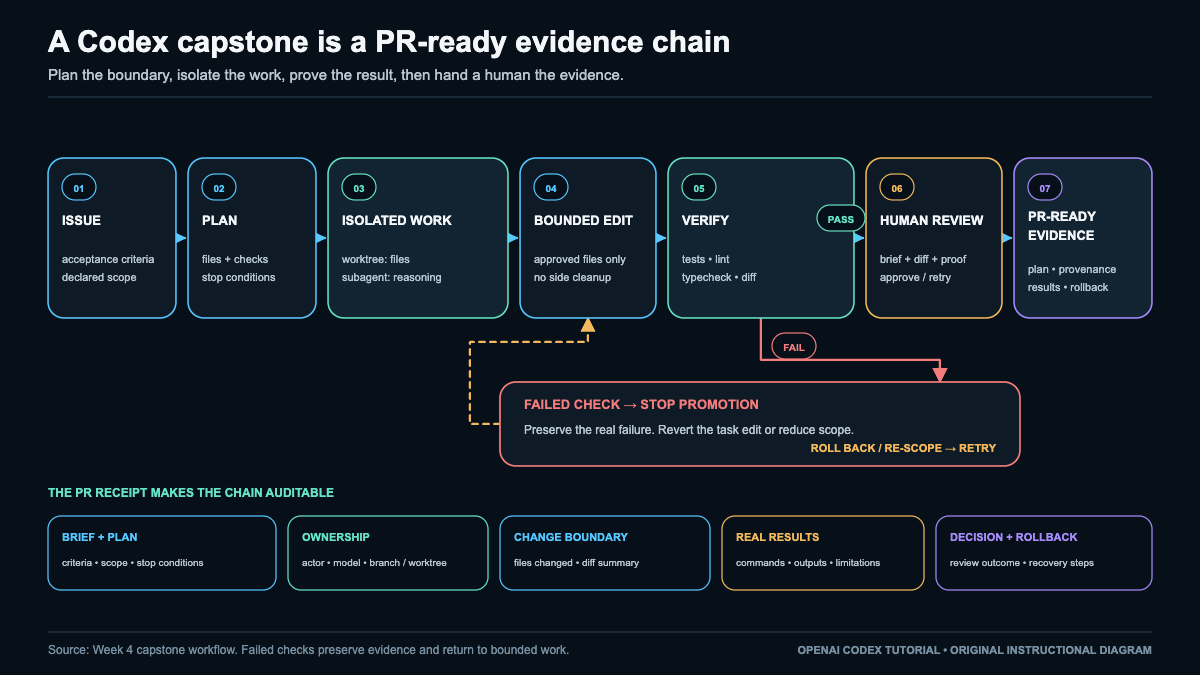
Bounded plan, change, and verification
The plan is to compare 3600, 3601, 3660, 3661, 59, and 0; locate token construction; track whether a larger unit started output; emit minutes and seconds after hours even when zero; preserve the pure-seconds path and signature; add focused assertions; inspect the two-file diff; then stop the writer.
The intended implementation shape is illustrative:
const parts: string[] = [];
let started = false;
if (hours > 0) {
  parts.push(`${hours}h`);
  started = true;
}
if (started || minutes > 0) {
  parts.push(`${minutes}m`);
  started = true;
}
if (started || seconds > 0 || parts.length === 0) parts.push(`${seconds}s`);
A human then runs the focused test, full suite, lint, typecheck, whitespace check, and diff inspection from <worktree-path>, capturing stdout, stderr, and the real exit code for each:
npx vitest run test/format.test.ts
npm test
npm run lint
npm run typecheck
git diff --check
git diff --stat
git diff
git status --porcelain
git diff --name-only <baseline-sha>
A nonzero exit is evidence, not a result to hide. The name-only diff must contain exactly src/format.ts and test/format.test.ts. Any other path fails the scope gate. Continue to failure handling and evidence only after preserving all outcomes.
Capstone Failure Routes and PR-Ready Evidence
Failure matrix, rollback, and human authority
| Failure route | Detection evidence | Stop or recovery action | Required decision |
|---|---|---|---|
| Ambiguous criteria | 3600 assertion conflicts with issue |
Preserve both texts; do not edit | Issue owner chooses contract |
| Dirty baseline | Status lists a path | Stop and resolve checkout ownership separately | Repository owner if unclear |
| Dependency unavailable | npm ci or runner exits nonzero |
Retain stderr; do not enable network or alter dependencies | Maintainer approves policy change |
| Permission escalation | Request reaches sibling path, secret, network, or broader write | Deny and preserve request | Human approves any escalation |
| Focused test fails | Focused transcript exits nonzero | Fix only bounded code or test; never relax criteria | Human resolves ambiguity |
| Full suite fails | Full transcript exits nonzero | Compare baseline; revert candidate-caused regression | Maintainer decides disposition |
| Unrelated file appears | Name-only diff exceeds allowlist | Stop, retain diff, restore only unauthorized path | Human confirms scope |
| Findings disagree | Prompt, diff, checks, or notes conflict | Do not accept; resolve against code and tests | Human is final authority |
Rollback removes only the candidate change. First copy sanitized evidence outside the worktree. For an uncommitted candidate, restore the two allowed files to <baseline-sha> or remove the named worktree only after confirming no evidence exists solely inside it. For a committed candidate, record <final-sha> and use a history-preserving revert. Re-scope only when the issue needs another file or owner authority. Record the blocked criterion and required authority, pause this candidate, and start any broader task with a new baseline.
Evidence bundle and outcome gates
Store this bundle outside the worktree:
<evidence-path>/
  prompt.md
  issue.md
  baseline-sha.txt
  final-sha.txt
  status.txt
  changed-files.txt
  diff.patch
  diff-stat.txt
  diff-check.txt
  test-focused.txt
  test-full.txt
  lint.txt
  typecheck.txt
  codex-metadata.txt
  review-notes.md
  decision.md
  SHA256SUMS.txt
Each transcript contains complete output and its exit code. Capture a command as one record so stderr cannot be separated from the status that explains it. Never rewrite a nonzero transcript, copy a success from another run, or summarize output in place of the retained bytes. status.txt, changed-files.txt, diff.patch, and diff-stat.txt establish repository state, scope, content, and size. final-sha.txt contains the accepted commit or uncommitted worktree.
Metadata records only values displayed by the installed tool, using not displayed otherwise. Notes identify failures, waivers, disagreement, and residual risk. A waiver names the unavailable check, reason, authorizing person, and remaining risk. A blocked or waived check is not a pass. decision.md names the human, date, accept/revise/reject outcome, and conditions. The human compares the issue and prompt with the actual diff, checks every named duration, confirms the public API and two-file boundary, and resolves any conflict between writer summary, subagent findings, and command records.
Create SHA256SUMS.txt last, covering every other bundle file, then verify each listed path and digest. Recompute it whenever any retained file changes. A hash proves byte identity, not correctness. The receipt gate is satisfied only when the issue, prompt, baseline, file scope, diff, check outcomes, human decision, and hashes agree. Record an outcome for each acceptance criterion and each command, including failures and explicit non-applicability, so absence cannot be mistaken for success.
PR-ready checklist and checkpoint
PR-ready means eligible to propose, not pushed or opened. Do not continue until every required path exists, each claimed command has a captured exit code, changed files match the allowlist, hashes verify retained bytes, failures are resolved or classified, and a human records the decision. Missing or contradictory evidence keeps the candidate outside the PR-ready gate.
Troubleshoot Codex by Finding the Failing Layer
A failed Codex task does not by itself identify a model defect. The same visible symptom can begin in account state, an old client, effective configuration, a provider route, an MCP server, permissions, Git state, an IDE, a cloud environment, or a usage limit. Broad resets erase useful evidence and can add a second failure.
Use one classification sequence:
- Symptom: Record what happened, on which surface, and the first useful error.
- Likely layer: Name the smallest component that can explain it.
- Safe diagnostic: Test that hypothesis without changing valuable state.
- Fix: Make one narrow, reversible correction, or record a no-change decision.
- Verify: Repeat the same bounded action and inspect a defined result.
Preserve the first useful error before retrying, and change one variable at a time. A later error may only be a consequence. A confident explanation is still a hypothesis until observable evidence supports it.
Keep the four failure classes distinct
A product failure is a defect, outage, rollout issue, or integration defect that local changes may not repair. A configuration failure comes from effective settings, precedence, version skew, routes, or connector setup. An authentication failure involves missing, expired, wrong-account, wrong-route, or provider-specific credentials. A permission failure blocks an otherwise valid operation through a sandbox, approval policy, operating system, repository, organization, network, or connector rule.
Classify after identifying the likely layer. An unauthorized response might reflect a wrong account, the wrong provider credential, or organization policy. A missing tool might be disabled in configuration, absent from an older client, blocked by permission, disconnected, or unavailable during an outage. When evidence disagrees with the class, revise the hypothesis instead of widening access.
Use the ten-layer matrix
| Layer and symptom | Likely class | Safe diagnostic | Narrow fix and verification |
|---|---|---|---|
| Authentication: sign-in loop, unauthorized response, wrong account, or absent cloud feature | Authentication, eligibility, or product | Record the surface and displayed account. Separate ChatGPT sign-in, API-key auth, provider credentials, and connector authorization. | Refresh only the affected route. Retry one harmless action and confirm the intended account and feature boundary. API billing does not unlock ChatGPT features. |
| Client: documented behavior differs from the app, CLI, or extension | Configuration, version skew, or rollout | Record each displayed version and compare supported-channel documentation for that build. | Update only through its supported channel, or use behavior documented for the installed build. Reopen it and repeat the smallest failing action. |
| Effective configuration: a setting is ignored or changes by repository | Configuration or permission | Identify user, project, profile, trust, environment, and one-off origins. Inspect key names without exposing values. | Reversibly disable or override one suspect key. Start a new session in the same scope and confirm only the intended behavior changed. |
| Provider: wrong endpoint, unavailable model, malformed response, or provider-specific unauthorized error | Configuration, authentication, billing, compatibility, or product | Check provider name, base URL shape, model mapping, expected API behavior, and whether the required environment variable exists, without printing its value. | Correct one route or mapping, or refresh only that provider’s credential. Send one minimal, nonsensitive request and verify transport plus required response or tool behavior. |
| MCP or plugin: missing tool, failed connection, or failed action | Configuration, authentication, permission, transport, or product | In a new session, reproduce with only the suspect integration disabled. Inspect declared tools, transport state, identity boundary, and side-effect annotations. | Reauthenticate or reconfigure only that connector, or leave it disabled. In another new session, test one harmless read-only action. |
| Sandbox and approvals: reads work but writes, network, browser, or connector actions are denied | Permission or configuration | Compare the requested capability with active sandbox, approval, OS, organization, and connector rules. Read the exact request and target. | Grant only the justified missing capability, or reduce scope. Repeat the bounded operation and confirm no broader capability was added. |
| Git and worktrees: wrong files, detached HEAD, dirty diff, branch conflict, or absent ignored file | Configuration, permission, or repository state | Preserve work. Inspect branch, status, worktree ownership, baseline commit, and ignored-file assumptions. Safe read-only checks include git status --short --branch and git worktree list. |
Do not move or delete anything until ownership is clear. Select the correct checkout, then verify branch, baseline, diff, and expected files. |
| IDE: stale context, wrong files, or behavior unlike another surface | Configuration, permission, version skew, or product | Record IDE and extension versions, workspace, selection, remote context, and OS permissions. Compare one minimal read-only task on a supported surface without assuming parity. | Reopen the correct workspace, update the supported extension, or correct the remote boundary. Repeat with the intended file and environment visibly selected. |
| Cloud and network: local files are absent, setup fails, or calls cannot connect | Configuration, permission, authentication, network, or product | Separate local connectivity from hosted task state. Check repository and environment selection, setup status, coarse network location, DNS, proxy, TLS, allowlist, policy, and official service state as appropriate. | Correct only the environment or approved network rule, or wait for a confirmed incident. Verify with a harmless environment check against the required input or approved destination. |
| Usage and eligibility: limit message, delayed counter, unavailable credits, or retries stop | Authentication, eligibility, billing, configuration, or product | Record the surface, account or workspace, displayed counter, and whether ChatGPT or API billing applies. Stop retries. | Follow displayed reset guidance, reduce scope, or resolve eligibility through the proper account route. Resume only after the counter or eligibility visibly changes. |
Configuration is the effective result of all active origins, not the contents of one file. Keep originals intact, never place secrets in TOML, and use a new session when activation requires it. See configuration.
Provider compatibility includes model names, streaming, tools, reasoning items, caching, usage metadata, and hosted features. A compatible schema does not guarantee feature parity. Provider identity and billing remain separate from ChatGPT identity and billing.
Sandbox capability determines what is reachable; approval policy determines when an attempt may proceed. OS, browser, connector, and organization controls can add gates. Do not grant broad access merely to discover a missing permission. See safety.
Worktrees are independent checkouts. A branch can belong to another worktree, ignored files may be absent, and uncommitted changes may live elsewhere. Inspect before switching, cleaning, resetting, or removing. See worktrees.
A healthy local connection does not prove a hosted task has repository access or permitted egress. A hosted incident does not justify deleting local state. Likewise, usage is not one universal counter: account, workspace, plan, API quota, billing, region, policy, and rollout can differ. Counters may lag, and retries may consume more usage. See cost controls.
Build a sanitized evidence bundle
Keep the bundle small and safe to inspect. Record the timestamp and coarse time zone; affected surface and displayed version; exact failing step; likely layer and class; sanitized first useful error; relevant configuration key names without values; sandbox, approval, OS, or organization mode; provider name without credentials or private endpoints; coarse network location; Git branch, worktree, and baseline when relevant; minimal-session reproduction status; one reversible change or no-change decision; and the verification result.
Redact tokens, API keys, cookies, pairing codes, Authorization headers, credential files, private URLs, usernames, email addresses, repository names, proprietary code, prompts, customer data, and full home paths. Use descriptive labels such as [REDACTED_TOKEN], never secret-shaped examples. Do not paste raw private logs into a model, issue, chat, or ticket. Sanitize a copy and retain any original only under approved access and retention rules.
For a symptom such as “tool unavailable,” record the named tool, surface, version, and first error. If other model responses work, test the integration hypothesis by starting a new session with only that integration disabled and checking its transport and declared tools. Correct or reauthenticate only that connector, then test one read-only call in another new session. If its transport still fails, keep the diagnosis at that layer. If all integrations fail, reconsider client, configuration, network, or product state.
Escalate without destroying evidence
Use this least-destructive ladder:
- Capture and redact the first useful evidence.
- Reproduce the smallest harmless case on the same surface.
- Select one likely layer, one class, and one alternative hypothesis.
- Disable or override one suspect component reversibly.
- Refresh only the affected authentication route, integration, or supported client.
- Submit the sanitized bundle through the approved support route with bounded reproduction steps.
Reinstalling, clearing caches broadly, replacing configuration, purging credential stores, hard resetting, deleting branches, and removing worktrees are not first-line diagnostics. Before any documented recovery step changes state, preserve recoverable configuration, uncommitted work, evidence, and ownership information. If the required scope cannot be made safe, stop and escalate rather than trading a diagnosable problem for irreversible loss.
Practical lab: isolate one failing layer
Objective: Convert one real or safely simulated symptom into an evidence-backed layer diagnosis, apply at most one reversible correction, and verify without destroying state.
Prerequisites and surface: Use the affected app, CLI, IDE, cloud task, or integration, its installed-build help, and an approved evidence location. For Git symptoms, use a disposable or recoverable repository and only the read-only checks above.
Starting risk: Stop repeated retries, preserve open work and the first useful error, and do not sign out everywhere, delete configuration, clear caches, reinstall, change branches, remove worktrees, or broaden permissions. If diagnosis would require a real secret, consequential write, paid action, or unsafe grant, use an already sanitized error and stop before that action.
Procedure:
- Create an evidence note containing the bundle fields above.
- State the symptom in one sentence without proposing a fix.
- Choose one of the ten layers and classify it as product, configuration, authentication, or permission. Record one alternative.
- Define verification before changing anything, such as a valid sign-in state, expected read-only tool, intended workspace, or minimal request through the intended route.
- Run one safe diagnostic from the matrix while holding other variables fixed.
- If evidence supports the hypothesis, make one reversible correction limited to that layer. If not, record the result and test the alternative. Do not turn uncertainty into access.
- Repeat the identical bounded action once. Record success, the same failure, or a new first error. A changed error is evidence, not proof of success.
Expected evidence: The note contains a reproducible symptom, primary layer and class, alternative hypothesis, sanitized diagnostic result, exact reversible change or no-change decision, and verification result. It explains why evidence supports or rejects the hypothesis without raw private logs.
Common failure and diagnostic: If multiple settings, credentials, permissions, or versions changed together, the result is inconclusive. Restore those changes and rerun with one variable. If the symptom disappears only under broad permission, revoke it and test the narrow requested capability. If reproduction fails, preserve time and context rather than claiming a fix.
Rollback and cleanup: Restore the temporary override, disabled integration, or permission change unless it is the accepted fix. Retain sanitized evidence under policy. Do not remove a worktree, branch, backup, or credential record merely to make the lab appear clean.
Do not continue until the symptom, likely layer, class, safe diagnostic, fix or no-change decision, and observable verification are recorded; sensitive data is redacted; only one variable changed at a time; rollback is complete or the narrow fix is explicitly retained; and every remaining uncertainty has a nondestructive escalation route.
When Codex Fits, When Claude Code Fits, and When to Use Both
Both OpenAI Codex and Claude Code are capable, multi-surface, extensible, automatable, provider-aware, and safety-sensitive tools. Neither is a toy, and neither is a universal answer. What actually moves your results is the combination you bring to the table: the model and version you route to, the reasoning effort you request, the permissions and policies you set, the environment you run in, and the shape of the task itself. A well-scoped, verifiable job behaves very differently from an open-ended synthesis across an unfamiliar codebase, and the same tool can feel excellent on one and merely adequate on the other. Treat the choice as evidence-driven rather than brand loyalty, and revisit it as versions and plans change.
Where Codex tends to shine
Codex offers an integrated ChatGPT desktop and Codex experience that many people already live inside. Its app-first flow across Local, Worktree, and Cloud makes it natural to spin up isolated work, watch a visible diff, review changes, and hand results off cleanly. It spans broad surfaces, including CLI, IDE, web and cloud, GitHub, and an SDK, and supports custom provider routes for teams that need them. In my practice, it executes strongly on well-defined, verifiable tasks where the acceptance criteria are clear and the output is easy to check.
Where Claude Code tends to shine
Claude Code brings terminal-native ergonomics and a rich control surface: agents, settings, hooks, granular permission and policy controls, and multiple surfaces to run from. It has shown mature reasoning over complex codebases and nuanced review on the tasks where I prefer it, along with strong autonomous synthesis when a job calls for connecting many pieces rather than filling in a tightly specified blank.
Parity and honest caveats
Both products offer multi-surface operation, extensibility, automation, model and provider choices, parallel and background execution patterns, and safety controls. That said, exact maturity and feature parity vary by surface, authentication route, version, and plan, so a capability that is polished in one place may be newer in another. Do not read this section as declaring a universal winner on safety, quality, cost, autonomy, or provider support. The responsible move is to test the specific pairing you care about on your own tasks. For a fuller side-by-side treatment, Read my full Claude Code vs Codex comparison.
| Task situation | Lean Codex | Lean Claude Code | Consider both |
|---|---|---|---|
| App/worktree workflow with visible review | Integrated app, worktree, and handoff fit this directly | Workable, but you give up the app-native diff flow | Draft in Codex, cross-check the diff with Claude Code |
| Terminal-native deep reasoning and review | Capable, though not the terminal-first default | Strong fit for nuanced review in the terminal | Split implementation and independent review across both |
| Provider and governance fit | Custom provider routes and SDK help here | Hooks, permissions, and policy controls help here | Match each tool to the route and policy it satisfies best |
| Unattended automation | Cloud and SDK support background runs | Agents and hooks support autonomous runs | Automate with one, gate with the other before merge |
| Cost-constrained repetitive work | Scope to well-defined, verifiable units | Scope to fit the plan and effort you need | Prototype on one, confirm on the other only when it pays off |
Use the table to choose based on task evidence and verification, not as a scorecard to total up.
My practitioner conclusion
In my own work, Codex has been better in many practical uses, especially when the task is well-defined, the expected result is easy to verify, and I can benefit from its integrated app, worktree, review, or parallel-execution workflow. That is my practitioner conclusion, not an official fact, an objective result, or a universal benchmark, and your mileage will depend on your tasks and setup. Claude Code remains my preference for some complex codebase reasoning, nuanced review, and autonomous work where its behavior fits the assignment better. For a single anecdotal counterexample rather than comparison proof, see my GPT-5.4 model-switch experiment. And because people often conflate categories, it helps to be clear about why a model, desktop agent, and orchestration layer are different.
A practical “use both” workflow
Give the first model a scoped implementation or analysis task. Preserve its patch or findings and the supporting evidence exactly, without letting later steps overwrite them. Then hand the second model an independent review against your written acceptance criteria, so it evaluates the work rather than regenerating it. After that, run your real test suite and static checks against the change, and require a human to make the final call. The second model is a reviewer, not a substitute for tests: it never replaces them, and a passing review with failing tests is still a failing change.
Reader exercise
Map three of your own tasks to Codex, Claude Code, or both, and write down why. For each task, set a Checkpoint that states the acceptance criteria before any model runs. Gather Evidence by preserving each tool’s patch or findings and the output of your tests and static checks. Treat as a Failure any case with ambiguous acceptance criteria, inconsistent recommendations between the two tools, or failing tests. For Recovery, narrow the scope, reset to a clean branch or worktree, rerun the defined checks, and escalate to human review rather than asking the models to vote among themselves.
The takeaway is that neither tool wins in the abstract. You pick by task shape, verify with real checks, and keep a human in the loop for the decisions that matter, and over time the pattern of which tool earns which kind of work becomes your own practical map rather than a claim you inherited from anyone else.
Your Next 30 Days with Codex
Treat this month as four operating cycles. Reserve three focused sessions each week. Use a real repository only for reversible work with a known acceptance check. Otherwise, use a disposable repository. Keep one learning log for briefs, evidence, and decisions. The linked sections own the procedures.
Week 1: Establish a safe baseline
| Card | Plan |
|---|---|
| Outcome | Give Codex one scoped task, understand surface access, inspect the change, apply a relevant check, and keep or reverse the result. |
| Tasks | Choose one surface with the surface decision guide and keep it all week. Complete the safe first task in a disposable or low-risk repository. Write a four-line brief: goal, allowed files, required check, and stop condition. Inspect the diff, run an existing check, and deliberately reverse one harmless change. |
| Evidence | Keep the brief, starting state, final diff, exact check and observed result, surface, and decision. If no check exists, state that and treat manual inspection as limited evidence. Keep sensitive material out of the log. |
| Checkpoint | Continue only when the starting state was known, scope stayed bounded, the diff was inspected, and a relevant check passed or its absence was recorded. You must be able to return to baseline. |
| Risk/rollback | Keep network access off unless required. Reject broad access, destructive commands, deployments, and credential changes. Consult sandbox and approval controls before widening authority. If scope expands, revert and retry narrowly. End with a clean tree or labeled branch. |
| Update habit | After each session, log the date, task, surface, risk boundary, check, result, rollback status, and one prompt improvement. |
Week 2: Match effort to the task
| Card | Plan |
|---|---|
| Outcome | Select model effort for task difficulty, work through your editor, and compare cost or latency without weakening verification. |
| Tasks | Use the model and effort guidance to define quick, bounded, and complex task classes. Try two comparable low-risk tasks with different effort settings while holding goal, files, and validation steady. Limit each to one retry. Follow the IDE integration, request an explanation of one function, then one small edit. Supply only needed context and create a routing note. |
| Evidence | Save both briefs, model and effort, observed elapsed time, visible usage if available, diffs, and validation results. Record accepted results rather than confidence. |
| Checkpoint | Explain the choice using uncertainty, consequence, context size, and cost of error, not the assumption that higher effort is better. Name a default for at least two task classes. Editor output remains untrusted until inspected and checked. |
| Risk/rollback | Do not chase ideal output through repeated escalation. If a provider change is required, use the provider boundaries. Keep the simpler setting when its result is correct and inspectable. Discard a poor patch and retry with tighter context. |
| Update habit | Date the routing note and record one default, two escalation triggers, one budget guardrail, the surface, and the model label you observed. Confirm current labels and availability rather than memorizing a catalog. |
Week 3: Isolate work and add reusable guidance
| Card | Plan |
|---|---|
| Outcome | Separate work with Git worktrees, delegate one scoped investigation, and add stable repository guidance without creating a fragile instruction stack. |
| Tasks | Follow the worktree workflow to create one worktree, validate a minor change, and confirm the primary directory is unaffected. Give one subagent a read-only assignment through the subagent guidance, requiring file references and uncertainties. Verify its findings. Add one short AGENTS.md instruction with the customization guidance. Test it once, then simplify it if misunderstood. |
| Evidence | Keep the worktree path and branch, status from both directories, assignment, report, verified references, instruction diff, and selected test command. Label the actor responsible for each artifact. |
| Checkpoint | Identify each change’s branch, each recommendation’s actor, and verified claims. The primary directory must be clean or intentionally changed, and repository guidance quickly inspectable. |
| Risk/rollback | Use at most two worktrees and one subagent. Never let agents edit the same files or let a delegate merge, deploy, or change credentials. Treat plugins and MCP connections as trust boundaries. Preserve wanted commits before removing a worktree. Revert surprising guidance. Resolve conflicts manually on one branch. |
| Update habit | Add working directory, branch, actors, and responsible human to future notes. Put temporary details in the brief. Change permanent instructions only when repeated failure reveals a stable rule. |
Week 4: Add bounded reuse and complete a capstone
| Card | Plan |
|---|---|
| Outcome | Define one narrow automation, one repeatable workflow, and one capstone change demonstrating planning, isolation, verification, evidence, and rollback. |
| Tasks | Choose a low-consequence task from scheduled tasks and automations. Prove it manually before considering preview scheduling. Select one reusable workflow and list inputs, allowed actions, outputs, validation, owner, and stop conditions. Complete a capstone on a separate branch or worktree. Approve bounded scope, inspect the diff, and run targeted checks. Prepare a brief receipt listing files, observed results, limitations, decision, and rollback steps. |
| Evidence | Preserve the automation definition, available manual or preview result, workflow checklist, capstone plan, diff summary, validation output, and receipt. Mark unavailable evidence not run with a reason. Never substitute sample output for an observed result. |
| Checkpoint | Any automation must be observable and easy to disable. The capstone must meet acceptance criteria, stay within declared files or explain an approved exception, and have usable rollback steps. If a condition fails, preserve evidence and reduce scope. |
| Risk/rollback | Avoid deployment, payment, deletion, credential rotation, database work, or unsupervised merges. Keep external effects behind human approval. Recheck cost controls, execution location, and configuration discipline before granting persistence. Disable noisy automation and revert changes when limits fail. |
| Update habit | Monthly, check model labels, effort defaults, permissions, connected tools, schedules, usage, instructions, and stale worktrees. Diagnose surprises through the troubleshooting layers before changing the whole setup. |
Adjust the sequence to your path
| Path | Adjustment | Success measure |
|---|---|---|
| Foundation | Spend two weeks on Week 1 if source control, diffs, tests, or shell commands are new. In Week 3, use one worktree and a read-only subagent. In Week 4, choose a documentation or test capstone and keep automation in preview mode. | Safe repetition, clear evidence, and reliable rollback rather than feature coverage. |
| Builder | Follow the weekly sequence. After the first practice task, use a real but noncritical repository. Choose a small bug fix or feature with existing tests for the capstone. | Reusable briefs, consistent verification, and clear evidence of when added effort improved the result. |
| Operator | Compress Week 1 into a baseline audit, but do not skip it. Add budgets, data boundaries, actor attribution, and approval ownership. In Week 3, test isolation and cancellation. In Week 4, require observability, a disable switch, a named responsible human, and a rollback rehearsal. | Controlled delegation with attributable evidence rather than maximum autonomy. |
Graduate when evidence shows you can scope, delegate, inspect, validate, and reverse work. If one week remains weak, repeat it before adding complexity. Keep one practice, refine one, and defer one that evidence does not support.
Frequently Asked Questions
These concise answers preserve the distinctions that matter after setup. Interfaces, labels, eligibility, limits, and supported features can vary by account, platform, workspace, provider, and rollout. For procedures and current details, follow the linked section in this document and confirm time-sensitive information in the product surfaces available to you.
Did OpenAI merge Codex into ChatGPT?
The safer description is a transition toward a unified ChatGPT desktop experience, not a claim that every Codex surface became one ChatGPT feature. Codex remains a product family spanning desktop, CLI, IDE, cloud, web, GitHub, SDK, and scripted workflows. A desktop label or bundle name does not define the whole product boundary. Use What OpenAI Codex Is to distinguish the shared desktop doorway from the broader set of Codex capabilities.
Is Codex still a separate app, and which platforms does it support?
Packaging may show ChatGPT while exposing Codex as a mode, and a local bundle name may reflect an earlier arrangement. Desktop availability and behavior can differ by operating system and rollout. Users without a supported desktop path may still use the CLI or compatible editor integrations. Surface support does not imply feature parity because desktop, CLI, IDE, web, cloud, and GitHub workflows differ in file access, execution location, and persistence. Start with Choose Your Codex Surface.
Which plans include Codex, and should I sign in with ChatGPT or an API key?
Plan access and usage allowances can change, so check the current account and workspace controls. ChatGPT sign-in uses eligible subscription access and supported ChatGPT integrations. API-key authentication supports API-billed CLI, IDE, SDK, or scripted activity, but it does not itself provide subscription credits or subscription-only cloud features. Managed automation may use separately governed credentials. Keep secrets outside prompts and repositories, and use the safe setup flow to verify the active identity and billing boundary.
What is the difference between GPT-5.6, Sol, Terra, and Luna?
Separate ChatGPT picker labels, Codex-supported models, and raw API identifiers because the catalogs can overlap without being interchangeable. gpt-5.6 may route within the GPT-5.6 family. Sol is positioned for difficult, open-ended work, Terra for balanced everyday tasks, and Luna for clear, repeatable transformations. A published API context limit does not establish identical usable context in every interface. Avoid inferring undocumented model IDs. See model and effort selection for routing guidance and context caveats.
Are reasoning effort, Fast, Max, Ultra, and API Pro the same setting?
No. Reasoning effort controls how much reasoning the selected model may apply. Fast describes a speed or service tier. Max targets deeper single-agent work, while Ultra describes an orchestration choice that may delegate decomposable work. API Pro is a reasoning mode for a selected model, not proof of a separate model ID. Increased effort does not add permissions or ensure a stronger result. Choose model, effort, orchestration, and access independently with the selection framework.
Does the Codex IDE extension work the same in every editor?
No. VS Code and compatible editors follow one integration path, while Xcode and JetBrains may use separately documented paths. Authentication, versions, selected context, model controls, diff review, and cloud handoff can vary across editors and releases. If a capability appears missing, check the editor, extension, account, repository trust, workspace, and current support notes. Then compare one bounded read-only task in the CLI to isolate an IDE-specific issue. See Use Codex Inside Your IDE.
Can Codex use Bedrock, Azure, Ollama, LM Studio, or another provider?
Codex can use documented built-in or custom provider routes, typically through a provider selection and matching configuration block. Keep credentials in environment-backed secret storage rather than configuration text. An OpenAI-shaped endpoint alone does not establish full compatibility: streaming, tools, reasoning items, images, caching, usage metadata, MCP, and hosted features may differ. Billing and support remain provider-specific. Validate the route with a small read-only task before writes, following the provider guidance.
Does Codex run locally, or does it send my repository to the cloud?
Execution location depends on the chosen surface and task. A local CLI or desktop task can work with files reachable in its workspace under active sandbox and approval rules. A cloud or web task runs in a hosted environment and does not directly edit an arbitrary local folder. Handoffs depend on repository and environment state, so do not assume every uncommitted file transfers. Choose by data boundary, isolation, persistence, network need, and review flow using the execution-location framework.
Are worktrees and subagents two names for parallel Codex tasks?
No. A subagent provides cognitive delegation with separate context; a Git worktree provides a separate checkout and branch workspace. Either can exist without the other. Subagents can divide research, implementation, or inspection, but add context cost and coordination risk. Worktrees isolate files without creating an agent or hosted environment. For parallel writes, assign disjoint paths and a synthesis owner. See subagent delegation and worktree isolation for their distinct operating rules.
How do AGENTS.md, skills, plugins, and MCP differ?
AGENTS.md supplies hierarchical repository instructions. Skills package repeatable workflows with triggers and checks. Plugins distribute bundles that may include skills, integrations, hooks, or templates. MCP connects Codex to external tools and context through supported transports. These mechanisms solve adjacent problems but are not substitutes for one another. Add the smallest mechanism that meets the need, inspect its permissions and origin, and test both intended and unintended triggers. Customization guidance explains scope and trust boundaries.
What sandbox and approval settings should a beginner use?
A practical starting point is workspace-scoped write access with approval requested for justified escalation. The sandbox limits what a process can reach; the approval policy determines when it must ask. They are independent controls. Begin in a disposable or version-controlled repository, inspect diffs and relevant checks, and review network or integration side effects before accepting changes. Broad bypass modes require external isolation suited to their risk. Use the safety framework for allowlists, injection threats, data boundaries, and rollback.
Can Codex safely run scheduled or unattended tasks?
Codex can support scheduled work on eligible surfaces, but unattended work should remain bounded and observable. Run the task manually first, narrow its inputs, make outputs reviewable, and grant only required permissions. Prefer read-only collection or an isolated worktree before enabling writes. Inspect early runs for drift, retries, unexpected network access, and scope growth. Scheduling is distinct from a background shell process, cloud delegation, or subagent work. Follow the automation guidance, and record unsupported scheduling as unavailable rather than as completed.
How much does Codex cost?
A single number would blur separate billing paths. Subscription usage and API-key usage can have different eligibility, meters, and included features. Consumption also varies with model, effort, context, retrieval, tools, caching, retries, images, service tier, parallel agents, and execution surface. Published allowances or prices may change. Evaluate cost against accepted work by recording the task, settings, retries, checks, and keep-or-discard decision. Cost controls provides the feedback loop without assuming one universal meter.
Is Codex better than Claude Code?
The answer depends on the task, environment, model, permissions, and preferred workflow. Codex may fit well-defined work that benefits from its app, worktree, handoff, review, or parallel surfaces. Claude Code may fit some terminal-centered, synthesis, reasoning, or inspection workflows. Neither product has a universal advantage, and a second model does not replace tests or human judgment. Compare both on the same bounded task and acceptance criteria using the decision framework, which owns the full comparison.
What should I check first when Codex behaves differently from this guide?
First classify the layer: client version, identity, plan or usage state, selected model, provider route, effective configuration, sandbox, approvals, integrations, Git or worktree state, IDE context, or local versus cloud execution. Interface labels and capabilities can change across releases and rollouts, so check current documentation for the active surface. Preserve a sanitized first error, reproduce with a small read-only task, and change one variable at a time. Use troubleshooting and configuration precedence for nondestructive diagnosis.
Your Turn To Share
The real value of Codex shows up when you put it to work on something small and specific, then check the results honestly. Pick one surface, whether that is the CLI in your terminal, the IDE integration, a cloud run, or a review pass on an open pull request. Define a bounded task with a clear boundary, write down what success actually looks like before you start, and decide in advance what proof would convince a skeptical teammate.
That proof matters more than any impression. A clean diff, a passing test suite, a readable log trail, or a reviewable artifact tells you whether the workflow earned its place in your routine. Vague satisfaction does not. Let the evidence, not the novelty, decide what stays.
Start where the cost of being wrong is low, keep the scope tight, and read the output with the same care you would give a colleague’s code. Then share what you found so others can learn from it too.
Which Codex workflow or surface will you try next, and what proof will you collect to know it worked?