

If you have been hearing about Claude Code and wondering where a beginner is actually supposed to start, this Claude Code tutorial is built to be your permanent home base. Not a news post that goes stale in three weeks. A course hub you can bookmark, work through once, and come back to whenever you forget exactly how a permission mode behaves or which command branches a session.
Here is the thing most tutorials get wrong: they hand you a wall of commands and assume you will figure out the safety and judgment on your own. That is how people end up letting an AI agent run loose in a real repository and then wondering why half their files changed. This course flips the order. You will learn to move slowly and safely first, then earn speed and autonomy as you understand what each control actually does.
You are probably wondering who this is for. Students and early-career developers who want a safe first success. Working software professionals who want to operate Claude Code reliably day to day. And experienced developers who want a fast path to controlled advanced workflows like subagents, worktrees, and scheduling. Everyone gets a reading path below, so you can skip what you already know and go straight to what you need.
Course currentness
This hub was reviewed and verified against the official Claude Code live documentation and official releases through v2.1.211, released July 15, 2026. The local research CLI observed during preparation was the older v2.1.113, so not every current feature described here was executed locally on that older build. Behavior can and does differ by version, plan, provider, platform, organization policy, and staged rollout. When your interface disagrees with this page, trust the official docs and report the mismatch. Verify current behavior at the live commands registry, the documentation index, the setup page, and the official changelog and releases.
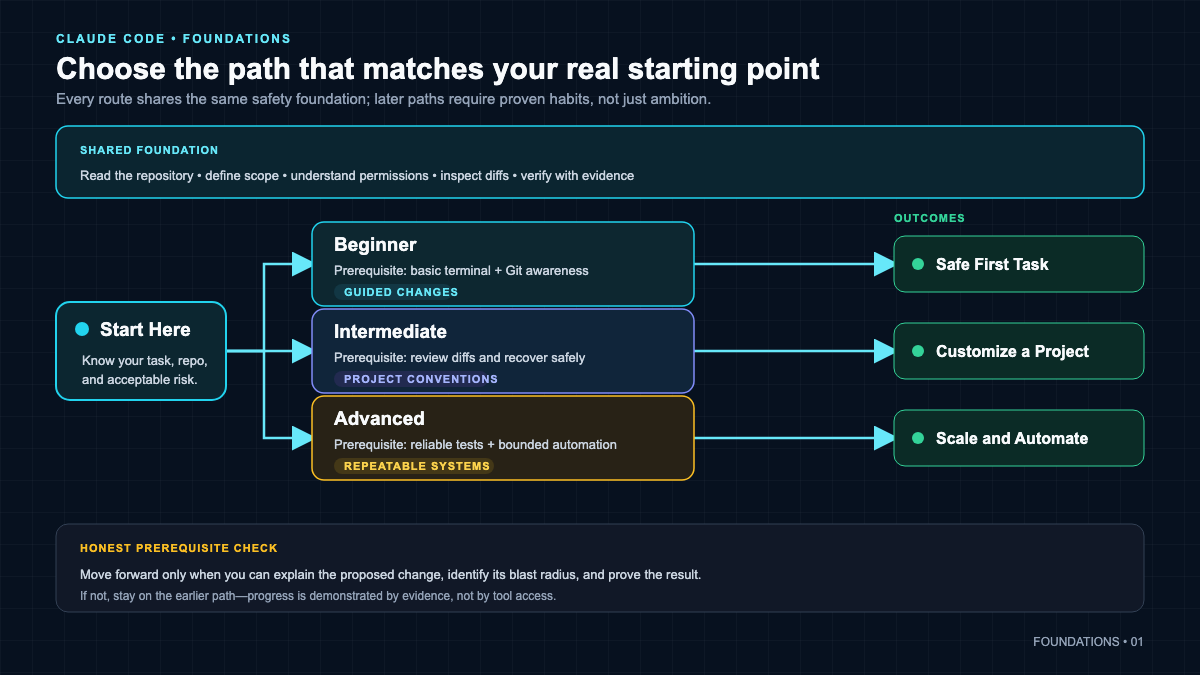 The whole course at a glance: orient once, then follow the path that matches where you already are.
Table of Contents
- How Claude Code Works: Model, Tools, and the Loop
- Choose the Right Model, Effort, and Mode
- Reading Paths: Beginner, Intermediate, Advanced
- Set Up a Safe Practice Workspace
- Your First Verified Task
- Permissions, Plan Mode, Sandbox, and Recovery
- Sessions and Context Discipline
- Project Control: CLAUDE.md, Rules, Settings, Memory
- The Extension Decision Framework
- Skills: Reusable Workflows
- Hooks: Deterministic Guardrails
- MCP: Connecting External Tools
- Subagents, Parallelism, and Agent Teams
- Tasks: Planning Checklist vs Background Work
- /goal: One Session Completion Condition
- Scheduling and Unattended Work
- Plugins: Packaging Components
- IDEs, GitHub, GitLab, and CI
- Voice, Remote Control, and Web Handoff
- Quick Reference Cards
- Capstone Project: Daily Pulse
- Your Next 12 Lessons
- Your Turn To Share
How Claude Code Works: Model, Tools, and the Loop
Here is what most people miss. Claude Code is not a chatbot that happens to know about code. It is a coding agent. The difference is that it has hands. A normal chat gives you text back. Claude Code can read your files, write to them, run shell commands, run your tests, and observe the results, all inside a loop, until the job is done or you stop it.
Think about it this way. A large language model is the reasoning engine. On its own it can only talk. Claude Code wraps that engine with a set of built-in tools and a control layer, and gives it a controlled way to act in your project through the terminal. You stay in charge of the boundary: what it can touch, when it needs to ask, and when it is allowed to just go.
The mental model that will save you the most trouble is the agentic loop:
- Ask. You give a bounded request.
- Plan. The agent proposes an approach and, in the right mode, shows it before touching anything.
- Act. It uses tools: read a file, edit it, run a command.
- Observe. It reads the output, the error, the test result.
- Verify. It checks whether the goal is actually met, then loops again or stops.
That last step is the one you must never outsource. When Claude says “done,” that is a claim, not evidence. Your job as the human is to look at the actual test output, the actual file, the actual diff. Overview of the product and its concepts is on the official Claude Code overview page, and the underlying request, tool, result cycle is documented for builders in the Agent SDK agent loop reference.
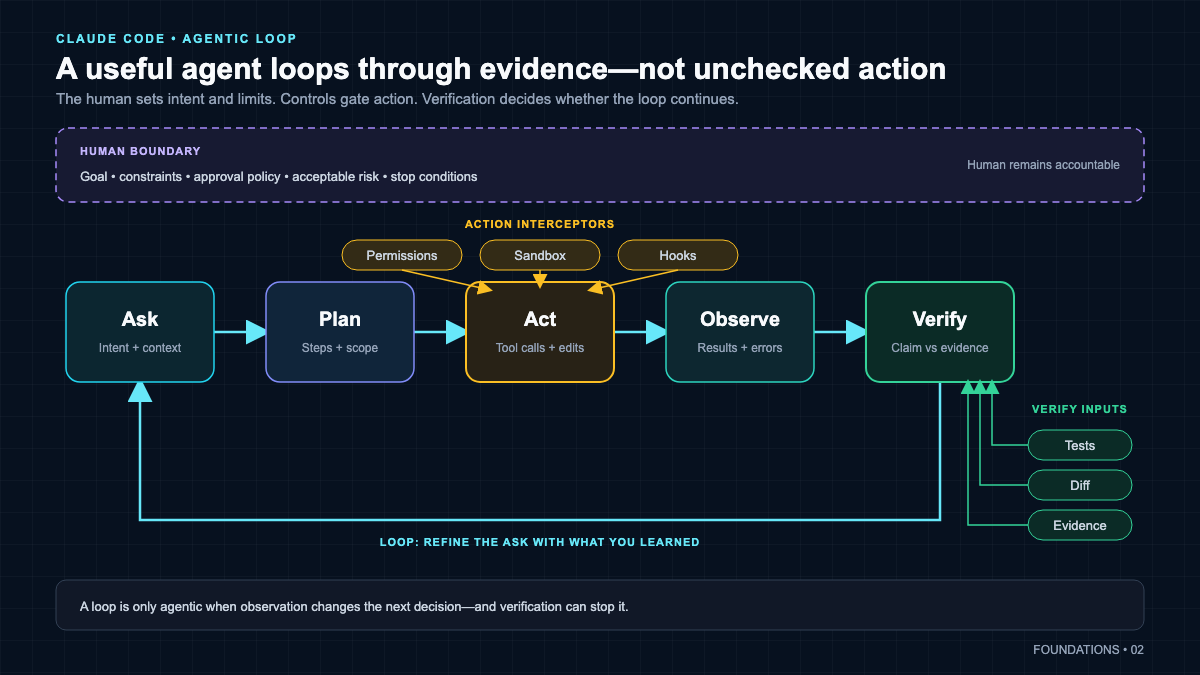 Every Claude Code action runs through this loop. The human owns the verify step, and permissions and hooks can intercept the act step.
A quick note on models, because people fixate on this. Claude Sonnet 5 became the Claude Code default in v2.1.197, but do not treat any model as a timeless universal default. The active default depends on your supported release, provider, plan, platform, and rollout. Learn to pick a model by task complexity, cost, and latency rather than memorizing a name that will change. The very next chapter turns that advice into an actual competency, so you stop guessing and start choosing by evidence. If you want the honest comparison of how Claude Code stacks up against alternatives before you commit, see the dedicated Claude Code vs Codex comparison, and if budget is your first question, read the real cost of AI coding agents. This hub will not try to re-own those questions.
Choose the Right Model, Effort, and Mode
Most beginners think picking a model is like picking a car trim: bigger is better, so grab the most powerful one and relax. That instinct quietly wastes money, adds latency, and still does not fix the real failures, which usually come from a vague task or missing context. So before you touch a single command, get the mental model right.
Three controls that are not the same thing
There are three separate dials here, and confusing them is the most common mistake I see.
- Model is who you hire. It sets the capability profile, the speed and cost profile, and sometimes the context window or available features. Fable, Opus, Sonnet, and Haiku are models.
- Effort is how much deliberation you ask that model to spend. It shapes how much total work the model does on your request: how many files it reads, how many tools it calls, how many steps it takes, and how much it reasons before checking back with you. Effort is a behavioral signal, not a hard token ceiling.
- Mode is what the agent is allowed to do and which workflow stage it is in. Plan Mode, Manual, Accept Edits, Auto, and the rest govern action, not intelligence.
Around those three dials sit filters that decide which combinations you can actually use: the provider, your subscription plan, your organization policy, and your installed Claude Code version. There is also thinking configuration (adaptive versus manual budgets), fast or performance mode, and orchestration settings. Those are adjacent controls, not the same as effort.
Say this part out loud until it sticks, because the docs are explicit about it:
- A stronger model does not grant more file permissions. Capability is not authorization.
- Higher effort does not leave Plan Mode. Effort is not a permission.
- Plan Mode is not the
opusplanalias. One is a read-only workflow state; the other is a model-routing choice. - A larger context window is capacity, not attention and not correctness. More room to load history does not guarantee the model reads it well.
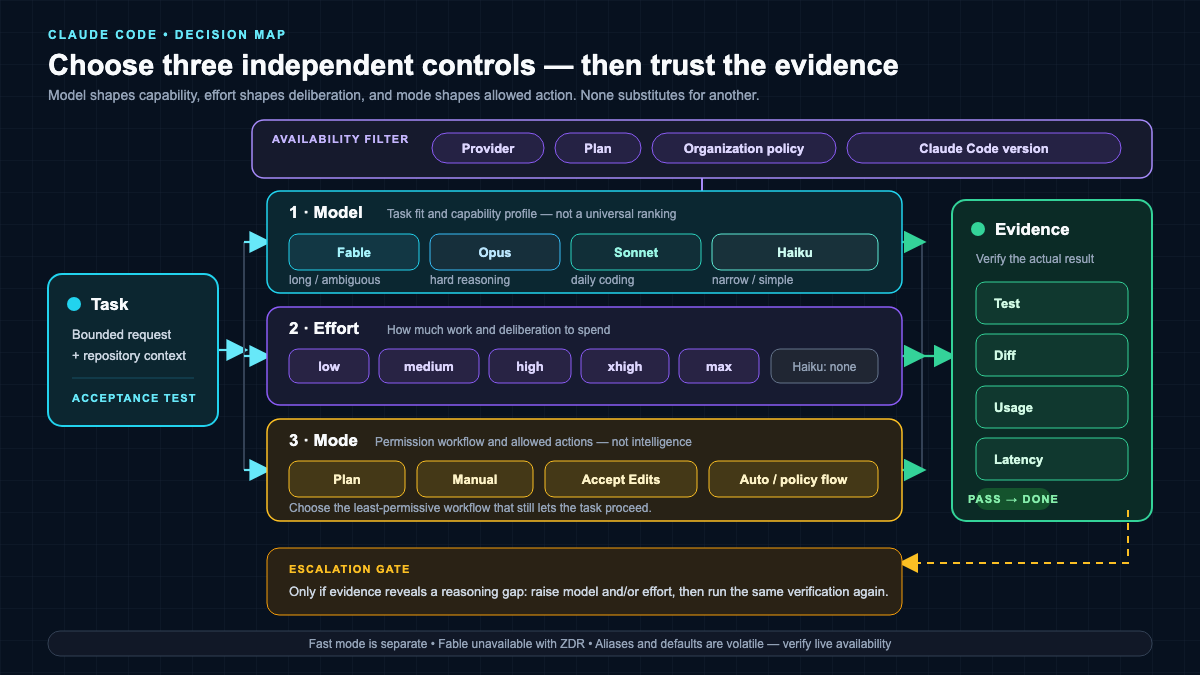 Model selects the capability profile, effort controls response work, and mode controls allowed actions. Provider, plan, policy, and version determine which combinations are available.
A dated snapshot of models and aliases
This table is the volatile part of the chapter, so treat it accordingly.
Verified 2026-07-16; volatile snapshot. Aliases move, defaults change, and providers resolve names differently. Confirm live behavior at model configuration before you rely on any single value.
| Selection | Documented behavior on 2026-07-16 | What it really is |
|---|---|---|
default |
Clears an override and returns to your account-recommended model or organization default | A reset value, not a model alias |
best |
Fable 5 where the organization has access, otherwise the latest Opus | Entitlement-aware alias |
fable |
Fable 5 for the hardest and longest-running tasks | Family alias |
opus |
Latest provider-recommended Opus | Provider-resolved family alias |
sonnet |
Latest provider-recommended Sonnet | Provider-resolved family alias |
haiku |
Fast, efficient Haiku for simple tasks | Family alias |
opusplan |
Opus in Plan Mode, then Sonnet in execution | Hybrid routing mode, not a model family |
opus[1m], sonnet[1m] |
Request extended context where supported | [1m] is a suffix, not a standalone model |
The default value is special: it is a reset, so it can resolve to different models on different accounts. The [1m] piece is a suffix you attach to an alias or a full name. Aliases move over time, which is exactly why aliases are convenient but not reproducible. When you need a choice to stay put, pin the full model ID or a provider deployment identifier.
The current exact API model IDs are:
claude-fable-5(Fable 5)claude-opus-4-8(Opus 4.8)claude-sonnet-5(Sonnet 5)claude-haiku-4-5-20251001(Haiku 4.5), withclaude-haiku-4-5as the API convenience alias
One naming trap worth internalizing: starting with the 4.6 generation, dateless IDs like claude-opus-4-8 and claude-sonnet-5 are still pinned snapshots, not floating pointers. They look like aliases because they lack a date, but they identify a fixed model.
Which account gets which default
Defaults are not universal, so do not memorize one. On 2026-07-16 the documented pattern is:
- Sonnet 5 is the default for Pro, Team Standard, and Enterprise subscription seats.
- Opus 4.8 is the default for Max, Team Premium, Enterprise pay-as-you-go, and the Anthropic API.
- The documented older-default example is Microsoft Foundry: on 2026-07-16, its
opusandsonnetselections resolved to Opus 4.6 and Sonnet 4.5, versus Opus 4.8 and Sonnet 5 on the direct Anthropic API. Verify your provider’s current resolution before relying on an alias.
On top of that, organization defaults, allowlists, installed version, entitlement, platform, and staged rollout can all change your effective model. Fable 5 is not the default on any account type; you opt into it. I am deliberately not listing every provider deployment identifier here, because a beginner does not need that firehose. When you deploy on a specific cloud provider, verify that provider’s resolution in its own account.
The families and what each is for
Treat these roles as starting heuristics, not benchmarks and not a universal ranking.
- Fable 5 was not part of the original course era; it launched later. It is built for the hardest and longest-running work, the ambiguous investigations that exceed a single sitting, where your account is entitled to it. It requires 30-day retention and is unavailable under zero-data-retention configurations.
- Opus 4.8 is your model for difficult reasoning, architecture decisions, and hard debugging.
- Sonnet 5 is the balanced daily-coding model, the one most implementation work should start on.
- Haiku 4.5 is for narrow, simple tasks that clearly pass their acceptance test, where speed and cost matter more than deep reasoning.
A Task-to-Model Matrix
The single rule that keeps you honest: start with the least expensive or slow option likely to pass the acceptance test, then escalate only when evidence shows a reasoning or capability gap.
| Task shape | Starting choice | Effort | Why | Acceptance evidence | Escalate when |
|---|---|---|---|---|---|
| File lookup, formatting, tiny deterministic edit | haiku |
not applicable | Fast and cheap for narrow work | Test passes and the diff is exactly what you asked for | It misses a dependency or the test stays red |
| Routine feature with clear tests | sonnet |
high (default) | Balanced daily coding | Green tests and a readable diff | Architecture is ambiguous or repeated attempts fail |
| Test writing, code review, repo exploration | sonnet |
medium or high | Good balance, isolate noisy work | Findings match the actual code and tests | A hidden root cause spans many files |
| Architecture, migration plan, hard debugging | opus |
high, then xhigh if justified | More reasoning headroom | A plan that survives your own review | The work becomes a long autonomous investigation |
| Long, ambiguous, autonomous investigation | fable or best, where entitled |
high (default) first | Designed for the hardest, longest work | Verified conclusion with evidence | Access, domain safety fallback, or budget blocks it |
| Complex plan then routine build | opusplan |
high | Opus plans, Sonnet executes | Both plan and implementation pass tests | The provider or allowlist blocks the upgrade |
The effort matrix
Effort support depends on the model, and the levels are calibrated per model, so the same name is not the same underlying value across families.
| Model | Effort levels | Default | Notes |
|---|---|---|---|
| Haiku 4.5 | No Claude Code effort support | not applicable | If you need effort control, pick an effort-capable model |
| Fable 5 | low, medium, high, xhigh, max |
high |
Always uses adaptive thinking; thinking cannot be disabled |
| Sonnet 5 | low, medium, high, xhigh, max |
high |
Adaptive thinking; effort tunes depth |
| Opus 4.8 | low, medium, high, xhigh, max |
high |
Adaptive thinking; effort tunes depth |
Two behaviors to remember. First, if you set a level a model does not support, Claude Code falls back to the highest supported level at or below it. Second, Fable does not lack reasoning; it always uses adaptive thinking and rejects any attempt to disable thinking or set a manual fixed budget. Keep the separate manual thinking budget control out of this mental model. Effort is soft guidance; a manual thinking budget is a different, legacy mechanism.
Fast Mode, Ultrathink, and Ultracode are not Effort
These three get mislabeled constantly, so pin them down.
- Fast mode is a separate research-preview performance configuration for supported Opus models. It is not a different model and it is not lower effort. It trades a higher per-token price for lower latency while keeping the same quality. It is not available on Amazon Bedrock, Google Cloud’s Agent Platform, Microsoft Foundry, or Claude Platform on AWS.
- ultrathink is one-turn, in-context steering. Including it in a prompt asks for deeper reasoning on that turn without changing your API effort setting, per current docs.
- ultracode is
xhigheffort plus Claude Code workflow orchestration. It is session-sensitive and version-sensitive, and it is not an API effort enum. Do not put it in a persistent effort setting.
Switching and inspecting your controls
Here are the exact commands. Copy them, do not guess.
/model                         # open the model picker
/model default                 # clear an override, return to the account or org default
/model sonnet                  # switch now
/model opus
/model fable
claude --model haiku           # one launched session
ANTHROPIC_MODEL=opus claude    # one launched session
/status                        # inspect model and account state
/effort                        # effort picker
/effort high
/effort auto                   # reset to the active model default
claude --effort medium         # one launched session
Persistent settings look like this:
{
  "model": "claude-opus-4-8",
  "effortLevel": "high"
}
Now the persistence rules, because they surprise people. As of v2.1.153, typing /model <name> interactively saves your choice as the default for future sessions by writing the model field in your user settings. In the picker, Enter saves; pressing s switches for the current session only. In non-interactive -p mode, /model applies only to that session and is not saved. Startup flags like --model and the ANTHROPIC_MODEL environment variable apply only to the launched session and take precedence over the settings value. A resumed session normally restores the model saved in its transcript, unless you supply an explicit launch override or that model is unavailable or restricted, in which case it falls through to normal precedence. Managed settings and an organization override can reapply on restart. The effortLevel setting accepts low, medium, high, and xhigh, but not max or ultracode; the highest-precedence effort control is the CLAUDE_CODE_EFFORT_LEVEL environment variable.
Fallback, and One Important Caveat
You can configure an availability fallback chain so a turn does not simply fail when a model is overloaded or briefly unavailable.
claude --fallback-model sonnet,haiku{
"fallbackModel": ["claude-sonnet-5", "claude-haiku-4-5"]
}The rules: up to three models after duplicates are removed, tried in order. The fallback lasts for the current turn only, and the next message tries your primary again. It fires only for eligible server or availability failures. It does not trigger on authentication, billing, rate-limit, request-size, or transport failures, because switching models cannot fix those. Keep this separate from Fable’s content-classifier fallback, which is Claude Code behavior: when a Fable safety classifier flags a request, Claude Code reruns it on your provider’s default Opus and continues the session on Opus until you run /model fable again. And note the boundary carefully: the raw Messages API returns a refusal (an HTTP 200 with a refusal stop reason) unless your application or a server-side fallback is configured. Do not present Fable safety fallback as an automatic raw-API default.
Cost, Cache, Context, and Switching Caveats
- A mid-session model switch retains your transcript, but the next response rereads the full history without cached context. History is not lost; the cached-prompt discount is.
- Larger context is capacity, not correctness. A 1M window is not permission to load the whole repository.
- Thinking tokens are billed even when the reasoning is hidden or collapsed. Visibility affects latency, not cost.
- A stronger model or higher effort can increase both latency and usage.
- Displayed prices are Anthropic list prices; third-party providers and gateways can bill differently. I am deliberately not printing an exact price table here, because it goes stale fast. Check the official pricing page, and for the budgeting mindset the existing owner is the real cost of AI coding agents.
Routing Subagents Deliberately
Subagents can inherit your model or specify their own, and the same evidence-first thinking applies. A subagent’s model resolves in this precedence: CLAUDE_CODE_SUBAGENT_MODEL, then a per-invocation model parameter, then the frontmatter model, then the parent conversation model. Effort has its own precedence, with the environment variable outranking frontmatter. Since v2.1.198, subagents inherit the main session’s extended-thinking on or off state, and the built-in Explore agent inherits the main conversation model rather than always running Haiku; on the Claude API only, that inheritance is capped at Opus, so a higher-tier parent runs Explore on Opus while a Sonnet or Haiku parent runs it on that same model, whereas on any other provider Explore inherits the main conversation’s model directly. Since v2.1.211, an explicit per-invocation model persists when a subagent is resumed or sent a follow-up.
A Haiku scanner needs no effort field, because Haiku is not effort-capable:
---
name: repo-scanner
description: Find relevant files and return paths with short evidence.
model: haiku
tools: Read, Grep, Glob
---
A Sonnet reviewer can carry effort, because Sonnet is effort-capable:
---
name: careful-reviewer
description: Review a bounded diff and verify findings against tests.
model: sonnet
effort: high
tools: Read, Grep, Glob
---
Three Labs to Build Real Judgment
These are for you to run in a disposable repo. This course text does not claim any of these labs were executed for you; the evidence is what you observe when you run them.
Beginner lab: same prompt, same acceptance test. – Prerequisites: a throwaway repo and one tiny testable task with a written acceptance test. – Steps: record /status and /effort. Run the task on haiku. Run the identical prompt and identical acceptance test on sonnet at default effort. Do not change the wording between runs. – Observe: the quality difference, the elapsed time and perceived latency, the effective model and effort from /status, any usage evidence your interface exposes, and the actual test and diff result for each run. – Common failure: editing the prompt between runs, or judging eloquence instead of whether the acceptance test passed. – Restore: run /model default or the picker to return to your intended default.
Intermediate lab: opusplan and bounded subagent routing. – Prerequisites: a small refactor with clear tests, plus comfort creating subagent files. – Steps: run the refactor once with /model opusplan. On a separate session copy or branch, run it with sonnet only. Then create a Haiku scanner and a Sonnet reviewer and route a bounded task through each. – Observe: the two plans, the two implementation results, the test outputs, the effective model and effort each agent reports where the interface supports it, and whether isolation reduced noise in your main context. – Common failure: giving both subagents your strongest main-session model by accident, so nothing is actually isolated for cost. – Restore: discard the branch or session copy and reset your default.
Advanced lab: a dated, governed routing policy. – Prerequisites: worktrees, secrets handling, and the ability to run disposable branches. – Steps: write a dated policy for three workload classes (routine scanner, implementation and review, hard architecture or root-cause). For each, specify alias or pinned ID, effort, fallback and escalation rule, provider identifier, allowed-model constraint, acceptance test, and a budget or latency target. Test one task per class in isolated worktrees. – Observe: the effective model output, the test and diff evidence, usage and latency where available, and whether each escalation rule fired for the right reason. – Common failure: pinning an Anthropic API ID and expecting it to work unchanged on a different provider. – Restore: remove the worktrees and archive the policy with the verification date.
Anti-Patterns to Avoid
- Equating model strength with permission or safety.
- Running the largest model at max effort for every task.
- Switching models repeatedly in a long session without considering the uncached history reread.
- Treating aliases as pinned reproducible versions.
- Assuming your
defaultis the same as everyone else’s. - Giving every subagent the strongest main-session model by accident.
- Forcing Haiku onto work that keeps failing its tests; cheap failed loops are false economy.
- Using a 1M window as an excuse to load the whole repository.
- Raising effort to compensate for a vague task, missing acceptance criteria, or bad context.
- Publishing exact model, default, or effort facts without a verification date and official link.
Currentness and updates for this chapter
Sources to check on each review: model configuration, subagents, the Models overview linked from model-config, the commands registry, and the official releases. In your designated test environment, run
claude --version,/model,/effort, and/statusto confirm live behavior. Review the volatile alias, default, and effort tables every two to four weeks while model velocity is high, and immediately on any new model family, default change, alias remap, effort-level change, or subagent inheritance change. When only the labels change, update the dated tables and leave the durable selection logic alone. Rewrite the mental model only when a control boundary actually changes.
Reading Paths: Beginner, Intermediate, Advanced
Pick one path. You do not have to read this hub top to bottom on the first pass.
Beginner path: safe first success. – Prerequisites: basic comfort with a terminal, a folder, and Git being installed. – Read: How Claude Code Works, then Choose the Right Model, Effort, and Mode, then Set Up, First Verified Task, Permissions, Sessions, Project Control. – Outcome: you install Claude Code, complete and verify one small task, recover from a bad change, write a concise project briefing, and can explain why model, effort, and permission mode are separate, inspect your active model with /status, and choose a sensible daily-work default instead of assuming everyone shares one. – Skip or continue: you can stop after Project Control and use the tool productively. Come back for extensions when a real need appears.
Intermediate path: customize a real project. – Prerequisites: you can install, complete a verified task, and use Git basics. – Read: Choose the Right Model, Effort, and Mode, then the Extension Decision Framework, then Skills, Hooks, MCP, and Subagents. – Outcome: you add exactly one skill, one hook, and one trusted MCP integration, measure the context cost of each, and you can switch models per session, use opusplan deliberately, and route a subagent’s model and effort with a bounded output contract. – Skip or continue: if you only manage single-developer projects, you can skip Agent Teams and Plugins for now.
Advanced path: scale, distribute, automate. – Prerequisites: intermediate evidence plus Git worktrees, shell scripting, and secrets handling. – Read: Choose the Right Model, Effort, and Mode with its subagent and governance sections, then Subagents and Parallelism, /goal, Scheduling, Plugins, IDEs and CI, then the Capstone. – Outcome: you run collision-free parallel work, package tested components, schedule a reversible, logged, human-gated task, and design a dated model-routing policy across main session, subagents, CI, and provider deployments, including version pins, allowed models, fallback, and cost caps. – Skip or continue: treat experimental agent teams as the last thing you turn on, not the first.
Set Up a Safe Practice Workspace
The good news is that installation is simple and the first safety rule is even simpler: never learn a new agent inside a repository you care about. Make a disposable sandbox folder first.
Lab 0: create a throwaway practice repo
Prerequisites: a terminal and Git installed.
mkdir claude-code-practice
cd claude-code-practice
git init
Expected evidence: git status reports a clean repository on an initial branch. This folder is where every risky experiment in this course lives, so a mistake costs you nothing.
Install and verify
Follow the current official routes on the setup page rather than copying a version-specific command from any blog, because install methods change. In broad terms, there is a native install script for macOS, Linux, and WSL, and package-manager options such as Homebrew and WinGet. Package-manager installs generally do not auto-update by default, so you upgrade them yourself.
After installing, verify:
claude --version
claude doctor
claude --version prints the installed build. claude doctor runs deeper health and setup checks, which is your first stop for a PATH or environment problem.
Authenticate
Authentication routes are covered on the authentication page. Interactive login uses /login inside the app, and there is a claude auth command group for login, logout, and status. Pro, Max, Team, Enterprise, Console, and cloud provider routes are supported. Do not assume a free Claude.ai account includes CLI access, and do not treat an API key and a subscription as interchangeable billing, because credential precedence matters.
For unattended automation you can mint a token with claude setup-token, which prints a one-year, inference-only token you place in an environment variable. It is printed, not saved, and it is not an API key. Never paste it into a screenshot or commit it.
Troubleshooting: install and auth –
claude: command not foundafter install usually means the binary is not on your PATH. Run the doctor check and follow the setup page for your platform. – Login opens but never completes: confirm you chose an account type you actually have access to, and retry/login. – Verified evidence to move on:claude --versionprints a build andclaude doctorreports no blocking issues.
Your First Verified Task
Now for the part that turns a nervous beginner into a confident operator. You are going to run one bounded task and prove it worked with your own eyes.
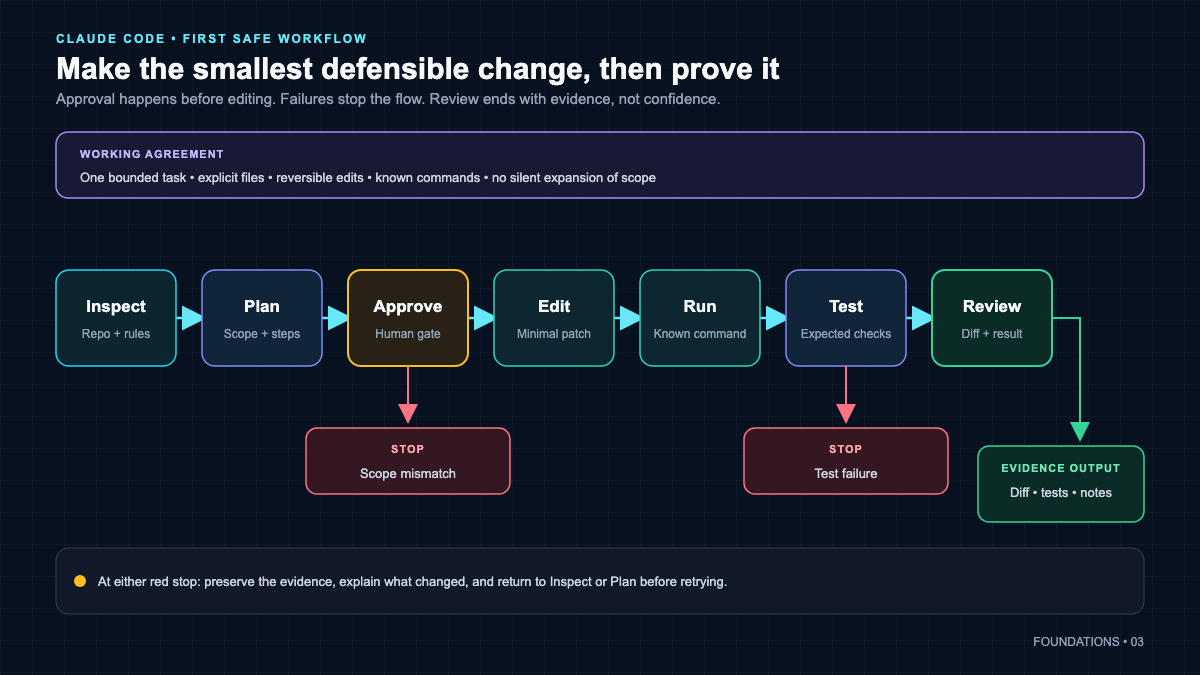 Your first task should be small enough that you can verify every step, so success is something you observe rather than something Claude claims.
Lab 1: inspect, plan, edit, run, verify
Prerequisites: Lab 0 complete, Claude Code installed and authenticated.
Step 1. Start in the right folder. This matters more than beginners expect. The current working directory is the agent’s world.
cd claude-code-practice
claude
Step 2. Ask for a bounded task, in Plan Mode. Plan Mode lets Claude read and explore, including permitted read-only shell work, but it blocks source edits until you approve a plan. Enter it with Shift+Tab, or start the session with:
claude --permission-mode planAsk something small and testable, for example: create a Python file number_facts.py with a function that returns whether a number is even, plus a tiny test file.
Step 3. Read the plan. Do not skim. Confirm the files and actions match what you asked for. Approve to leave Plan Mode.
Step 4. Let it edit, then run. After the files exist, run them yourself:
python number_facts.py
python -m pytest -q
Step 5. Verify. The observable success evidence is a passing test and a file whose contents you can read. If pytest prints a green result, you have proof. If Claude said “all tests pass” but pytest is red, believe pytest.
Troubleshooting: first task – Claude edits nothing: you may still be in Plan Mode. Approve the plan, or switch modes as covered in the next chapter. –
pytest: command not found: install it in your environment first, then rerun. A missing tool is not a failed task, it is a missing dependency. – Common failure to expect: the agent claims completion before you have run the test. Always run it yourself.
Permissions, Plan Mode, Sandbox, and Recovery
This is the safety core of the entire course. Read it before you give Claude Code any real autonomy.
Permission modes
Permission modes are documented on the permission modes page. The configuration values are default, acceptEdits, plan, auto, dontAsk, and bypassPermissions. In current builds the default mode is displayed as Manual. Plan Mode allows read-only exploration but blocks source edits until approval. Approving a plan drops you into the execution mode you selected.
| Mode | What it does | Safe use |
|---|---|---|
plan |
Read and explore only, no source edits until you approve | Start here for anything unfamiliar |
default (Manual) |
Asks before protected actions | Everyday supervised work |
acceptEdits |
Auto-accepts file edits, still guards other actions | Trusted, well-scoped edit sessions |
auto |
Broader autonomy within policy | Only after you trust the task and rules |
dontAsk |
Suppresses prompts, never appears in the Shift+Tab cycle | Narrow, deliberate use |
bypassPermissions |
Removes protections | Only inside a separately isolated container or VM, if ever |
Pay attention to this part: bypassing permissions is not a normal workflow. The forbidden default is to reach for --dangerously-skip-permissions because a prompt annoyed you. If you ever use bypass, it belongs in an isolated throwaway environment where a mistake cannot reach anything real.
Permission rules
Rules live under permissions.allow, permissions.ask, and permissions.deny, managed interactively with /permissions or via --allowedTools and --disallowedTools on the CLI. See the permissions page. Settings scopes merge permission rules rather than doing a simple override, so a deny in one scope still counts. And remember: instructions in a prompt are guidance, not enforcement. Only permission policy, sandbox boundaries, and blocking hooks actually enforce anything.
Sandbox
The sandbox, described on the sandboxing page, is an operating-system-enforced filesystem and network boundary built into macOS, Linux, and WSL2. It is not a virtual machine, and it does not sandbox every tool Claude can use. Enable it with /sandbox, and for hard enforcement set sandbox.failIfUnavailable: true so it does not silently fall back to unsandboxed execution.
Checkpoints and recovery
Claude Code takes an automatic checkpoint before every prompt, documented on the checkpointing page. Roll back with /rewind (aliases /checkpoint and /undo), or press Esc twice on an empty input. Here is the critical limit you must internalize: checkpoints track direct file-edit tools only. They do not undo Bash side effects, external edits made outside Claude, or your Git history, and they are not a replacement for Git. So your real safety net is still version control:
git add -A
git commit -m "checkpoint before letting Claude refactor"
If something goes wrong that checkpoints cannot fix, git restore or git reset to your last good commit. For a deeper permissions and recovery treatment, the Planned lesson below expands this, and for the mindset behind why AI-generated code still needs a human architect, read why AI-generated code needs an architect.
Sessions and Context Discipline
Sessions are how your work persists, and context is the working memory Claude has in the moment. Managing both deliberately is what separates a smooth week from a frustrating one.
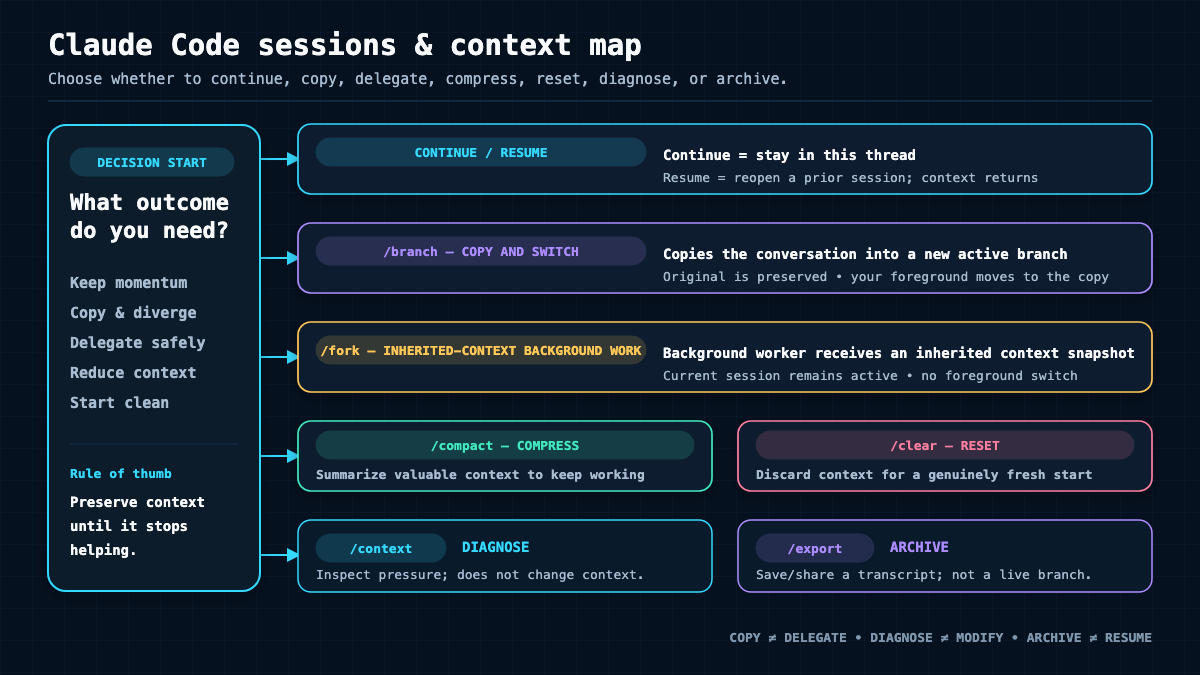 Continue, resume, branch, fork, compact, and clear are different tools for different needs. Choosing the wrong one is how people lose or bloat their working context.
Continue and resume
CLI sessions save locally per project. See the sessions page.
claude -c            # continue the most recent session
claude -r            # resume by picking from a list
claude -r <id|name>  # resume a specific session
Inside the app, /resume [session] does the same. Do not assume the CLI, Desktop, VS Code, and web all share one identical history. The docs say each surface maintains its own histories.
Name, branch, and fork
These three are easy to confuse, so let us work through it precisely.
claude -n my-feature-work            # name a session
/rename my-feature-work              # rename the current one
/branch [name]                       # copy the conversation and switch you into the copy
/fork <directive>                    # v2.1.161+, launch a background subagent, you stay in the parent
claude --continue --fork-session     # CLI equivalent of copying a session
/branch copies the conversation and moves you into the copy while the original stays resumable. /fork <directive>, available from v2.1.161 onward per the commands registry, is different: it spawns a background subagent that inherits the full conversation while you remain in the parent session. /fork is not /branch, and neither is a Git branch.
Inspect, compact, and clear
Context behavior is on the context window page.
/context [all]           # visualize how context is being used
/compact [instructions]  # summarize into the same session, keeping it going
/clear [name]            # empty the active context but keep the prior conversation resumable
/export [filename]       # write a human-readable transcript
The consequence of each choice matters. /compact keeps the session but replaces detailed history with a summary, so it does not preserve verbatim tool output. /clear gives you a blank context without deleting the old conversation. /context is your measurement tool: run it before and after adding a skill or MCP server to see what each one costs you.
Checkpoint: session literacy You have this chapter when you can resume yesterday’s session, branch it to try a risky idea, compact a long session with a custom instruction, and explain out loud why compacting is not the same as clearing.
Project Control: CLAUDE.md, Rules, Settings, Memory
This is where you teach Claude about your specific project once, so you stop repeating yourself. Everything here is covered on the memory page and the settings page.
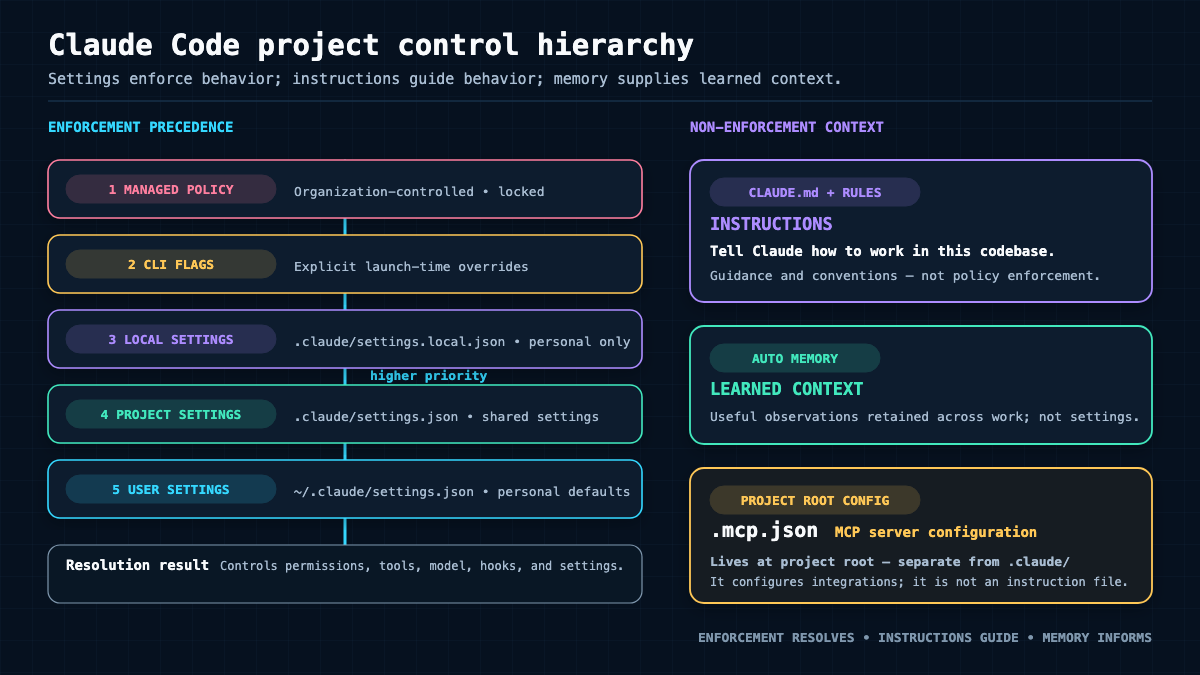 CLAUDE.md and rules are instructions. Settings and permissions are enforcement. Knowing which is which prevents a lot of confusion.
CLAUDE.md and its relatives
CLAUDE.md files load as context, concatenated from broad to specific. Locations include a managed OS path, ~/.claude/CLAUDE.md for you personally, project ./CLAUDE.md or ./.claude/CLAUDE.md, and local ./CLAUDE.local.md for personal project notes. Initialize with /init and manage with /memory. You can import other files with @path up to a recursive import depth of four.
Let me correct a stale claim you may have read elsewhere: CLAUDE.md does not truncate after 200 lines. Official docs say it loads in full. Keeping it under 200 lines is an adherence and context-quality target, not a truncation rule. Longer files still load; they just cost more context and can dilute attention.
Rules and auto memory
Path-scoped rules live under .claude/rules/**/*.md and personal rules under ~/.claude/rules/. Unscoped rules load every session; rules with a paths: glob load only when matching files are read. That selective loading is the point, so you do not pay context for guidance that is not relevant.
Auto memory is separate. It is Claude-written, per repository, toggled with /memory or autoMemoryEnabled. Its loading boundary is documented and specific: the first 200 lines or 25KB of MEMORY.md, whichever comes first, enters each session. Notice the distinction. That first-200-lines boundary applies to auto memory’s MEMORY.md, not to CLAUDE.md. Treat auto memory as helpful context, not guaranteed truth and not enforcement.
Settings scopes and precedence
Settings exist at several scopes with a general precedence: managed policy, then CLI, then local, then project, then user. Most keys hot-reload; system-prompt keys may need /clear or a restart. Do not assume .claude/settings.local.json is team-shared. It is your local file, and it is where interactive choices like a sandbox decision get written. Do not assume every array overrides; permission arrays merge.
Lab 2: a concise project briefing
Prerequisites: a small sample repo.
/initThen edit the generated CLAUDE.md down to essentials: what the project is, how to run it, how to test it, and any convention Claude keeps getting wrong. Verify what actually loaded with /context.
Expected evidence: a short reviewed CLAUDE.md, and a /context view showing it loaded. Common failure: a bloated CLAUDE.md that pastes your entire README. Trim it; instructions compete for attention.
The Extension Decision Framework
Here is what actually matters when your project outgrows plain prompting: choosing the smallest sufficient primitive. Do not configure everything up front. Add a layer only when a real trigger appears.
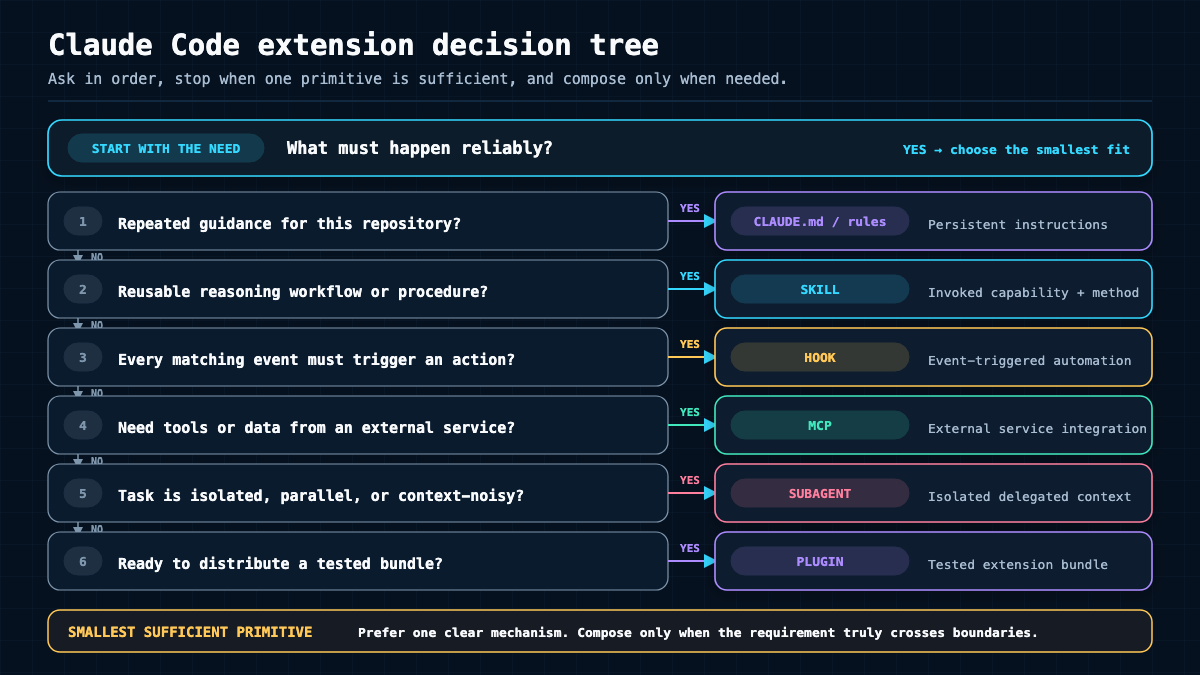 When a need appears, walk down this tree and stop at the first primitive that solves it. The smallest sufficient tool wins.
| Primitive | Best trigger | Context cost | Enforcement | Distribution | Failure mode |
|---|---|---|---|---|---|
| Always-on instructions (CLAUDE.md, rules) | Claude keeps missing a convention | Loaded every session (scoped rules load on match) | None, guidance only | Commit to repo | Ignored under load or when file is long |
| Skill | A repeatable multi-step workflow | Body loads only when used | None, it is a workflow | Repo, personal, or plugin | Wrong trigger metadata means it never fires |
| Hook | An event must always do the same thing | Small, event-driven | Deterministic, can block | Settings scope | Bad matcher or recursion can loop |
| MCP server | You need an external service or data | Tool definitions add context | Trust and scope controlled | Project, user, or local scope | Untrusted server or leaked secret |
| Subagent | A bounded side task needs its own context | Runs in isolated context | Tool and permission limited | Agent files or plugin | Same-file collisions if not isolated |
| Plugin | You must package and share tested components | Depends on bundle | Inherits component enforcement | Marketplace or scope install | Supply-chain risk if not reviewed |
The rule of thumb: wrong convention twice becomes a CLAUDE.md line; a repeated workflow becomes a skill; an action that must happen on every edit becomes a hook; an external service becomes an MCP server; a noisy side task becomes a subagent; and only a set of already-working components becomes a plugin.
Skills: Reusable Workflows
Skills are how you package a repeatable workflow so Claude runs it consistently. Full details are on the skills page.
A project skill lives at .claude/skills/<name>/SKILL.md, a personal one at ~/.claude/skills/<name>/SKILL.md. Note the uppercase SKILL.md. The body loads only when the skill is used, and the description advertises when the model should invoke it.
Lab 3: a minimal working skill
Prerequisites: Project Control chapter done.
Create .claude/skills/weekly-report/SKILL.md:
---
name: weekly-report
description: Generate a weekly status summary from the current repository's recent git history. Use when the user asks for a weekly summary, standup notes, or a progress report.
---

# Weekly Report

When invoked:
1. Run `git log --since="7 days ago" --oneline`.
2. Group the commits into features, fixes, and chores.
3. Write a short summary a non-engineer could read.
Invoke it with /weekly-report, list installed skills with /skills, and refresh after edits with /reload-skills. To make a skill manual-only, set disable-model-invocation: true; to hide it from the menu, set user-invocable: false; to run it in an isolated subagent, set context: fork.
Verification: run /weekly-report in a repo with recent commits and confirm the summary reflects the actual log, not an invented one.
Legacy commands
Older custom commands at .claude/commands/<name>.md still create a /name command, and that path remains a supported legacy compatibility route. It is not removed. For new reusable workflows, though, skills are preferred because they support supporting files and richer metadata. If you want the broader picture of what skills unlock across automation, the existing owner post on Claude Skills as a game-changer covers that intent, and a concrete example of a purpose-built skill is the video-watch skill and why an agent needs it.
Hooks: Deterministic Guardrails
Where a skill is a workflow, a hook is a guarantee. Hooks fire on events and can run deterministic code, including code that blocks an action. The authoritative reference is the hooks page, and you should confirm exact field names and payload schema there because they evolve. Do not invent hook fields.
Hooks are configured in the hooks section of user, project, local, or managed settings, and inspected with /hooks. Handler types include command, http, an MCP tool, a prompt, and an agent. Principal events include SessionStart and SessionEnd, UserPromptSubmit, PreToolUse, PostToolUse, Stop, and more. Scope follows the settings file location.
Lab 4: a safe deterministic hook
Prerequisites: comfort with a shell script and JSON.
Add to .claude/settings.json:
{
  "hooks": {
    "PreToolUse": [
      {
        "matcher": "Bash",
        "hooks": [
          {
            "type": "command",
            "command": ".claude/hooks/guard.sh"
          }
        ]
      }
    ]
  }
}
Create .claude/hooks/guard.sh, make it executable, and have it read the event JSON from stdin, inspect the proposed command, and exit 0 to allow or a non-zero status to block. Keep it simple and log what it sees.
Two things you must respect. First, do not assume an exit-0 hook silently approves an action; the normal permission flow still continues. Second, watch for recursion and secrets: a hook that triggers a tool that triggers the same hook can loop, and a hook that echoes environment values can leak them. Test with a safe case that passes and an unsafe case that blocks, and record the actual exit behavior you observe.
Troubleshooting: hooks – Hook never fires: the matcher does not match the tool name. Re-check against the hooks reference. – Session feels stuck: suspect recursion. Add a guard so the hook cannot retrigger itself. – Evidence to move on: your unsafe case is blocked and your safe case passes, both confirmed in the terminal.
MCP: Connecting External Tools
MCP, the Model Context Protocol, is how Claude Code reaches external tools and data through servers. The reference is the MCP page. The key roles: a client (Claude Code), a server (the integration), a transport (how they talk), a scope (who can see it), and a trust boundary (what you approve).
Add and manage servers
claude mcp add --transport http my-server https://mcp.example.com/mcp
claude mcp add my-local -- my-command --flag        # stdio server
claude mcp list
claude mcp get my-server
claude mcp remove my-server
Inside the app, /mcp shows servers and handles OAuth. Scopes matter: --scope local is the default and is private to the current project; --scope project shares configuration through a committed file; --scope user applies across your projects.
Shared project config lives in .mcp.json
Shared, committed project MCP configuration goes in the project-root .mcp.json. Do not teach or use .claude/mcp.json as the shared root file, because that is not where shared project config lives. A minimal .mcp.json looks like this, and you should confirm the exact schema against the official page:
{
  "mcpServers": {
    "example-http": {
      "type": "http",
      "url": "https://mcp.example.com/mcp"
    }
  }
}
Trust, secrets, and the runtime distinction
A committed project server does not auto-run without trust and approval, and you should never commit credentials into .mcp.json. Reference secrets through the environment instead. Keep one more distinction clear: MCP here is a development-tool integration inside your Claude Code session. That is not the same as calling a provider API directly at your application’s runtime. When you package a capstone later, the app’s own runtime API calls are separate from the MCP tools you used while building it.
Checkpoint: one trusted MCP server Add a server at an explicit scope, use one of its tools, measure the context cost with
/context, then disable and remove it. You should be able to state what it cost you and why you trusted it.
Subagents, Parallelism, and Agent Teams
This chapter is where power and risk both spike, so version boundaries matter more than anywhere else in this Claude Code tutorial.
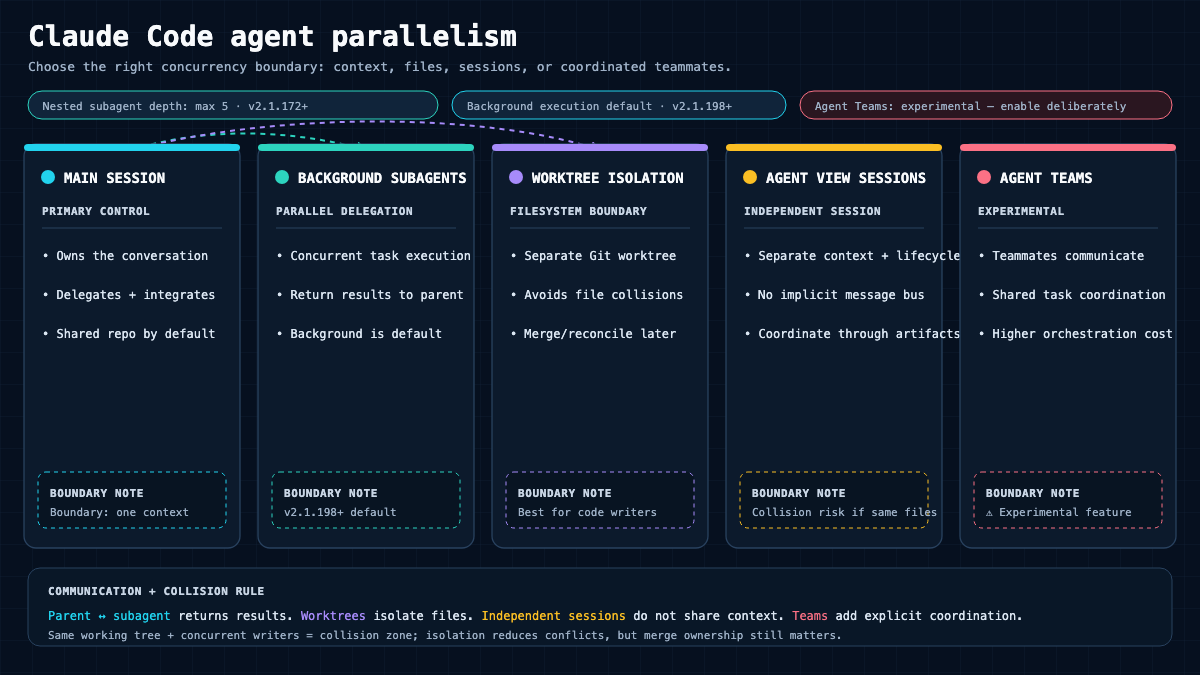 These are distinct primitives, not synonyms. Start with bounded subagents and worktrees before you ever consider experimental teams.
Subagents
A subagent is a delegate with its own context, prompt, tools, and permissions. Define them in .claude/agents/*.md or ~/.claude/agents/*.md, or pass session-only agents with --agents, and launch a main session with a specific agent using --agent NAME. The reference is the subagents page. For how to choose and route each subagent’s model and effort deliberately, including the exact precedence order and inheritance rules, see Choose the Right Model, Effort, and Mode rather than repeating it here.
Two boundaries you must respect:
- Background by default only from v2.1.198. Before that release, subagents did not run in the background by default. Do not backport that behavior to earlier versions.
- Nested subagents only from v2.1.172. A subagent must have the
Agenttool to spawn another, the maximum depth is fixed at five below the main session, and a depth-five agent gets noAgenttool. A forked agent cannot spawn another fork.
Also note the v2.1.198 change to /agents: it no longer opens a creation wizard. To create an agent now, ask Claude to create one or edit the agent files directly. That is different from the top-level claude agents command, which opens agent view for independent background sessions. /agents and claude agents are not synonyms. See the parallel agents page.
Worktrees
For real parallel edits without collisions, use Git worktrees so each line of work has its own checkout and branch. The reference is the worktrees page.
claude -w my-parallel-taskThe default worktree path is .claude/worktrees/<name> on a worktree-<name> branch. Worktrees do not merge changes automatically, and they do not always preserve an untracked .env, so treat merges and secrets deliberately.
Agent teams
Agent teams are experimental and disabled by default. Enable with the environment variable CLAUDE_CODE_EXPERIMENTAL_AGENT_TEAMS=1. See the agent teams page for the limitations you must read before enabling. Teams differ from subagents: a subagent only reports back to its caller, while teammates are independent sessions that message each other directly and share a task list. Teammates cost more and have documented resume, coordination, and shutdown limits. Do not present teams as stable or as the default for parallelism. For the full treatment of how multi-agent coordination actually works, the existing owner is Claude Code Agent Teams explained; this hub only orients you and links out.
Tasks: Planning Checklist vs Background Work
These two look similar and are constantly confused, so let us separate them cleanly.
The planning checklist is Claude’s own to-do list, surfaced with Ctrl+T and managed through the Task tools. It tracks intended steps and survives context compaction. You can even share a named checklist across sessions with CLAUDE_CODE_TASK_LIST_ID=my-project claude. It is bookkeeping; it does not itself execute work.
The /tasks view (alias /bashes) is different. It shows the current session’s background work: running shells, subagents, and workflows. As of v2.1.208, completed background agents remain visible in /tasks until cleanup, so you can review what finished. Do not conflate the planning checklist with the /tasks background-work view. One is a plan; the other is live and recently-completed execution.
/goal: One Session Completion Condition
/goal is an official Claude Code built-in, introduced in v2.1.139 and documented on the goal page. It is not a Hermes invention, not a plugin, not a routine, not an Agent SDK primitive, and not a synonym for /loop.
Here is exactly what it does. It stores one session-scoped completion condition. After each turn, a small-model Stop-hook evaluator checks whether the condition is met and decides whether another turn is needed. One active goal per session.
/goal npm test exits 0 and git status is clean
/goal        # show the current goal
/goal clear  # remove it
A nuance to remember: an active goal restores on resume, but its counters reset. And a caution: because a goal can drive more turns automatically, keep the condition tight and watch your turn budget, especially on anything that mutates files. A vague goal plus autonomy is how you burn credits and touch things you did not intend.
Scheduling and Unattended Work
There are several ways to run Claude Code on a schedule, and they are not interchangeable. Choosing the wrong one is how people expect a task to run with the laptop closed and then wonder why nothing happened.
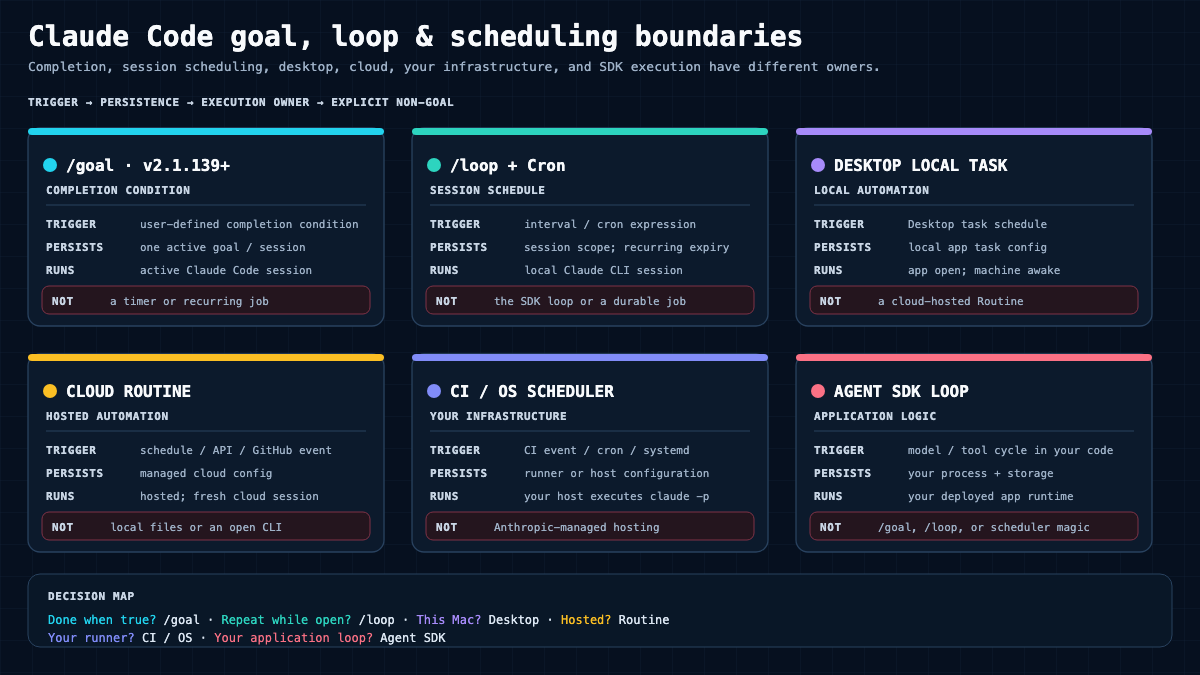 Each scheduling surface has a different persistence and location boundary. Match the surface to whether the work must survive a closed laptop and where it is allowed to run.
| Surface | What it is | Persistence and requirement | Source |
|---|---|---|---|
/loop plus Cron tools |
Session-scoped scheduling skill; CronCreate, CronList, CronDelete are model tools, not slash commands |
Machine and an open or idle session must run; min 1 minute, max 50 tasks, recurring tasks expire after 7 days | scheduled tasks |
| Desktop local task | Desktop Routines, New routine, Local | Persistent; app open and machine awake; min 1 minute; one catch-up run for a recent miss | desktop scheduled tasks |
| Cloud routine | Anthropic-managed cloud automation, research preview | Durable in the cloud; each run is a fresh cloud session; min schedule 1 hour | routines |
| CI or OS scheduler | GitHub Actions, cron, systemd running claude -p |
Durable per your infrastructure; you own logging and secrets | github actions |
| SDK agent loop | The request, tool, result execution cycle in the Agent SDK | Host application controls turns and budget | agent loop |
/loop is an official Anthropic-bundled skill for session scheduling. It is not the SDK agent loop, not a task checklist, not the /tasks view, not a Desktop local task, and not a cloud routine. A cloud routine runs on Anthropic infrastructure with no local-file access during the run; /loop runs locally and dies with the session. You can disable in-session cron entirely with CLAUDE_CODE_DISABLE_CRON=1.
Whatever you schedule, design it to be safe: make it idempotent, log its output, start read-only, and add a human review gate before anything mutates real state. Never schedule a mutating workflow that you have not first run manually and proven correct.
Plugins: Packaging Components
Teach yourself plugins last, after your components already work alone. A plugin is a packaging layer, documented on the plugins page. It can bundle namespaced skills, agents, hooks, MCP config, and more.
claude plugin install PLUGIN[@MARKETPLACE] --scope user
claude plugin list
claude plugin enable PLUGIN
claude plugin disable PLUGIN
claude plugin update PLUGIN
claude plugin uninstall PLUGIN
Scopes are user, project, and local. Only the manifest goes in .claude-plugin/; the actual components do not. Before you install anything from a marketplace, review it like any dependency: check the namespace, read what hooks and MCP servers it ships, and remember that a plugin is a supply-chain surface. And do not package prematurely. If a skill and a hook only ever serve one repo, committing them to that repo is simpler than a plugin.
IDEs, GitHub, GitLab, and CI
Claude Code runs in more than a bare terminal, but each surface has its own boundaries. Do not assume they all share one identical session history.
- VS Code: install the extension, which bundles its own CLI for the panel. It supports editable plan review, inline diffs, and file references. See VS Code.
- JetBrains: install the standalone CLI plus the Marketplace plugin; it does not bundle the CLI. Connect with
/ide. See JetBrains. - GitHub Actions: set up with
/install-github-appor the official action, using an API key secret and workflow permissions, triggered by@claude. The action runs on GitHub runners, not on Anthropic machines. Never hardcode keys. See GitHub Actions. - GitLab CI/CD: a separate official integration, not GitHub Action compatibility. See GitLab CI/CD.
- Headless CI: run
claude -pnon-interactively, gate it with permission rules, a--max-budget-usdlimit, and controlled output. You own secret handling and the runner boundary.
Voice, Remote Control, and Web Handoff
Three convenience features that are easy to misdescribe, so stay within the official support boundaries.
- Voice dictation: toggle with
/voice. It needs a Claude.ai account and a local microphone, sends audio to Anthropic, and is not available for API-key-only, certain provider, or SSH and web contexts. It is not offline speech recognition. See voice dictation. - Remote Control: requires a supported subscription and a current CLI. Your process, files, and tools stay local; only the transcript syncs, over outbound HTTPS with no inbound port. Remote Control does not execute in the cloud. See remote control.
- Web and cloud handoff: a web handoff runs in an Anthropic cloud sandbox, not on your local files. So Remote Control and a web session are not the same execution location. See Claude Code on the web.
Quick Reference Cards
Every command below is documented on the live commands registry; confirm min-version and plan notes there.
Sessions and context
claude -c                        # continue latest
claude -r [id|name]              # resume
/resume, /context, /compact, /clear, /export
/branch [name]                   # copy and switch into it
/fork <directive>                # v2.1.161+, background subagent
claude --continue --fork-session # copy a session via CLI
Safety
claude --permission-mode plan
/permissions, /sandbox, /rewind
git commit -m "..."              # your real recovery net
Model, effort, and mode
/status                          # inspect effective model and account
/model                           # picker
/model default                   # reset to account/org default
/model sonnet | opus | fable     # switch (interactive saves as default, v2.1.153+)
claude --model haiku             # session-only at startup
ANTHROPIC_MODEL=opus claude      # session-only via env
/effort, /effort high, /effort auto
claude --effort medium           # session-only
claude --fallback-model sonnet,haiku   # turn-only, server/availability failures only
# settings: {"model": "...", "effortLevel": "low|medium|high|xhigh"}
# Haiku has no effort support; max and ultracode are not persistent effortLevel values.
Extensions and agents
/skills, /reload-skills, /hooks, /mcp
claude mcp add|list|get|remove
claude agents                    # agent view (independent sessions)
claude -w [name]                 # worktree
/goal <condition>, /goal, /goal clear
/loop <interval> <prompt>, /tasks
File locations
| Purpose | Location |
|---|---|
| Personal instructions | ~/.claude/CLAUDE.md |
| Project instructions | ./CLAUDE.md or ./.claude/CLAUDE.md |
| Local personal project notes | ./CLAUDE.local.md |
| Path-scoped rules | .claude/rules/**/*.md |
| Project skill | .claude/skills/<name>/SKILL.md |
| Agents | .claude/agents/*.md |
| Shared project MCP config | project-root .mcp.json |
| Local settings | .claude/settings.local.json |
Capstone Project: Daily Pulse
This is where the layers combine. You will build a small app called Daily Pulse in a disposable Git repo. To be clear, this is a project for you to build and verify. This course text does not claim any of it was run for you; the evidence is what you observe when you run it.
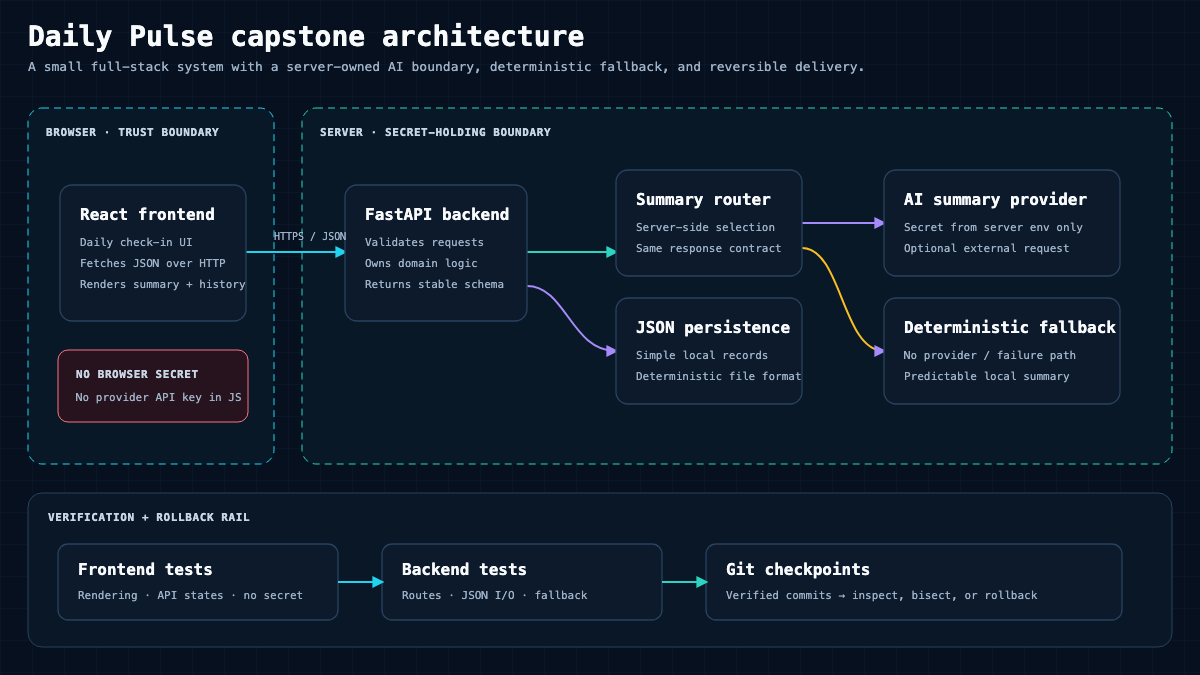 Daily Pulse keeps a clean line between the app’s own runtime AI call and the Claude Code developer workflow you used to build it, with a graceful fallback when the AI provider fails.
Human-owned specification
Daily Pulse accepts short daily notes, stores them, and returns a one-line AI summary of the last few days, with a plain non-AI fallback when the summary provider is unavailable. You, the human, own this spec and the architecture. Claude Code implements against it, incrementally.
Architecture and file tree
daily-pulse/
  backend/
    main.py          # FastAPI app: POST /notes, GET /summary
    store.py         # JSON file persistence
    summarize.py     # AI summary with a deterministic fallback
    test_api.py      # endpoint tests
  frontend/
    (React app: a form and a summary card)
  README.md
Build, run, and test
git init
# Backend
cd backend
uvicorn main:app --reload
python -m pytest -q
# Frontend
cd ../frontend
npm install
npm run dev
Tests and acceptance criteria
POST /notesstores a note andGET /summaryreturns a summary string. Covered bytest_api.py.- When the AI provider is forced to fail,
GET /summarystill returns the deterministic fallback, not a 500. This is the acceptance test that proves your fallback works. - Frontend loads, submits a note, and displays the returned summary.
Failure and recovery paths
- Tests red after an edit:
/rewindto undo direct file edits, orgit restoreto your last green commit. Remember checkpoints do not undo Bash side effects, so commit often. - CORS error between frontend and backend: fix the backend CORS configuration, then rerun both.
Git checkpoints
Commit after each milestone: after the store works, after the endpoints pass tests, after the fallback test passes, after the frontend connects. Each commit is a recovery point.
Security boundaries
Keep any provider key in the environment, never in the repo or in .mcp.json. Add a .gitignore before your first commit. Run the AI call server-side so a key never reaches the browser.
Final evidence checklist
You verify, in your own terminal and browser:
For the mindset that keeps a build like this from becoming unmaintainable, revisit why AI-generated code needs an architect, and for the broader practice of building AI-powered apps, the complete vibe coding guide owns that wider scope.
Your Next 12 Lessons
You now have enough to work safely and productively. These twelve deep dives extend each area. Future deep dives are labeled Planned and are intentionally not linked, because this hub does not link to unpublished pages. Where a published gauraw.com post already owns a topic, it is offered as a linked Elective.
- Install and Troubleshoot Across macOS, Windows, and Linux. Prerequisite: none. Outcome: a clean verified install on your platform. Exercise: run
claude doctorand resolve one PATH issue. Status: Planned. - The Essential CLI and Session Workflow. Prerequisite: install. Outcome: fluent continue, resume, branch, and export. Exercise: recover yesterday’s session and branch it. Status: Planned.
- Choose Models and Effort with Evidence. Prerequisite: How Claude Code Works and a first verified task. Outcome: select a model and effort pair by task shape, latency, cost, and acceptance test, and justify the tradeoff. Exercise: run the same bounded task on two model and effort combinations and document the winning choice with observable evidence. Status: Planned.
- CLAUDE.md and Path-Scoped Rules in Depth. Prerequisite: project control. Outcome: a lean, correctly scoped briefing. Exercise: convert one repeated correction into a scoped rule. Status: Planned.
- Plan Mode for Exploring a Codebase Safely. Prerequisite: permissions. Outcome: read-only architecture review before edits. Exercise: map an unfamiliar repo without changing a file. Status: Planned.
- Permissions, Sandboxes, and Recovery Drills. Prerequisite: first task. Outcome: correct mode per risk and a rehearsed rollback. Exercise: break something on purpose, then recover. Status: Planned.
- A Disciplined Git and GitHub Workflow. Prerequisite: Git basics. Outcome: branch to reviewed pull request. Exercise: ship one change through review. Status: Planned.
- Debugging: Reproduce, Fix, Test, Verify. Prerequisite: prompting. Outcome: repro-first bug fixing with test evidence. Exercise: fix a failing test you did not write. Status: Planned.
- MCP Step by Step. Prerequisite: extension framework. Outcome: one trusted integration added and removed cleanly. Exercise: measure its context cost. Status: Planned.
- Hooks Labs: Formatter, Guard, Logger. Prerequisite: settings. Outcome: three tested deterministic hooks. Exercise: block an unsafe command reliably. Status: Planned.
- Reusable Workflows with Skills. Prerequisite: skills chapter. Outcome: a tested skill with an argument. Exercise: migrate one legacy command. Status: Planned. Elective: Claude Skills, the game-changer.
- Subagents and Parallel Work Without Collisions. Prerequisite: sessions and worktrees. Outcome: a bounded read-only reviewer subagent. Exercise: run two isolated worktrees and merge. Status: Planned. Elective: Agent Teams explained.
A few electives sit outside the numbered path but are worth your time as context. If you are still deciding whether to invest, read Claude Code vs Codex and the real cost of AI coding agents. If you want the fundamentals under agents, see the learning path from RAG to AI agents. For students weighing whether this skill is worth it, what Anthropic’s jobs report means for students and freshers is a grounded read, and for terminology on how a model differs from an agent platform, GPT-5.4 vs Claude Cowork vs OpenClaw helps.
Your Turn To Share
Which stage of this Claude Code tutorial are you standing at right now: still setting up your first safe workspace, or already planning your Daily Pulse capstone? Tell me the one safety rule or workflow you wish you had learned before you started, so the next reader can skip the mistake.