
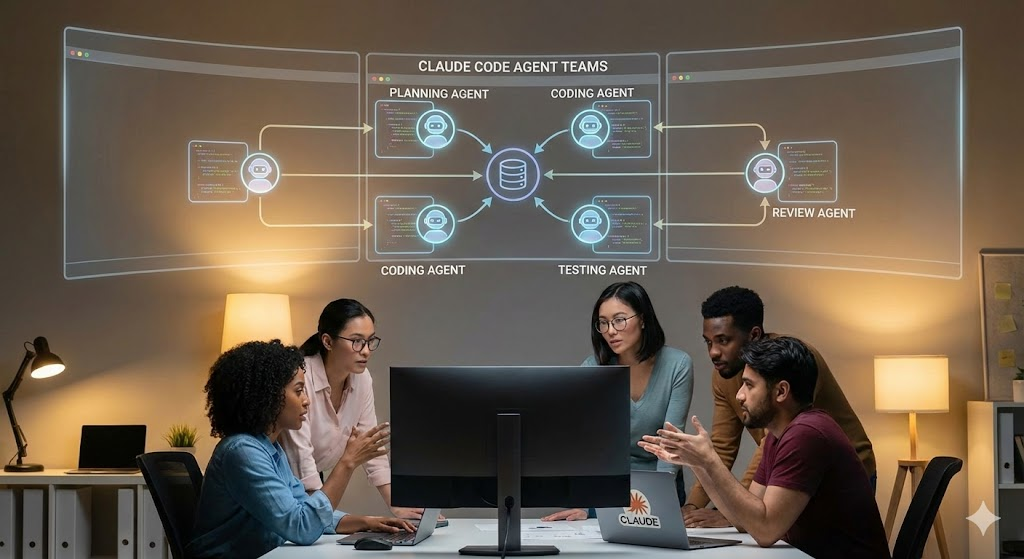
Have you ever started a coding project and realized halfway through that you’re juggling too many moving parts? Frontend changes breaking backend logic. Test files falling out of sync. Documentation getting forgotten while you’re deep in debugging mode.
If you’re nodding along, you’re not alone.
For months, I’ve been using Claude Code as my AI pair programmer. It’s been solid for feature work, refactoring, and the kind of coding that needs deep thinking. But there was always this nagging feeling that bigger projects would benefit from multiple perspectives working simultaneously. Not just one AI agent doing everything sequentially, but a coordinated team tackling different pieces at once.
That’s exactly what Claude Code’s Agent Teams feature does. And after using it for the past week or so on real projects, I’m convinced this is one of those features that changes how you think about AI-assisted development.
Let me show you what it actually does, how it works, and when you should (and shouldn’t) use it.
What Are Claude Code Agent Teams?
Here’s the thing: Agent Teams isn’t just about running multiple Claude sessions. It’s about coordination.
Think of it this way. When you work on a complex feature with your human team, you don’t have everyone working on the same file at the same time. You delegate. Your frontend developer owns the UI components. Your backend developer handles the API logic. Your QA engineer writes the test suite. And critically, they communicate with each other without everything flowing through you.
Agent Teams replicates this model with AI agents.
Instead of one Claude Code session trying to handle everything, you get:
- A Team Lead: One session that coordinates the work, assigns tasks, and synthesizes the final results
- Specialized Teammates: Independent AI agents, each with their own context window, working on specific components
- Direct Communication: Teammates can message each other, challenge assumptions, and coordinate without you acting as the middleman
The key difference from traditional “subagents” (which just report back to a main agent) is that Agent Teams members can talk to each other. They share discoveries. They debate approaches. They actually collaborate.
Why This Matters More Than You Think
Interestingly, most AI coding tools still work on the “one agent does everything” model. And that works fine for small tasks. But when you’re building a new feature that touches frontend, backend, database, and tests? Sequential execution becomes your bottleneck.
Here’s a real example from my own work:
I recently needed to add a new analytics dashboard to one of my client projects. This involved:
- Creating new API endpoints (backend work)
- Building the React components (frontend work)
- Writing database queries (data layer work)
- Adding unit tests (QA work)
- Updating documentation (technical writing work)
With a single Claude Code session, that’s five sequential tasks. Each one dependent on the previous. Total time: about 3-4 hours of back-and-forth.
With Agent Teams? I spun up five teammates. Each owned their piece. They coordinated on shared interfaces. Total time: about 45 minutes of parallel work, plus 20 minutes of integration.
That’s not a 10% improvement. That’s a 4x speed increase.
How Agent Teams Actually Work
The architecture is simpler than you’d think.
1. Team Structure
When you initiate Agent Teams, Claude creates:
- One Team Lead session: This is your main point of contact. The lead understands the big picture, delegates tasks, and makes sure everything fits together.
- Multiple Teammate sessions: Each teammate is a full Claude Code session with its own context window. They’re not lightweight subprocesses. They’re independent workers.
2. Task Distribution
The team lead maintains a shared task list that all teammates can see. Tasks can be:
- Assigned by the team lead to specific teammates
- Self-claimed by teammates who recognize they’re best suited for the work
- Reassigned if priorities change
This prevents duplicate effort and keeps everyone aware of what’s in progress.
3. Communication Protocol
Here’s where it gets interesting. Teammates communicate through:
- Direct messages: One teammate can ask another for clarification without involving the lead
- Shared findings: When one teammate discovers something (like a breaking API change), they can broadcast it to relevant teammates
- Challenge mechanisms: Teammates can question each other’s assumptions, forcing better solutions
This is critical for debugging scenarios where you want multiple competing hypotheses tested in parallel.
4. Context Management
Each teammate maintains their own context window. This means:
- No context pollution from unrelated work
- Each agent stays focused on their specific domain
- Faster responses because smaller, focused contexts
But it also means coordination overhead. The team lead needs to synthesize results from multiple contexts.
Setting Up Agent Teams (Step by Step)
Alright, let’s get practical. Here’s how you actually enable and use this feature.
Prerequisites
Before you start:
- Update Claude Code: Make sure you’re running the latest version. Agent Teams is experimental, so you need the newest release.
- Choose the right model: Agent Teams works best with Opus 4.6. Sonnet can handle it, but you’ll get better coordination with Opus.
- Check your terminal: If you want split-pane views, you’ll need tmux or iTerm2.
Enable the Feature
Agent Teams is experimental, so it’s behind a feature flag. Here’s how to enable it:
- Open your Claude Code settings file:
- code ~/.claude/settings.json
- Add the experimental flag:
- {
“experimental”: {
“agentTeams”: true
}
}
- Restart Claude Code.
That’s it. You’re ready to create teams.
Initiating an Agent Teams Workflow
There are two ways to trigger teams:
Option 1: Explicit Request
Just ask for it directly:
Create an agent team to build a new user authentication system.
I need separate agents for:
– Backend API (FastAPI)
– Frontend UI (React)
– Database schema (PostgreSQL)
– Test suite (pytest)
Claude will recognize this as a team-appropriate task and spin up the structure.
Option 2: Let Claude Suggest
Describe a complex task naturally:
I need to add a payment processing feature with Stripe integration,
including webhook handling, frontend checkout flow, and admin dashboard.
If Claude determines this would benefit from parallel work, it’ll propose creating a team.
Display Modes
You get two options for viewing your team:
In-Process Mode (default): – All teammates run inside your main terminal – Use Shift+Up/Down to select different teammates – Type to message the selected teammate directly – Good for simple coordination
Split Panes Mode (advanced): – Each teammate gets its own terminal pane – You see everyone’s output simultaneously – Requires tmux or iTerm2 – Better for complex projects where you want full visibility
To enable split panes, add to your settings:
{
“agentTeams”: {
“displayMode”: “splitPanes”
}
}
When to Use Agent Teams (And When Not To)
This is where most people get it wrong. Agent Teams isn’t always the answer.
Use Agent Teams When:
- Building New Features Across Multiple Layers
Perfect scenario: A feature that needs frontend, backend, and database work. Each teammate owns their layer, and they coordinate on interfaces.
Example: Adding a comments system with moderation. Frontend teammate builds the UI. Backend teammate creates the API. Database teammate designs the schema. They communicate about data structures and validation rules.
- Research and Investigation
Multiple teammates can investigate different aspects of a problem simultaneously, then share and challenge each other’s findings.
Example: “Why is this API endpoint slow?” One teammate profiles the database queries. Another examines the caching layer. Another looks at network calls. They compare notes and identify the bottleneck faster than sequential investigation.
- Debugging with Competing Hypotheses
When you have multiple theories about what’s wrong, spin up teammates to test each theory in parallel.
Example: “Authentication is failing sporadically.” One teammate assumes it’s a token expiration issue. Another assumes it’s a race condition. Another assumes it’s a database connection problem. They actively try to disprove each other’s theories.
- Cross-Repository Coordination
If your project spans multiple repos (microservices, mono-repo with multiple packages), teammates can each own a repo.
Example: Updating an API contract across a frontend repo, backend repo, and shared types repo. Each teammate makes coordinated changes in their repo.
Don’t Use Agent Teams When:
- Simple, Linear Tasks
If the task is “fix this bug” or “add this button,” a single Claude session is faster and cheaper.
- Early Exploration
When you’re still figuring out what you want to build, you need conversation and iteration. Teams add coordination overhead without benefit.
- Tight Budget
Agent Teams consume more tokens. Each teammate is a full Claude Code session. If you’re optimizing for cost, stick with single sessions for routine work.
- Small Codebases
If your entire project is under 1,000 lines, the coordination overhead of teams outweighs the benefit.
The Cost Reality
Let’s talk numbers. Agent Teams are expensive.
Here’s what I’ve observed from my own usage:
- Single Claude Code session (Opus 4.6): ~$0.50-1.00 per complex feature
- Three-agent team: ~$2.00-3.00 for the same feature (4-5x more tokens)
- Five-agent team: ~$4.00-5.00 for the same feature (8-10x more tokens)
Why the cost increase?
- Each teammate has its own context window, so you’re duplicating project context across multiple sessions.
- Coordination messages between teammates add overhead.
- The team lead needs to synthesize results, which means additional reasoning steps.
But here’s the nuance: if Agent Teams reduces a 4-hour task to 1 hour, the token cost might be higher, but the time savings can justify it. It depends on what your time is worth.
For my client projects where I bill by the deliverable (not by the hour), Agent Teams pays for itself. The faster delivery means I can take on more projects.
For hobby projects or exploratory work, I stick with single sessions.
Agent Teams + OpenClaw: The Power Combo
Here’s where my setup gets interesting. I run Claude Code through OpenClaw, which gives me orchestration superpowers.
For those who don’t know, OpenClaw is an AI automation platform that can spawn and manage AI agents in background processes. It has a built-in coding-agent skill that supports Claude Code.
Here’s what this combo unlocks:
1. Scheduled Coding Tasks
I can set up cron jobs in OpenClaw to spin up Agent Teams at specific times:
# Run nightly code review with Agent Teams
openclaw cron add \
–schedule “0 2 * * *” \
–task “Review all PRs from today with Agent Teams” \
–session isolated
2. Messaging Integration
I can trigger Agent Teams from Telegram or Discord:
@openclaw Create an Agent Team to refactor the authentication
module in the main repo. DM me when done.
OpenClaw spins up the team, coordinates the work, and sends me the results when finished.
3. Background Execution
Agent Teams run in PTY mode through OpenClaw, so I can:
- Start a team for a big refactoring task
- Close my laptop
- Come back hours later to find the work completed
This is powerful for overnight builds or long-running analysis tasks.
4. Cross-Tool Coordination
OpenClaw can coordinate between Claude Code Agent Teams and other tools. For example:
- Agent Team refactors code
- OpenClaw runs tests via CI pipeline
- If tests fail, OpenClaw spins up a new team to debug
- Results posted to my project’s Discord channel
This is orchestration that no single tool can do alone.
Real Example: Building a Feature with Agent Teams
Let me walk you through a real project I did last week.
Task: Add a video upload feature to a content management system.
Requirements: – Users can upload videos (frontend) – Videos are transcoded to multiple formats (backend) – Metadata is indexed for search (database) – Admin dashboard shows upload stats (frontend) – All features are tested (QA)
The Setup:
I initiated Claude Code with:
Create an agent team to add video upload functionality.
I need these specialists:
1. Frontend Dev (React + Tailwind)
2. Backend Dev (Node.js + AWS S3)
3. Database Engineer (PostgreSQL)
4. QA Engineer (Jest + Playwright)
5. Tech Writer (update documentation)
Claude Code spun up five teammates plus a team lead.
The Workflow:
- Team Lead broke down the task into subtasks and assigned them.
- Frontend Dev started building the upload UI component while Backend Dev simultaneously designed the API endpoint.
- They coordinated on the API contract (upload endpoint, response format, error handling) via direct messages.
- Database Engineer designed the schema and migration scripts, communicating with Backend Dev about indexing requirements.
- QA Engineer started writing test cases in parallel, asking Frontend and Backend about edge cases.
- Tech Writer drafted API documentation based on Backend’s responses.
The Result:
- Total time: 52 minutes from start to first working prototype
- All five components delivered simultaneously
- Integration took 15 minutes (just connecting the pieces)
- Final code was cleaner because each agent stayed focused on their domain
Cost breakdown: – Tokens consumed: ~180,000 (input + output combined) – Estimated cost: ~$4.20 (using Opus 4.6 pricing) – Time saved vs sequential: ~2.5 hours
For a billable client project, that’s a massive win.
Common Pitfalls (And How to Avoid Them)
After using Agent Teams for a few weeks, here are the mistakes I made (so you don’t have to):
Pitfall 1: Too Many Teammates
Mistake: I once created an 8-agent team for a project. Coordination overhead exploded. Agents spent more time messaging each other than writing code.
Fix: Start with 3-4 teammates max. Only add more if you genuinely have independent workstreams.
Pitfall 2: Vague Task Descriptions
Mistake: Telling the team lead “build a dashboard” without specifying components led to agents making conflicting assumptions.
Fix: Be specific about what each teammate should own. Define interfaces upfront.
Pitfall 3: Not Monitoring Progress
Mistake: I walked away from a running team and came back to find one agent blocked, waiting for input from another.
Fix: Use Shift+Up/Down to check on each teammate periodically. The team lead can’t always catch blockers.
Pitfall 4: Using Teams for Exploratory Work
Mistake: I tried using Agent Teams for “explore different architecture options,” which led to divergent solutions that were hard to reconcile.
Fix: Use a single session for exploration. Once you know what you want, THEN use teams for parallel implementation.
Agent Teams vs Other Multi-Agent Approaches
You might be wondering: how does this compare to other tools? Read on.
Agent Teams vs Codex CLI
Codex doesn’t have a native team feature. It’s designed for single-agent, highly autonomous execution. If you want multi-agent with Codex, you’d need to orchestrate it externally (via OpenClaw or custom scripts).
Winner for teams: Claude Code (native support)
Agent Teams vs CrewAI / AutoGen
These are multi-agent frameworks where you define agents programmatically. More flexible but require coding to set up.
Winner for ease of use: Claude Code (just ask for a team)
Winner for customization: CrewAI / AutoGen (full control)
Agent Teams vs Cursor Composer
Cursor’s “Composer” mode lets you work across multiple files, but it’s still a single agent. No parallel processing.
Winner for parallel work: Claude Code (true multi-agent)
Winner for simplicity: Cursor (less coordination overhead)
The Future of Multi-Agent Coding
Here’s what I think is coming:
- Persistent Teams: Right now, Agent Teams dissolve after the task. Imagine teams that persist across sessions, learning from each project.
- Human-Agent Teams: Not just AI talking to AI, but developers joining the team. You own the architecture, agents own implementation and testing.
- Cross-Model Teams: One teammate using Claude Opus for reasoning, another using Codex for terminal efficiency, another using a specialized model for security audits.
- Team Templates: Pre-configured teams for common scenarios (e.g., “Full Stack Feature Team” or “Bug Hunt Squad”).
We’re in the early innings of multi-agent development. The tools are primitive. The patterns are emerging. But the direction is clear: software development is becoming a collaboration between human experts and coordinated AI teams.
Your Turn To Share
I’m curious: what’s the biggest coding project you’ve tackled recently where multiple perspectives would have helped? Drop it in the comments. I read every one, and I’d love to hear if Agent Teams could have made a difference for your specific use case.