
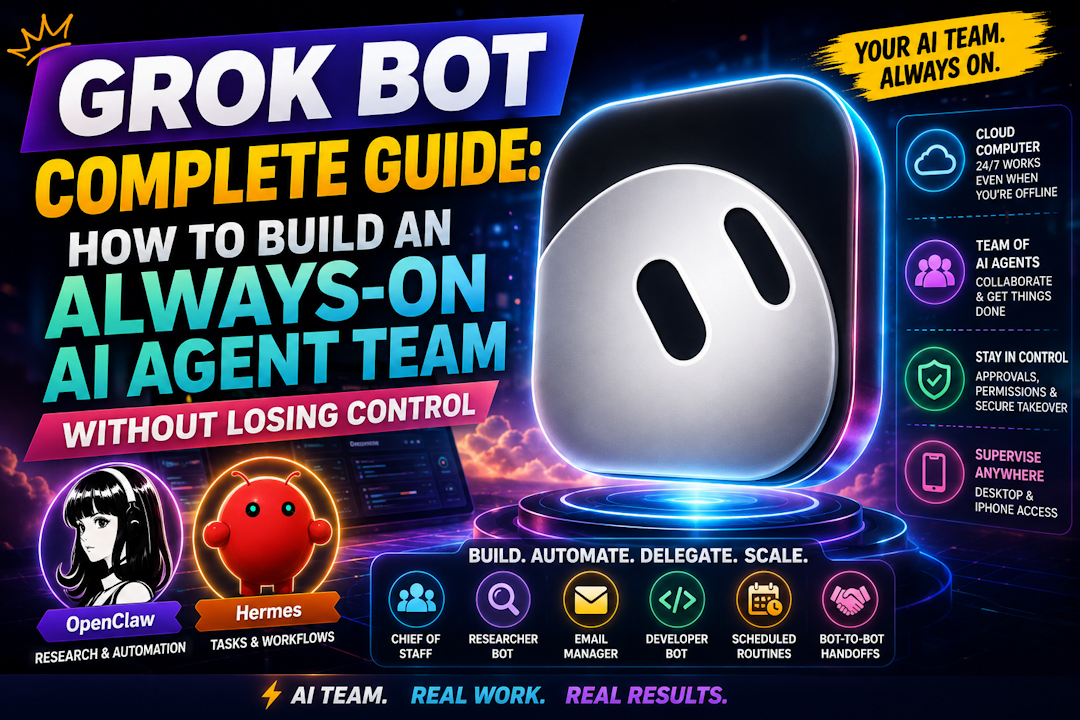
Grok Bot has been the latest sensation for last few weeks where everyone in the AI world couldn't get enough of it. So many creators, AI enthusiasts have been so fired up about it and I decided to give it a try a couple of weeks ago although I have been using OpenClaw and Hermes Agent for a while now. But who doesn't want to have an experience of the next sensational Agentic AI tool of 2026, right?
Well, I first watched a few Grok Bot demonstrations and found it to be very impressive and we will discuss some of this in this post. But if you ever wondered whether you can now build an entire AI team before lunch, I think you will be amazed to see how Grok Bot makes it happen for real.
The team of AI agents you can create and manage is just so easy and amazing to watch working for you that has gotten so many people so excited about it. A chief of staff coordinates a researcher, an email manager watches the inbox, a developer works in the cloud, and routines continue after your laptop closes. It looks like a company in a box.
But here is the question that matters: what are you trusting when you create that team?
Grok Bot makes advanced agent capabilities feel approachable. Behind the friendly teammate interface, however, sits a persistent cloud computer with files, authenticated browser sessions, credentials, permissions, and tools that can take real actions.
This Grok Bot complete guide explains what the product officially is, how its shared-computer architecture works, where practitioner workflows are useful, and how to adopt it without confusing convenience with security isolation.
In this fast changing AI world, Plans, access, connectors, triggers, notifications, and other early-product details can change quickly. So, before it does, let's talk about it.
What Grok Bot Actually Is
SpaceXAI introduced Grok Bot on August 11, 2026 as an early beta. Cursor documentation adds an important legal detail: the beta label communicates that this is an early product, but does not place Grok Bot under Cursor’s Beta Services terms.
According to the official Grok Bot overview, a Bot is a persistent, named AI agent with a job, its own conversation, role-specific context, and memory that develops over time.
A Bot can work with approved services, websites, files, a browser, a terminal, and a managed cloud computer. It can continue working in the background, collaborate with other Bots, and run scheduled or supported event-triggered routines.
The product combines several capabilities that otherwise require more assembly:
- Named roles with durable working context
- Managed cloud execution
- Connected services and computer use
- Bot-to-Bot handoffs and group conversations
- Reusable skills
- Scheduled and supported event-triggered routines
- Desktop and iPhone supervision
- Human approvals and secure takeover
Here is the thing: Grok Bot is not simply a chatbot with several names in a sidebar. It is an opinionated persistent multi-agent workspace.
Its value comes from packaging roles, cloud execution, connectors, handoffs, routines, mobile supervision, and approvals into one understandable experience.
Access, plans, and supported devices
Grok Bot authenticates through a Cursor account.
At the documentation cutoff used for this guide, official sources listed Cursor Pro+, Cursor Ultra, and self-serve Cursor Teams as access paths. Eligible individual SuperGrok Plus and SuperGrok Heavy accounts could also be linked as usage grants. Base Cursor Pro was not included in those cutoff documents, while enterprise access was rolling out.
That means the claim that Grok Bot requires Cursor Ultra is too narrow.
I am intentionally not publishing an exact price table. Eligibility, usage allowances, and prices are volatile. Check the current Cursor plans and billing page, then confirm what your actual account screen offers before making a decision. You can also check GrokAI's GrokBot page to see current pricing from subscribers of Grok platform as well/
The documented platforms at the research cutoff were:
| Platform | Documented status |
|---|---|
| macOS | Supported on Apple silicon and Intel |
| Windows | Supported on x64 and Arm64 |
| iPhone | Supported on iOS 18 or later |
| Linux desktop | Not supported |
| Android | Not supported |
| iPad | Not currently designed for it |
The managed cloud computer runs Linux, but there is no documented Linux desktop client. The same Bots and conversations synchronize across supported devices, and cloud work can continue when those devices are closed.
Why Grok Bot Feels Different
If you use Cursor, Codex, Claude Code, OpenClaw, or Hermes Agent, many individual ingredients will look familiar.
What feels different is the opinionated workflow.
You do not begin by choosing a model, reasoning level, execution framework, memory system, and orchestration library. Grok Bot gives you named teammates, shared tools, persistent cloud execution, and a built-in path from conversation to routine.
There is also no Grok Bot model picker for users or administrators. The product routes requests through a managed fixed model set with automatic failover. Analytics can expose which model served a request, but you do not choose that model yourself.
Think about it this way. A customizable workshop lets you arrange every machine and tool. Grok Bot gives you a furnished office. You can start sooner, but you accept the building’s operating model.
Its strongest experiential advantages are:
- Persistence: Bots retain role context and continue cloud work in the background.
- Delegation: One Bot can hand work to another and receive the result later.
- Coordination: Group chats, mentions, threads, and visible handoffs help assign ownership.
- Mobile supervision: An iPhone can start work, review results, approve or deny actions, and take over the shared computer.
- Operational reuse: A successful method can become a skill and later a routine.
Mobile does not offer complete desktop parity. Editing routine instructions and schedules, testing routines, inspecting run history, deleting routines, and resetting the computer require desktop. Push notifications were also still rolling out at the cutoff.
The Shared-Computer Architecture You Must Understand
One you have installed GrokBot on your computer, or phone, you may feel like every agents has its own terrminal, it's own little desktop and it does give that impression. However you need to understand. That's not true. Most people miss this: your Bots do not each receive an isolated virtual machine.
Each user or team member receives one dedicated managed Linux VM. All Bots belonging to that member share the same persistent computer.
They can have separate screens and perform work in parallel. Those screens are work surfaces, not separate computers and not security boundaries.
xAI designed this shared-environment model deliberately to make collaboration easier. Because they share the underlying computer, different bots can hand off tasks to one another, pass context, and work on the same projects without you having to re-authenticate or manually transfer files between them.
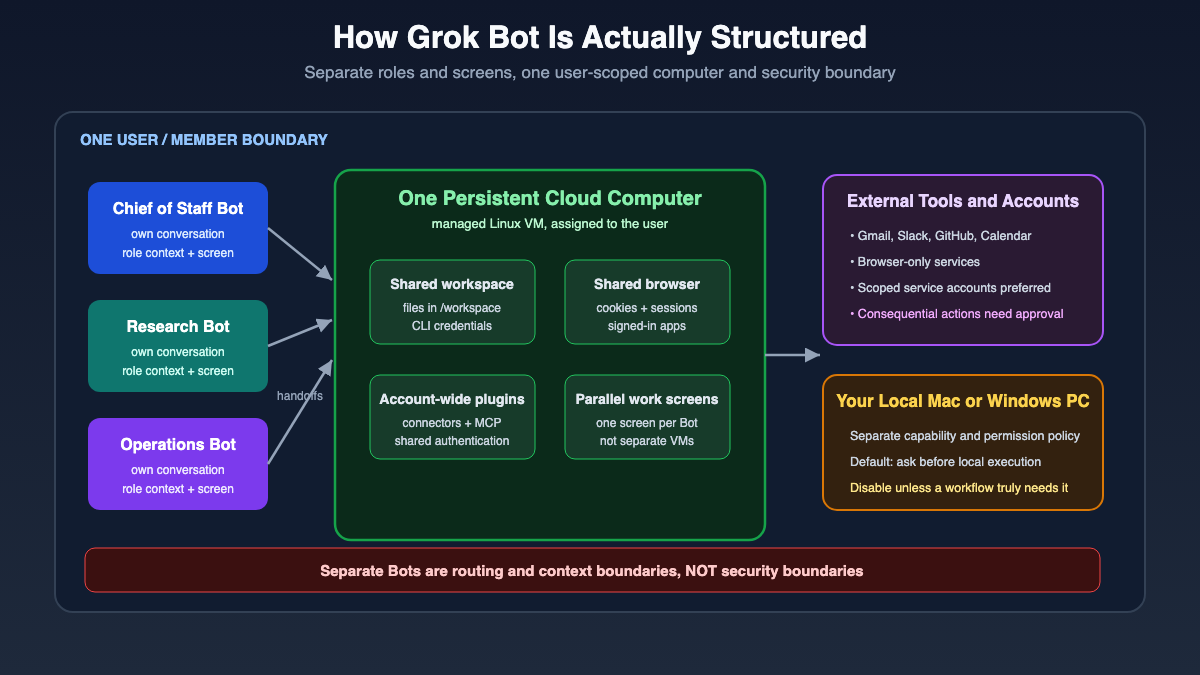
The correct mental model looks like this:
| Bot-specific context | Shared member-scoped environment |
|---|---|
| Name and role | Managed Linux VM |
| Conversation | Durable files and /workspace |
| Stable preferences | Browser cookies and sessions |
| Role memory | App logins |
| Separate screen | Command-line credentials |
| Current task context | Installed connectors and plugins |
| Role instructions | Applicable local-computer permissions |
One Bot can save research in /workspace, then another can continue from that artifact. This is useful for collaboration, but it also means the file is not isolated from the rest of that user’s Bot roster.
The same rule applies to authenticated browser sessions. If you take over the computer and sign in to a service, that session can persist and may be usable by other Bots on the shared VM.
Connectors shown as Plugins are generally installed account-wide. A private skill may be enabled for a specific Bot, but that does not make the underlying connector, login, files, or computer private to that Bot.
Let that sink in. Separate profiles, conversations, screens, and role memories are routing and context boundaries, not confidentiality boundaries.
The cloud VM is separate from the Mac or Windows computer in front of you. Local execution requires another permission decision and defaults to Ask every time. Official guidance recommends selecting Never allowed unless a workflow genuinely needs local files, commands, or transfers.
Cloud execution can reduce direct access to your laptop. It does not become inherently secure simply because it runs elsewhere. It creates a concentrated cloud environment containing shared sessions, files, credentials, and permissions.
If one Bot must never access a resource, do not place that resource on the member’s shared computer.
Design the Smallest Useful Bot Roster
The teammate metaphor makes it tempting to create a large organization chart immediately. Resist that urge.
As of August 25th, 2026 – Grok Bot allows up to 50 Bots and group chats combined, but that is a product limit, not an onboarding goal. More Bots introduce overlapping responsibility, extra handoffs, and more places for outdated context to accumulate. Here is how to get started once you have installed and conencted to Grok Bot on your machine.
Start with one useful specialist.
Add another only when you discover a stable responsibility with distinct inputs, tools, outputs, or review requirements.
A good Bot description should answer six questions:
- What job does this Bot own?
- Which sources may it use?
- What output should it produce?
- What evidence must accompany the result?
- Which actions require approval?
- When should it stop and ask a human?
For example:
Monitor the five projects listed in the approved tracker. Check only the linked project channels and issue boards. Report material changes with source links and timestamps. Do not message anyone, edit tickets, or add projects without approval. If a source is unavailable, report the failure instead of guessing.
That is a working contract. “Be my brilliant operations manager” is not.
Add a chief of staff after specialists become stable
Practitioners have demonstrated a chief-of-staff pattern where one coordinating Bot becomes the main interface, delegates to specialists, and summarizes their work.
That pattern makes sense after stable specialist roles exist.
Use a chief-of-staff Bot when:
- Several proven workflows frequently need coordination
- Specialists have clearly different sources or outputs
- Each stage has one accountable owner
- A final reviewer must reconcile evidence or priorities
Do not create a chief simply because the title sounds impressive. If you have only one vague workflow, a coordinator adds another layer without adding clarity.
Keep durable project facts in organized shared files, role preferences in Bot descriptions or memory, and current facts in authoritative source systems. Yesterday’s summary should not quietly become today’s truth.
The best part of Gork Bot is the easy installation, and the time saved in choosing and connecting LLM models and other configurational settings we usually need to do to work with Hermes and OpenClaw like platforms. Grok Bot is just install, sign in with your Cursor or GrokAI's account subscription and done!
A Safe First Setup in About 30 Minutes
The good news is that you do not need to connect your entire business on day one.
Here is a safer first session.
1. Confirm account ownership and privacy settings
Sign in with the Cursor account that should own usage. If you link an eligible individual SuperGrok account, confirm the destination carefully because the documented link cannot be transferred later.
Review Cursor privacy settings before adding data. Grok Bot requires cloud data storage and does not support Privacy Mode (Legacy). Training opt-out depends on the applicable Cursor account or team settings.
2. Choose one read-and-prepare task
Select a real task with low consequence, such as:
- Summarizing updates from a defined source list
- Preparing a weekly bookmark digest
- Reconciling receipts and flagging exceptions
- Researching an email sender and drafting a reply
- Reproducing a bug in staging and collecting evidence
3. Write the role contract first
Define the job, sources, expected output, evidence, approval boundaries, and failure behavior before connecting tools.
Include a no-data rule such as:
If no material change is found, return “No material change” and list the sources checked.
This prevents a Bot from feeling pressure to invent something interesting.
4. Connect the minimum account
Prefer a structured connector over browser clicking when an approved connector exists. Give it only the service and permission needed for the test.
A dedicated scoped identity is better than an owner’s administrator account. Invite that identity as an ordinary team member whenever the service permits it.
Remember that installed plugins are account-wide. Naming one Bot “Email Assistant” does not isolate the email connector from other Bots on your account.
Also distinguish a service plugin from an event-trigger integration. Official documentation confirms examples such as Slack messages and GitHub notifications, but the trigger connection can require a separate setup flow.
5. Configure approvals
Use explicit approval boundaries for:
- External messages and invitations
- Publishing
- Purchases or transfers
- Deletion or overwrite
- Permission changes
- Production changes
- Acceptance of legal terms
The official approvals, security, and privacy guide explains that where Auto Review enforcement is available, Require Approval takes precedence over Always Allow.
Always Allow permits an action only if automated review finds no other reason to stop. Auto Review is model-based, so it complements least privilege rather than replacing it.
Set local-computer execution to Never unless the workflow has a documented local requirement.
6. Run the task and inspect evidence
Ask for source links, timestamps, files changed, unresolved uncertainties, and a concise result.
If computer use occurred, inspect the work. Remember that “Stop now” stops future actions but does not reverse actions already completed.
Correct the process before automating it. That’s it.
Move From Task to Skill, Routine, and Earned Autonomy
A routine should be the result of a proven workflow, not the starting point for an exciting idea.
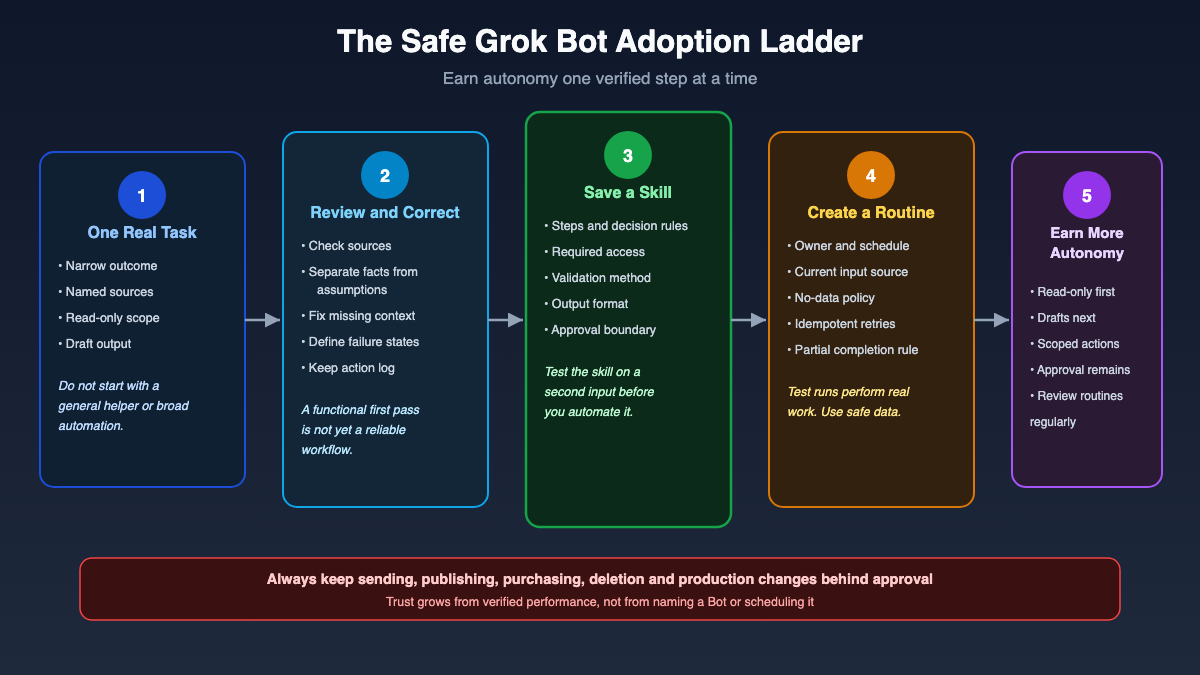
Use this adoption sequence:
- Run one safe read-and-prepare task.
- Review the evidence and correct the method.
- Save the proven method as a skill.
- Test that skill with a different input.
- Create a routine, then expand autonomy only after reliable results.
A skill stores reusable task guidance, including steps, decision rules, validation, output expectations, and safety boundaries.
A routine assigns a workflow to one Bot and determines when it runs.
According to the official skills, routines, and automations guide, routines can use schedules and supported event triggers. Official examples include Slack messages and GitHub notifications. The documentation used here did not provide a complete, timeless trigger catalogue, so verify the live interface.
Teach-by-demonstration needs review too
When Teach a task is available, you can demonstrate visible browser interaction from a one-to-one Bot conversation.
The recording can last up to ten minutes, does not capture microphone audio, and produces a draft skill for review. Availability may vary during rollout.
One demonstration rarely communicates every exception, decision rule, retry condition, or approval boundary. Edit the draft and test it with safe data before relying on it.
Routine limits and test-run risk
At the research cutoff:
- One Bot could own up to 50 routines
- Each routine retained its 20 most recent run records
- Hiding a Bot did not pause its routines
- Deleting a routine was immediate and had no undo
- Deleting a Bot removed routines owned by that Bot
- A routine test run performed real work
A test may navigate a website, modify a file, or call a connected service. Use safe inputs and keep consequential writes behind approval.
Before scheduling anything, ask:
| Readiness question | Acceptable answer |
|---|---|
| Does it use current data? | Yes, from named sources with timestamps |
| What happens when nothing changes? | A defined no-data response |
| What happens when a source fails? | An explicit failure without guessing |
| Can a retry duplicate an action? | No, or duplication is safely detected |
| Are writes reversible? | Yes, or held for approval |
| Was a different input tested? | Yes |
| Is there an owner and activity record? | Yes |
| Are external actions approved? | Yes |
Practitioner Workflows Worth Testing
The following patterns came from practitioner demonstrations, not official templates or performance guarantees. I have included them because the operating ideas are useful when paired with official security guidance.
Focused visual extraction from the supplied YouTube material failed because of delivery errors and HTTP 403 responses. I did not use video frames as visual evidence. Product claims in this guide rely on official text documentation.
Monitor a situation, not the whole world
A useful monitoring Bot maintains a short list of active situations, checks approved systems, and reports only meaningful changes.
Give it:
- A bounded watch list
- Exact approved sources
- A sensible cadence
- A definition of material change
- A requirement for links and timestamps
- A rule that only a human changes the watch list
“Watch everything and keep me informed” is not a useful instruction. It creates noise and encourages unsupported interpretation.
Prepare email drafts, then let a human send
A safer email workflow can classify a message, research the sender from approved sources, prepare a response in your preferred style, and save a draft.
The human reviews and sends it.
External communication affects reputation, privacy, legal exposure, and commercial commitments. Autonomous sending should not be the default merely because it is technically possible.
Email and web content can also contain hostile instructions. My guide to prompt injection and practical defenses explains why apparently ordinary content must be treated as untrusted input.
Give the agent a scoped identity
A practitioner pattern worth keeping is a dedicated agent identity rather than the owner’s login.
For example, create an ordinary service account or invite an agent-specific account as a team member. Grant only the permissions required for its job.
This makes access easier to review and revoke. It also limits damage if the workflow behaves incorrectly.
Require development evidence
A development workflow should use a branch or staging environment, run tests, and return evidence for review.
A useful result includes:
- The branch or pull request
- Test output
- Screenshots where relevant
- Files changed
- Known limitations
- Any failed checks
Keep merges, deployments, production changes, and secret access behind approval.
This is where spec-driven development becomes valuable. A written specification gives the coding agent and reviewer the same definition of done.
For risky code execution, review my guide to sandboxing untrusted code. A separate Bot screen is not proof of an isolated code sandbox.
Use a researcher and reviewer loop
One Bot can gather evidence while another checks relevance, source quality, missing counterevidence, and drift from the original question.
This pattern separates production from review. Give each stage one owner, and require the reviewer to reject unsupported claims instead of merely improving the wording.
For document work, preserve the user’s primary draft. Append evidence or a clearly separated research section instead of rewriting the original without permission.
Log activity outside chat
A practitioner demonstrated recording delegated tasks in an external project system. That was a custom workflow, not a native Grok Bot audit log.
For important tasks, record:
- Owner and status
- Start and completion time
- Source evidence
- Files or records changed
- Approval received
- Final result
- Failure and retry status
This is particularly useful because the documented enterprise action-audit view was not yet current.
Combine Grok Bot and Hermes carefully
A practitioner used Grok Bot as a cloud coordinator while a separate Hermes deployment handled flexible or repetitive work.
That is a custom architecture, not an officially supported Grok Bot integration or cost guarantee. Still, the pattern is sensible when responsibilities are explicit and credentials are not passed casually between systems.
Security, Privacy, and Enterprise Reality
Approvals and policies help, but governance remains your responsibility.
Credentials and secure human takeover
Use human takeover for passwords, passkeys, two-factor codes, CAPTCHAs, payments, and identity checks. Never paste secrets into ordinary chat.
Supported secure secret requests mask the value, exclude it from the transcript, and keep it from the model. This is useful, but it is not a general-purpose password manager.
After authentication, the browser session may remain active on the shared computer. Plan around the session, not merely around how the password was entered.
Grok Bot also cannot use every website reliably. Sites may block automation, flag datacenter IP addresses, expire sessions, or require human identity checks. It does not bypass CAPTCHAs or access controls.
Privacy and deletion require deliberate handling
Grok Bot requires cloud data storage. Privacy Mode (Legacy) is unsupported, and training opt-out depends on Cursor account or team settings.
Deleting a Bot removes its active profile, conversation, and owned routines, but may not remove files or browser sessions from the shared member computer.
A proper offboarding sequence should include:
- Pause or delete routines.
- Sign out of websites.
- Uninstall connectors where appropriate.
- Revoke authorization in source systems.
- Remove sensitive files from
/workspace. - Hide or delete the Bot.
- Verify that access has actually ended.
Deleting the visible teammate is not the same as deleting every artifact it touched.
Current team and enterprise controls
The official teams and enterprise guide documents integration with existing Cursor controls, including:
- Cursor account authentication and SSO
- Team privacy settings
- Team rules scoped to Cursor, Grok Bot, or both
- Applicable Auto Review instructions
- MCP configuration and policy
- Static egress IP addresses for member VMs
There are no separate Grok Bot plugin controls. Existing Cursor MCP policy can govern allowed servers, member-added servers, and network allowlists. MCP authentication is shared across Cursor and Grok Bot.
Important gaps remained at the research cutoff:
| Control area | Documented status |
|---|---|
| Bot action audit view | Coming, not current |
| Grok Bot-specific spend cap | Not available |
| Account-level on-demand control | Available and applicable |
| User or admin model picker | Not available |
| Model routing | Product-managed with automatic failover |
| Team-level local execution ceiling | Described as coming |
| Push notifications | Rolling out |
| Enterprise access | Rolling out |
Organizations with contractual subprocessor restrictions should consult their Cursor account team because administrators cannot choose or constrain the serving model through a model picker.
Organization administrators can inspect and remove member computers. However, killing a VM removes the running computer while preserving durable storage. The next session can create a fresh computer. That action is not a complete data-deletion procedure.
Grok Bot Myths That Need Correction
Creator demonstrations are useful for discovering workflows. Official documentation must control architecture and security claims.
| Myth | What the evidence supports |
|---|---|
| Every Bot receives its own VM | False. One member receives one managed Linux VM shared by all their Bots. |
| Separate Bot screens isolate credentials | False. Screens support parallel work, not security isolation. |
| Cursor Ultra is the only access route | Too narrow at the cutoff. Verify current eligible plans live. |
| Cloud execution is inherently secure | False. It changes the boundary and concentrates shared assets. |
| Each Bot has private plugins | Misleading. Installed connectors are account-wide. |
| Autonomous email sending is a safe default | False. Draft-first with human approval is safer. |
| Every website works reliably | False. Blocks, expired sessions, CAPTCHAs, and identity checks exist. |
| Users can select Grok Bot’s serving model | False. No user or administrator model picker is documented. |
| Every trigger shown in a demonstration is currently supported | Unverified. Check the live trigger interface. |
I have also excluded creator claims about large deals, labor savings, payback periods, and productivity multipliers. Those anecdotes were not independently verified and are not reliable ROI evidence.
Grok Bot vs Hermes Agent vs Cursor Coding Agents
These tools overlap, but they package control differently.
| Dimension | Grok Bot | Hermes Agent | Cursor coding agents |
|---|---|---|---|
| Primary experience | Persistent named Bot team | Customizable agent environment | Focused software delegation |
| Execution | Managed shared cloud computer | Local, remote, and custom setups | Managed coding workflow |
| Model control | Product-managed, no picker | Flexible providers and local models | Product-specific choices and routing |
| Mobile supervision | Built around iPhone continuity | Depends on deployment | Not the same teammate-style workflow |
| Automation | Built-in routines and supported triggers | Custom orchestration and scheduling | Primarily development-oriented |
| Custom tooling | Opinionated plugins and skills | Deeply extensible | Strong within coding workflows |
| Strong use case | Cloud coordination and review | Local work, custom tools, flexible models | Branch, code, test, and pull request tasks |
Grok Bot is attractive when you want a low-friction persistent coordinator with mobile supervision.
Hermes Agent is attractive when you need model flexibility, local execution, custom providers, specialized tools, or deeper control. My Hermes Agent setup guide explains that path.
Cursor coding agents are a natural fit for focused software work where branches, tests, and pull requests matter more than a named multi-role team.
OpenClaw offers another interpretation of an AI system that performs work rather than merely answering questions. You can compare that operating idea in my article about OpenClaw as an AI employee.
In my experience, in this fast changing AI world, tool loyalty is not a strategy. Choose the operating boundary that fits the task, and combine tools only when ownership, data flow, credentials, and review responsibilities remain clear.
Who Should Use Grok Bot Now
Grok Bot is worth a narrow evaluation if you:
- Have a recurring read-and-prepare workflow
- Can define exact sources and outputs
- Want cloud work to continue while devices are closed
- Need desktop and iPhone continuity
- Prefer a named-team interface over model selection
- Can use scoped accounts and human approval
- Are prepared to supervise an early product
You should wait, or keep the pilot very narrow, if you:
- Require hard isolation between agent roles
- Need Linux desktop, Android, or iPad support
- Require a complete current action-audit view
- Must lock the system to an administrator-selected model
- Need a Grok Bot-specific spend cap
- Cannot permit the required cloud data storage
- Depend heavily on websites that block datacenter automation
- Want unattended payments, production changes, legal actions, or external communication
The question is not simply whether Grok Bot is capable. The question is whether its architecture and controls match your risk.
The Practical Takeaway
Grok Bot’s most important contribution is that it offers a coherent interface for persistent agents: named roles, shared tools, cloud execution, handoffs, routines, mobile supervision, and approvals.
That coherence is valuable, but it can hide concentrated risk.
Start with the smallest useful roster. Treat Bot descriptions as contracts. Prefer structured connectors over fragile browser clicking. Keep current facts in source systems. Ask for evidence. Prove a skill before scheduling a routine. Keep sending, publishing, purchasing, deletion, permission changes, and production work behind approval.
Use scoped identities instead of owner credentials. Leave local execution disabled unless you have a specific requirement.
Most importantly, remember the architecture: one persistent member-scoped Linux VM shared by all of that member’s Bots. Distinct roles and conversations organize work. They do not isolate files, sessions, credentials, plugins, or permissions.
Official Documentation and Resources
Product details can change after this guide’s August 22, 2026 research cutoff. Review these official sources and your live account screen before rollout:
- Grok Bot official overview
- Computer and apps architecture
- Approvals, security, and privacy
- Skills, routines, and automations
- Teams and enterprise controls
- Current Cursor plans and access information
Your Turn To Share
What is one recurring task you would trust Grok Bot to prepare today, and which action would you still insist on approving yourself?