

I have been fascinated by the improvements Databricks keeps making in their Genie offering and I have a habit of sharing what I practice. So, this post is dedicated to Genie AI and different features within it. So, let's get into it.
Speaking of Genie, Databricks has put the Genie name on three experiences, and the similar names can create real architecture mistakes. Here is the short version of Databricks Genie One vs Genie Code:
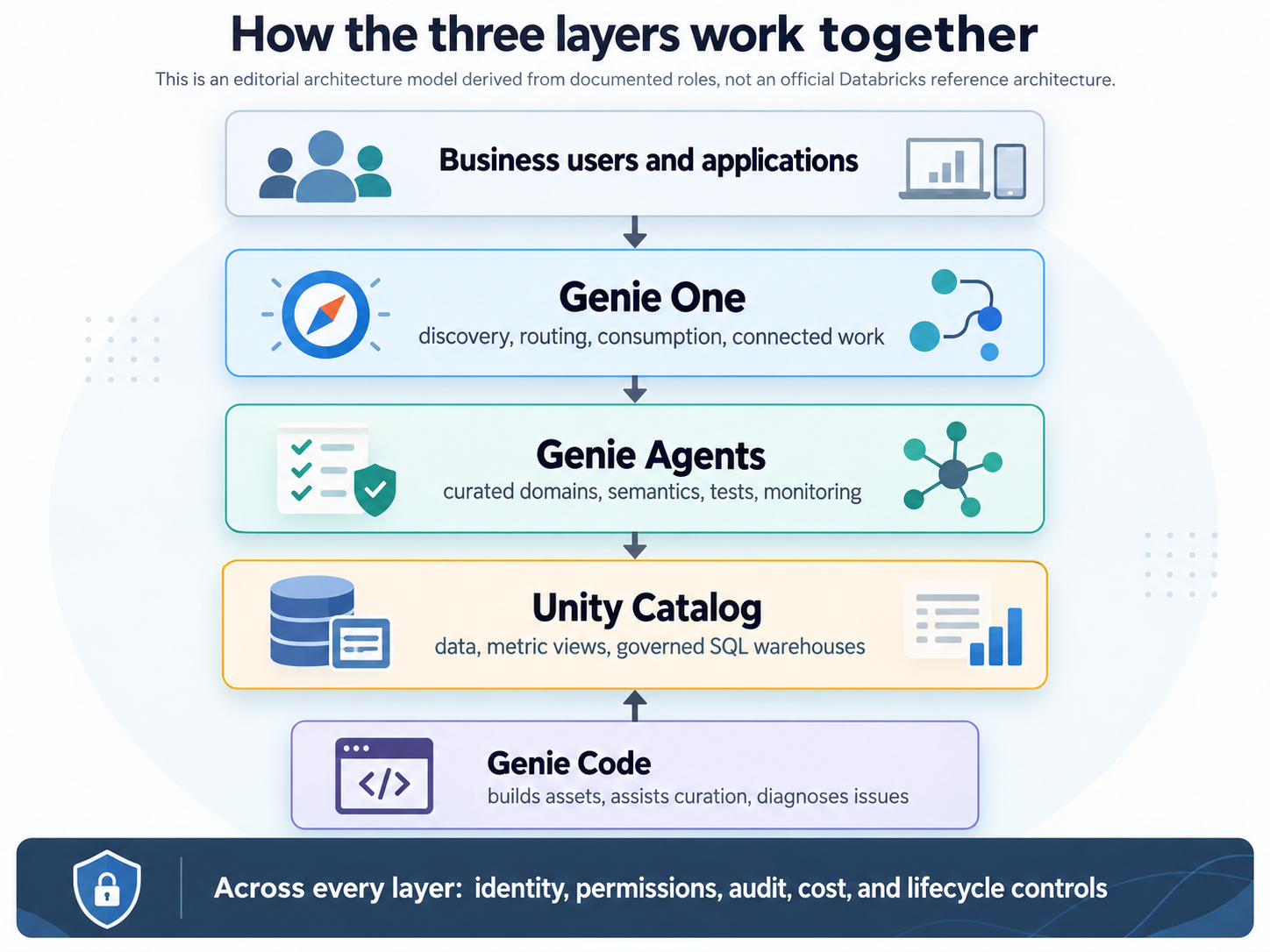
Genie One is the business-user entry point, Genie Code is the technical builder and operator assistant, and Genie Agents are curated domain environments for repeatable data questions. They are complementary, not interchangeable.
That distinction determines who changes assets, curates meaning, executes work, and owns monitoring.
Databricks Renamed Them – However, The Boundaries Matter
- Genie One was previously Databricks One. Databricks renamed it to Genie on April 27, 2026, then to Genie One on June 9, 2026. The release notes describe both as name-only changes. The retained /one route is for compatibility.
- Genie Agents are the current name for what Databricks formerly called Genie Spaces. API paths and identifiers can still say spaces, space_id, or serialized_space. Preserve those literal identifiers in code. The Genie Agents overview is the current product definition.
- Genie Code is the current name for Databricks Assistant. Databricks announced the rename and expanded agentic workflows on March 11, 2026. The current Genie Code overview should replace older Assistant guidance when behavior differs.
Shared branding does not create one permission, maturity, cost, or operating model. As a Data Architect, I prefer to use the full product name in architecture decisions.
Databricks Genie One vs Genie Code in one minute
The official Genie family overview separates the experiences by audience and job. This table turns that distinction into an enterprise decision map.
| Dimension | Genie One | Genie Agents | Genie Code |
| Primary persona | Business users, managers, executives, and data consumers | Data and domain teams curate; business users or applications consume | Data engineers, analysts, data scientists, BI developers, ML engineers, and technical operators |
| Primary job | Discover governed assets, ask questions, view dashboards, run Apps, and use connected tools | Package domain semantics, instructions, examples, tests, and monitoring into a reusable analytical service | Discover data, generate and run code, edit technical assets, debug failures, and perform multi-step technical work |
| Typical surface | Account or workspace consumer UI, plus supported mobile, desktop, Slack, and MCP channels | Authoring and management UI, direct conversation, embedding, REST APIs, or use as a specialist in another agent system | Full-page command center and side pane in notebooks, SQL, pipelines, dashboards, MLflow, jobs, and serving surfaces |
| Source behavior | Dynamic routing across assets the user may access | Attached sources guide grounding and curation, but are not the authorization boundary | Dynamic technical context plus referenced files, assets, instructions, skills, and approved tools |
| Mutation boundary | Native data questions are read-only; connected tools can add writes | Native analytical SQL is read-only; management operations change agent configuration | Can edit and execute code and change workspace or external state within the user's permissions |
| Quality control | Source citations, asset governance, and operational review | Benchmarks, SQL inspection, feedback, review queues, audit events, and curator updates | Diffs, approvals, tests, source control, job history, and normal software delivery controls |
| Best fit | One governed front door for broad employee consumption | Repeated domain questions where definitions and testable quality matter | Technical creation, repair, investigation, and operation |
A useful rule is:
Use Genie One to consume and route. Use Genie Agents to package a trusted domain experience. Use Genie Code to build, change, and operate technical assets.
All three can support one workflow.
What Each Experience Does
Genie One is the business-user front door
Genie One is a simplified experience for users who should not need to navigate notebooks, models, queries, or compute configuration. Consumers can browse permitted dashboards, Genie Agents, Apps, tables, and other shared assets across supported workspace or account surfaces. But in my experience, you can think of Genie One as the main interface that can allow you to work with the other two. You can work with Genie One to create Genie Agents or invoke Genie code to create notebooks and so on.
The Genie One chat documentation says chat first looks for a relevant Genie Agent. If none matches, it searches permitted dashboards, queries, metric views, and other assets. Genie One is the doorway; an agent can be the specialist behind it.
Use Genie One when a business user needs one place to discover governed experiences, ask without choosing tables, open a dashboard or App, or reach a domain agent. Do not use it to repair pipelines or refactor production SQL.
Genie Agents are owned domain experiences
A Genie Agent is a curated, domain-specific analytical environment. Its curator selects sources and defines terms, joins, measures, examples, functions, instructions, and tests.
The attached sources guide grounding and configuration, but architects must not treat that list alone as an authorization boundary. The current Genie Agent setup documentation explains that Genie may query other tables the user is permitted to access when a prompt asks for a join, a user edits SQL, or instructions or metadata reference those tables. September release notes also describe a staged change under which agents use only attached sources. Because documentation and rollout state can differ, use Unity Catalog least privilege, governed views, and persona tests whenever data must remain in a strict scope. Attachment is a curation control; authorization still comes from the acting identity's permissions.
A Genie Agent suits recurring questions where semantic consistency or an API boundary matters. Its native query path is read-only, but a wrong join or stale definition can still produce a convincing wrong KPI. This is why production AI agents need evaluation and observability.
Genie Code is the technical builder and operator
Genie Code works across Databricks technical surfaces. It can discover data, plan tasks, generate and run SQL or Python, edit notebooks and files, build pipelines and dashboards, inspect outputs, and diagnose errors.
During Genie Agent setup, Genie Code can inspect data, suggest descriptions and examples, identify candidate tables, and build context for review. It can later inspect a poor answer or benchmark run and propose changes through the monitoring workflow. That is a builder-curator relationship, not autonomous publication.
Genie Code has the largest mutation surface. Unity Catalog and workspace permissions remain the authorization boundary. Databricks warns that generated code can be wrong and that auto-approve is not a security boundary in Genie Code Agent mode.
Use it when the outcome is code, a notebook, pipeline, job, dashboard, technical diagnosis, or an improved Genie Agent configuration. It is optimized for Databricks data and AI work, not general-purpose software development.
The Agent Mode Naming Collision
Two different features use the words Agent mode.
- Genie Agent's Agent mode is an analytical interaction mode. It creates a plan, runs multiple read-only queries, tests hypotheses, and returns a cited report. Chat mode is better for a focused question-to-SQL path.
- Genie Code's Agent mode is the technical execution model. It plans, retrieves assets, edits files or platform objects, runs code, inspects results, and can use tools with configured approval behavior.
How the Three Layers of Databrick's Genie Work Together
Context, Data, and Control Flow
Genie One searches relevant agents and governed assets. A Genie Agent prioritizes attached sources, metadata, examples, business rules, instructions, and conversation history, subject to the source-boundary caveat above. Genie Code receives technical context from the active surface, referenced assets, Unity Catalog metadata, instruction files, attached files, skills, and approved MCP tools.
Genie Ontology, currently Public Preview, is broader than one agent's local curation. It combines modeled context such as metric views and domains with inferred snippets from governed assets and usage. Snippets have authority signals and remain permission-gated.
For native questions, Genie One and Genie Agents generate read-only SQL. Genie One workspace chat requires SQL warehouse access and defaults to Auto compute. A standalone Agent uses a configured pro or serverless warehouse. Its latest author supplies the compute credential while Unity Catalog evaluates data as the end user, creating an ownership dependency.
Genie Code runs through selected or permitted compute. It can change technical state, but only within the acting user's grants and tool approvals. Interface access, data access, compute access, and action approval are separate controls. Do not collapse them into one “Genie enabled” checkbox.
How to enable and use Genie One
This is the workspace-member path. Account-only access is a separate Beta path with additional limits.
- Confirm eligibility. Consumer entitlements require Premium or above. Check region, Geo, and compliance-profile support for every feature you plan to use.
- Assign least privilege. Consumer access is the normal business-user starting point. The entitlements guide defines the boundary.
- Share actual assets and data. Grant only the needed dashboards, Apps, Agents, tables, metric views, and underlying Unity Catalog objects.
- Provide query compute. Workspace chat requires CAN USE on at least one SQL warehouse and defaults to Auto compute.
- Test discovery, then chat. Open a shared asset, ask a known question, inspect the selected source or agent, and compare with approved ground truth.
- Test restricted personas. Include users affected by row filters or column masks and verify that results remain permission-appropriate.
- Enable optional channels separately. Memory, web search, mobile, desktop, Slack, connectors, and account-only access have their own requirements and statuses.
- Watch routing quality. Databricks warns in the chat documentation that routing accuracy can decline when a workspace has many Genie Agents.
How to Create a Concise Genie Agent Workflow
- Choose one domain, audience, owner, and supported decision set.
- Confirm Unity Catalog grants, metric definitions, filters, masks, and a pro or serverless warehouse.
- Attach a small, deliberate source set. The live setup page listed up to 50 tables, views, or metric views, while another best-practices page still referred to 30. Design well below either ceiling and enforce strict access through Unity Catalog, not attachment alone.
- Let Genie Code suggest candidates and examples, then require domain and SQL review.
- Put reusable semantics in metric views or governed data products where possible.
- Add benchmarks for happy paths, paraphrases, joins, time logic, ambiguity, permissions, and out-of-scope questions.
- Pilot, inspect SQL and feedback, and classify failures as data, semantic, permission, or agent behavior.
- Assign monitoring, benchmark, warehouse-credential, cost, and deprecation ownership before broad exposure.
Curate a domain product. Do not attach every table and hope.
How to Enable and Use Genie Code
- Confirm availability and model settings. Genie Code is a Designated Service. Agentic capabilities generally require partner-powered AI, supported region and Geo configuration, and compatible compliance settings. The partner-powered AI guide documented an administrative setting transition for November 1, 2026, so record the actual workspace state.
- Set least privilege and compute. Grant only the data, assets, compute, and external tools needed for the task.
- Choose the surface. Use the full-page command center for new or multi-task work. Use the side pane beside an existing notebook, query, pipeline, dashboard, experiment, or endpoint.
- Attach precise context. Use @ for assets, / for focused actions, and + for files or connections. State the output, constraints, and whether execution is allowed.
- Review plans and actions. Use ask-first approvals in sensitive environments. Inspect code, diffs, selected sources, and intended tool calls.
- Promote normally. Test in development, commit changes, review pull requests, and deploy through established CI/CD.
- Govern unattended work. Scheduled Genie Code tasks were GA, while the Lakeflow Jobs task was Beta at the research cutoff. Both use auto-approve, so restrict permissions, prompts, environments, and budgets.
Governance, Privacy, Monitoring, and Cost
Permissions and blast radius
Unity Catalog permissions govern data sent to assistive models, but each layer adds controls.
- Genie One: An entitlement grants the experience, not unrestricted data. Asset permissions and Unity Catalog grants still apply. Per-user OAuth connectors can add write actions.
- Genie Agents: Users need agent and data permissions. Row filters and masks evaluate for the end user, while management rights change configuration and sharing. Attached sources improve relevance but do not replace least privilege.
- Genie Code: User permissions and tool approvals bound execution. Auto-approve can permit destructive actions that match the request, so environment separation remains essential.
Treat this as an enterprise AI tool strategy and access-governance problem, not merely a feature-enablement task.
Privacy and model data
The Databricks AI trust documentation says assistive features can send prompts, code, metadata, samples, outputs, errors, instructions, and examples to models. Databricks states that model partners use zero-data-retention endpoints and do not use submitted data to train foundation models offered to third parties.
Those statements do not cover every MCP server, web provider, SaaS connector, or custom app. Review each destination, OAuth scope, retention, Geo path, compliance profile, and contract. The trust documentation says Agent managers can see prompt text from private conversations, so keep unnecessary secrets out of prompts.
Monitoring and quality
Databricks documents separate operational surfaces: Genie Agent Monitor, aibiGenie and genieChat audit events, Unity Gateway records for connected tools, and Genie Code adoption and engagement telemetry. Feedback does not automatically retrain or update an Agent; a curator must make and test a change.
These records show activity, not artifact correctness. Correlate benchmarks, SQL and query history, lineage, asset revisions, job runs, repositories, Gateway records, billing, and incidents. The wider discipline of monitoring AI systems in production still applies because no single built-in dashboard proves answer or code quality.
Compute and cost boundaries
As of September 26, 2026, the Genie cost documentation said human usage of Genie One and Genie Agents was free through January 31, 2027, while service-principal usage was billed. Genie Code had a 150-DBU monthly per-user LLM allowance. The Genie pricing page equated 150 DBUs to $10.50 in US East, with regional variation.
Do not translate that into “Genie is free.” Compute, pipelines, jobs, model serving, and external tools can be billed separately. Genie budgets support alerts and approximate blocking, but enforcement can lag and is not an absolute cap. system.billing.usage remains the billable usage record.
APIs, MCP, and Integration Boundaries
Genie Agents are the strongest application service boundary
The Genie Agents API guide documents stateful Conversation APIs and management APIs for CI/CD; current references also cover Agent mode streaming. Legacy paths can retain /spaces/{space_id}.
Prefer user-to-machine or on-behalf-of-user identity when results must honor end-user permissions. Use a dedicated least-privilege service principal only when unattended operation is necessary and its grants are the intended boundary. Add retries, timeouts, polling, cancellation, and correlation IDs around asynchronous calls.
Genie One exposes managed channels and MCP
Genie One connectors use per-user OAuth for systems such as Google Workspace, Microsoft 365, Atlassian, Glean, Slack, and GitHub. Read and write capabilities vary by connector, and authentication expiry is an operational dependency.
For external assistants and MCP clients, the documented target at the research cutoff was the Unity Gateway service system.ai.genie_one_mcp. The Genie One MCP documentation identified the older Beta /api/2.0/mcp/genie endpoint as deprecated with an October 31, 2026 sunset. MCP results are asynchronous and can be truncated, so clients must poll correctly and request full query results when needed. Reconfirm the live page because staged documentation briefly exposed conflicting Beta and GA text.
Genie Code consumes tools but is not a general runtime API
Admins can make approved MCP servers available to Genie Code, and users can select permitted tools. This expands both technical reach and external action risk.
The Genie Code overview does not present it as a general external application runtime comparable to Genie Agent APIs. For automation, use native jobs, bundles, platform APIs, scheduled tasks where appropriate, or a purpose-built Agent or custom service. A successful demo is not enough; evaluate an enterprise AI platform beyond the demo by checking identity, failure handling, observability, cost, and lifecycle ownership.
A Decision Tree You Can Use For Tool Selection
- Is the primary user a business consumer who needs one simple entry point? Start with Genie One.
- Do recurring questions require owned definitions, selected sources, and reusable tests? Add a Genie Agent, but enforce data scope with Unity Catalog rather than assuming attached sources create a hard wall.
- Does another application need the analytical capability? Use a Genie Agent API or supported embedding pattern.
- Does the task create, modify, execute, debug, or operate technical artifacts? Use Genie Code with controls matched to the blast radius.
- Does the user need both broad discovery and reliable domain answers? Use Genie One with a small catalog of certified Agents.
- Does the workflow need custom routing across structured data, documents, and transactional agents? Use a custom multi-agent architecture with a Genie Agent as one specialist.
Five realistic enterprise scenarios
1. A sales leader investigates pipeline coverage
Use Genie One as the front door and route questions to a certified Sales Genie Agent. Chat mode answers direct KPIs; Agent mode handles a multi-step “why.” Genie Code maintains metric views and helps repair benchmark failures.
2. A data engineer builds a medallion pipeline
Use Genie Code to build and test Bronze, Silver, and Gold transformations and diagnose failures. Publish stable governed views into a Genie Agent, then expose it through Genie One.
3. A customer portal needs self-service analytics
Use a narrow Genie Agent behind an API or iframe, with row filters, masks, user-aware identity, retries, timeouts, and monitoring. Genie One is not the portal backend, and customers should not receive Genie Code.
4. Executives want a recurring morning briefing
Use Genie One scheduled tasks, domain agents, and per-user connectors. Review write scopes and prepare for OAuth expiry. Use Genie Code to maintain the governed data product behind the briefing.
5. Operations investigates pipeline failures
Use Genie Code with conservative approvals, development isolation, scoped connections, and pull-request review. An Operations Genie Agent can expose SLA metrics through Genie One, but it cannot repair the pipeline.
What Not to Assume
- “Genie One is Genie Spaces renamed.” Genie Spaces became Genie Agents.
- “Genie Code is only autocomplete.” It performs multi-step Databricks engineering work.
- “A Genie Agent is any autonomous Databricks agent.” It is a specific curated analytical product.
- “Attached Agent sources are a permission boundary.” Treat attachments as grounding and configuration; enforce access through identity and Unity Catalog.
- “Agent mode means the same thing everywhere.” Genie Agent Agent mode is analytical; Genie Code Agent mode can change technical state.
- “Consumer access grants all company data.” It grants entry to the consumer surface, while asset and data permissions remain separate.
- “GA at product level makes every feature GA.” Clients, connectors, file reasoning, Ontology, web search, and job integration have separate statuses.
Frequently asked questions
What is the difference between Genie One and Genie Code?
Genie One serves business discovery and questions. Genie Code generates and executes code, edits assets, and performs technical work.
Where do Genie Agents fit?
A Genie Agent packages domain semantics, grounding, tests, and monitoring. Genie One can route to it, while Genie Code helps improve it. Attachments do not replace Unity Catalog least privilege.
Is Genie One the same as Databricks One?
Yes. It was formerly Databricks One and briefly Genie. The /one route remains for compatibility.
Is a Genie Agent the same as a former Genie Space?
Yes. Some APIs retain literal space identifiers and paths, which should not be renamed in code.
Can Genie Code create or improve a Genie Agent?
Yes. It can suggest context and propose changes after weak answers or benchmark failures. A human curator still approves them.
Do all three use Unity Catalog permissions?
Unity Catalog is the shared data foundation, but each experience adds entitlements, ACLs, compute, approvals, and integration identities.
Do I need to choose only one?
Usually not. A common pattern uses Genie Code for builders, Agents for domain services, and Genie One for general use or a starting point when you don't know which one to use.
Who should own a Genie Agent?
Assign domain, SQL, curation, security, and operations ownership across meaning, permissions, monitoring, cost, and lifecycle.
Your Turn To Share
If you want to learn how to evaluate and operate governed enterprise AI systems beyond product demos, join KGF Pathshala.
Which layer is hardest in your organization today: the governed data foundation, the curated domain experience, or the business-user entry point? What would have to change before you could pilot all three together?