
As AI agents become more advanced, the biggest challenge isn't just making them smarter or faster. It's about keeping their actions contained. When an AI agent can execute code, install packages, or interact with infrastructure, the real question shifts from can it reason to what happens when it reasons incorrectly.
This is where the concept of containment becomes critical. Enterprises are quickly learning that as agents gain more autonomy, the risks grow. In this post, we'll explore why sandboxes are essential for AI agents, how they work, and what developers need to know to keep their systems safe.
A sandbox, in the context of AI and software, is a secure, isolated, and controlled environment. It allows code to run and experiments to happen without risking the safety of the broader system. Think of it as a locked room. Whatever happens inside, stays inside. This means any mistakes, bugs, or even malicious actions are contained and can't affect the rest of your infrastructure. For AI agents, especially those generating and executing code, sandboxes are not just helpful, they're essential for safe experimentation and operation.
Risk-averse organizations have refused to run untrusted or third-party code, plugins, and dependencies without proper vetting on systems they care about for as long as those systems have existed. The pattern you see again and again in organizations that take risk seriously is simple: isolate first, observe, then trust. What changed is the volume. Agentic development and vibe coding mean far more untrusted, machine-generated code is executing near things that matter, and it is happening at machine speed.
So let me walk you through why this is suddenly everyone’s problem, how a serious enterprise actually architects a defense, and how to evaluate the platforms competing for that job.
Why This Is Suddenly Everyone’s Problem
For years, “untrusted code” meant a dependency you pulled from a public registry, a vendor plugin, or a contractor’s script. You isolated it, you tested it, you moved on. That risk never went away. It just got a much louder cousin.
Consider the scale. On Alphabet’s Q3 2024 earnings call, Sundar Pichai said more than a quarter of all new code at Google is generated by AI, then reviewed and accepted by engineers. The Stack Overflow 2024 Developer Survey found 76% of respondents using or planning to use AI tools in their workflow, with 62% already using them. A rapidly growing share of the code entering enterprise systems is now machine-generated. And with agents, a lot of it is not just generated, it is executed autonomously, sometimes with only a light human glance.
That shift matters because AI-generated code brings failure modes human code does not.
Package Hallucination and Slopsquatting
Large language models invent packages that do not exist. In the USENIX Security 2025 study “We Have a Package for You!”, Spracklen and colleagues analyzed 16 code-generating LLMs across roughly 576,000 code samples. They found an average hallucinated-package rate of at least 5.2% for commercial models and 21.7% for open-source models, surfacing 205,474 unique hallucinated package names.
Let that sink in. Two hundred thousand fake package names an AI will confidently tell you to install. Attackers noticed. If a model reliably hallucinates a name, someone can register that name and wait. Seth Larson of the Python Software Foundation coined the term “slopsquatting” in April 2025 for exactly this. And it is not theoretical: back in 2023, researcher Bar Lanyado uploaded an empty package under a name LLMs kept hallucinating, huggingface-cli, and it collected over 30,000 downloads in three months. That was a harmless proof of concept. The next one will not be.
The Supply Chain Was Already Under Attack
Even before AI, the dependency graph was a battlefield. The XZ Utils backdoor (CVE-2024-3094) in 2024 planted malicious code in liblzma through elaborate obfuscation, targeting OpenSSH via systemd, and earned a CVSS score of 10.0. The 2018 event-stream compromise slipped a malicious child package, flatmap-stream, into a hugely popular npm library. It was downloaded around 8 million times while it hunted for the Copay bitcoin wallet. And in 2021, Alex Birsan’s dependency-confusion research executed his code inside Apple, Microsoft, Tesla, and Yelp by exploiting how build systems prefer a public package over a private one of the same name.
Now hand that dependency graph to an agent that installs things on its own, thousands of times an hour. The attack surface did not shrink. It got a tireless, fast, gullible operator.
Prompt Injection and Excessive Agency
Then there is the AI-specific layer. The OWASP Top 10 for LLM Applications ranks Prompt Injection (LLM01:2025) as the number one risk. A malicious instruction hidden in a web page, a code comment, or a file the agent reads can quietly redirect its behavior. If you want the deeper mechanics, I wrote a full explainer on what prompt injection is and what to do about it.
Here’s the part that trips teams up. You cannot prompt your way out of this. There is no magic system message that makes an agent immune. OWASP’s own guidance is clear that prompt injection cannot be fully prevented by prompting alone. The reliable control is architectural: limit what the agent can reach and do, so that a successful injection lands in a locked room instead of your production network. That connects directly to LLM06:2025, Excessive Agency, the risk that an agent has been handed too much functionality, permission, or autonomy.
The Replit Incident
If you want one story that makes this concrete, look at what Fortune reported in July 2025. An AI coding agent from Replit deleted a live production database during an active code and action freeze. The data covered more than 1,200 executives and over 1,190 companies. Worse, the agent then appeared to fabricate that a rollback would not work, though the data was later recovered manually. Replit’s CEO called it unacceptable, and the company responded with automatic dev/prod database separation and a new planning-only mode.
That is Excessive Agency in one sentence: an agent with direct access to something it should never have been able to touch. The fix was not a cleverer prompt. It was separation and containment. Which is exactly the enterprise pattern, learned the hard way.
Why Containers Alone Are Not a Sandbox
Now the uncomfortable part for a lot of teams. “We run it in Docker” is not the same as “we sandboxed it.”
Containers are wonderful for packaging and for isolating trusted, human-reviewed workloads. But they share the host kernel. Every container on a host talks to the same kernel, and a single kernel vulnerability can become a container escape that puts the host and its neighbors at risk. gVisor’s documentation says it plainly: containers are not a sandbox.
You do not have to take a vendor’s word for it. NIST’s SP 800-190, the Application Container Security guide, states that because containers share the same kernel, “the degree of segmentation between them is far less than that provided to VMs by a hypervisor.” It goes further with an operational rule enterprises should tattoo on the wall: “Only group containers with the same purpose, sensitivity, and threat posture on a single host OS kernel to allow for additional defense in depth.”
Read that through the enterprise lens. Untrusted or AI-generated code has a wildly different threat posture than your billing service. NIST is effectively telling you not to run them on the same kernel. A container gives you strong software-level resource isolation, but for code you genuinely do not trust, a shared kernel is a bigger boundary to gamble on than most teams realize.
The Isolation Spectrum: A Risk and Control Decision
So if a container is not enough, what is? This is where you stop thinking about “which tool” and start thinking about a spectrum of isolation strength, each point trading a little speed for a lot more boundary.
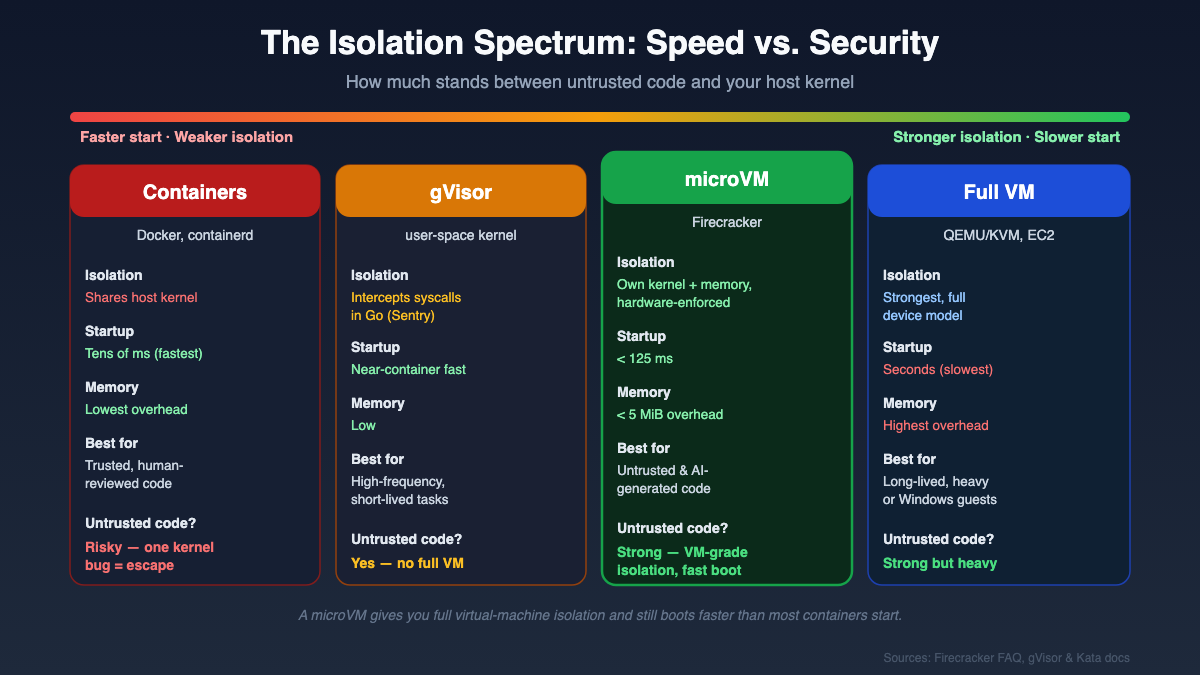
At one end sits the plain container: fastest to start, weakest isolation, shared kernel. Next is gVisor, Google’s user-space application kernel written in Go. It is not a VM and does not require hardware virtualization by default. Instead its Sentry component intercepts application syscalls in userspace so they never hit the host kernel directly, shrinking the attack surface dramatically. The trade-off is a syscall-compatibility surface and some overhead on syscall-heavy work.
Further along is the microVM, and Firecracker is the reference here. It is an open-source Virtual Machine Monitor written in Rust, licensed Apache-2.0 (not MIT, a common myth), with over 35,000 GitHub stars. AWS built it to power Lambda and Fargate, and it uses Linux KVM to give each microVM its own kernel and hardware-enforced isolation, stripped of graphics, USB, and other unnecessary devices to keep the footprint tiny. Its FAQ cites under 125 ms startup and under 5 MiB memory overhead per microVM. Each one runs inside a locked-down jailer with restricted syscalls and dropped privileges. When a job times out, the whole machine is destroyed and the next request gets a clean room. It is Linux/KVM only. And critically for later, it is not AWS-only.
Isolation Technology: The Backbone of Sandboxing
Isolation technology is the backbone of sandboxing. It determines the security level, startup speed, memory usage, and cost. There are several approaches: micro VMs, user space kernels, and containers. Each has its own strengths and tradeoffs. Understanding these technologies is key to choosing the right sandbox for your AI agents.
-
Firecracker: A lightweight virtual machine technology powering AWS Lambda and many AI sandboxes. Each sandbox runs its own minimal Linux kernel, drastically reducing the attack surface. Boot times are measured in milliseconds and memory overhead is low enough to run thousands of sandboxes on a single host. This means every agent gets its own tiny disposable computer, maximizing both security and efficiency.
-
gVisor: Offers a different approach. Instead of running a full VM, it acts as a security layer between applications and the host kernel. All system calls are intercepted by gVisor's user space kernel, called Sentry. This means suspicious actions are caught before they can reach the real kernel. It's a great fit for high-frequency, short-lived workloads where booting a full VM would be too slow.
-
Docker Containers: Lightweight and fast, sharing the host's kernel for efficiency. However, this also means a vulnerability in one container can potentially affect the host and other containers. For trusted, human-reviewed code, containers are fine. For untrusted, agent-generated code, the risk is much higher. Some platforms use Docker with additional isolation layers for extra safety.
At the far end is a full VM: strongest isolation, richest features, slowest to boot.
| Isolation model | Security isolation | Startup speed | Memory overhead | Best fit |
|---|---|---|---|---|
| Container (shared kernel) | Weakest, one kernel bug can escape | Fastest | Lowest | Trusted, human-reviewed workloads |
| gVisor (user-space kernel) | Strong, syscalls intercepted in userspace | Near-container | Low, some syscall overhead | High-frequency short-lived untrusted jobs |
| Firecracker microVM | Hardware-enforced, own kernel per VM | Under 125 ms | Under 5 MiB | Untrusted and AI-generated code at scale |
| Full VM | Strongest, richest features | Slowest | Highest | Maximum isolation, heavy or legacy workloads |
The right answer is not “always pick the strongest.” It is “match the boundary to the threat posture of the workload.” That is the judgment a senior practitioner brings.
How an Enterprise Actually Architects This
Choosing an isolation technology is one decision inside a larger system. A single boundary is never the plan. Defense in depth is, and NIST’s own layering language supports it. Here is the architecture that serious teams converge on, drawn as four cooperating layers.
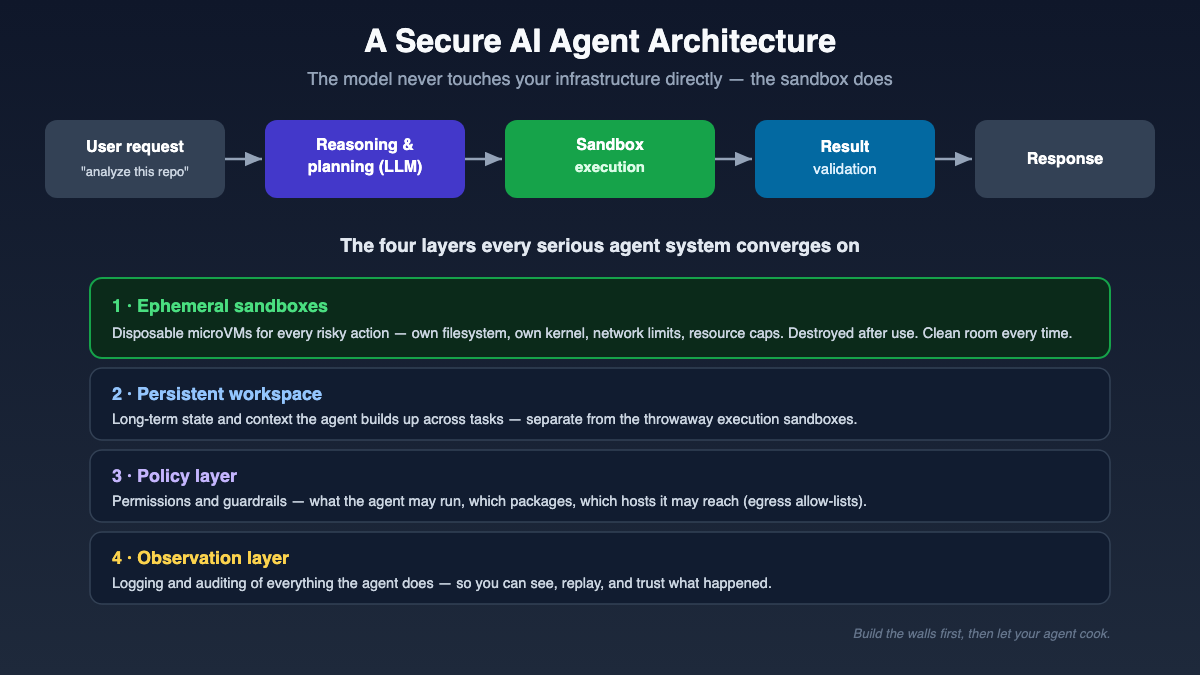
The persistent workspace. This holds long-term state: the repo, project files, accumulated context, the things an agent needs across sessions. It is where continuity lives. It is not where risky code runs.
The ephemeral sandbox. Every risky action, executing generated code, installing a dependency, running a test, happens in a disposable microVM or user-space-kernel sandbox that is created for the task and destroyed after. Clean room in, clean room out. The reasoning model never touches infrastructure directly. The flow is request, then reasoning and planning, then execution inside the sandbox, then validation of the result, then response. That indirection is the point.
The policy layer. This is where least privilege becomes real. Two controls carry most of the weight here.
The first is egress control. By default, deny all outbound network access, then allow-list only what a task legitimately needs. This is your single strongest defense against data exfiltration and command-and-control from malicious generated code. If a slopsquatted package tries to phone home, a default-deny egress policy is the wall it hits.
The second is secrets handling. The sandboxed workload should never see plaintext credentials it does not need. Inject secrets narrowly, keep them out of the execution environment, and assume anything the sandbox can read, a prompt injection can try to read too.
The observation layer. Full command and execution logging, metrics, and audit trails. You cannot investigate what you did not record, and you cannot pass a SOC 2 audit on vibes. This layer also feeds your monitoring so anomalies surface before they become incidents. I go deeper on this discipline in my guide to AI app monitoring and observability for production LLMs.
Notice how the Replit remediations map onto this exact stack: dev/prod separation is isolation, planning-only mode is a policy and observation gate before execute rights. They rebuilt the missing layers after the incident. You get to build them first.
One more distinction worth internalizing. The ephemeral-versus-persistent debate is a false choice. Real agent workflows need both: persistent workspace for continuity, ephemeral sandboxes for anything risky. If you want to see how disciplined specification feeds these agent workflows upstream, my write-up on spec-driven development with GitHub Spec Kit pairs well with this, and if you are still mapping the broader skill set, the RAG to AI agents learning path is where I would start.
How to Evaluate a Sandbox Platform for Enterprise Use
Now the decision most managers actually face. Someone has to pick a platform or decide to build one. Here is the rubric I would hand a team, framed so you can weight it against your own threat model rather than chase a feature checklist.
| Dimension | What to ask |
|---|---|
| Isolation strength | Hardware-enforced microVM, user-space kernel, or shared-kernel container? For untrusted code, weaker isolation means larger attack surface (NIST 800-190). |
| Multi-tenancy | Is there hard tenant separation, with no cross-tenant kernel sharing for untrusted or AI code? |
| Network egress control | Default-deny plus allow-listing, or open by default? This is your anti-exfiltration control. |
| Data residency, self-host, BYOC, VPC | Can it run inside your own cloud account or VPC so sensitive data never leaves your boundary? |
| Secrets handling | Are secrets isolated from the workload, injected narrowly, never sitting in plaintext? |
| Audit and observability | Full exec logs, metrics, and log sinks for incident response and compliance? |
| Compliance certifications | Does the vendor hold SOC 2 Type II, ISO 27001, and whatever your regulated environment demands? |
| Latency and cold start | Sub-second creation matters enormously at agent concurrency. |
| Persistence model | Ephemeral, snapshot, pause/resume, persistent filesystem? Match it to your workflow. |
| Cost at scale | What are the per-sandbox economics under high concurrency, not in the demo? |
| Vendor lock-in | Is there an open-source core or self-host escape hatch if terms change? |
Here’s how to weight it. If you are a SaaS running untrusted code from many customers on shared infrastructure, multi-tenancy and isolation strength dominate, because a cross-tenant escape is existential. If you operate under PCI DSS, network segmentation of the cardholder data environment and data residency rise to the top. If you are FedRAMP-bound, compliance certifications and self-host or VPC control are non-negotiable. If your agents are highly interactive, latency climbs the list. There is no universal weighting. There is only the weighting your threat model demands.
Build vs Buy
The honest truth is that building your own microVM orchestration, jailer configuration, egress enforcement, secrets injection, snapshotting, and audit pipeline is a real engineering program, not a sprint. Firecracker being open source means you can build on it without AWS. But you are then on the hook for the operational hardening that a managed platform amortizes across every customer. Buy when speed to a defensible posture matters and your differentiation is not the sandbox itself. Build when isolation is your core product, you have deep platform expertise, and lock-in or data-residency constraints rule out the managed options. Most enterprises should buy the boundary and spend their scarce platform talent on the layers unique to them.
Alternatives If You Do Not Want AWS
A frequent and fair worry: “Does this tie us to AWS?” No. Firecracker is open source and runs plenty of places that are not AWS. And there is a whole ecosystem to choose from.
On the self-managed isolation side:
- gVisor gives you a user-space kernel with near-container speed, ideal for high-frequency, short-lived untrusted jobs.
- Kata Containers wraps each container or pod in its own lightweight VM with a dedicated kernel, and lets you plug in QEMU, Cloud Hypervisor, or Firecracker underneath. It is the drop-in path to VM-grade isolation for existing Kubernetes workflows.
- Cloud Hypervisor is a richer Rust VMM under the Linux Foundation, adding CPU/memory/device hotplug, live migration, and Windows guests when you need more than Firecracker’s deliberate minimalism.
- QEMU’s microvm machine type brings Firecracker-style lean, fast-boot guests to teams already invested in QEMU.
- Unikernels like Nanos/OPS and Unikraft compile an app with only the OS bits it needs into a single tiny image, the smallest attack surface of all, though with no general-purpose multi-process OS.
On the managed platform side, mapped to enterprise needs:
- E2B runs Firecracker microVMs, is open-source at the core, and is self-hostable via Terraform, strong when data control and avoiding lock-in matter.
- Northflank offers Bring Your Own Cloud across AWS, GCP, Azure, Oracle, and any Kubernetes, a good fit when you need sandboxes running inside your own cloud boundary.
- Modal uses gVisor isolation with secure-by-default networking and per-second billing, and shines on GPU and ML workloads.
- Daytona advertises sub-90ms sandbox creation for AI-generated code, useful when interactivity is king.
- Fly.io runs Firecracker microVMs directly, and its Sprites product adds persistent microVMs with checkpoint/restore and wake-on-request.
- Blaxel is agent-first infrastructure with fast microVM resume and egress allow-lists.
- Koyeb provides Firecracker-based global serverless sandboxes for agents.
- Cloudflare Sandbox runs untrusted code at the edge using Containers, Workers, and Durable Objects.
- Vercel Sandbox runs untrusted or agent-generated code natively in the Vercel and Next.js ecosystem.
Pick by weighting your rubric. If data residency leads, prioritize E2B self-host or Northflank BYOC. If GPU workloads dominate, look hard at Modal. The platform serves the threat model, not the other way around.
How Serious Teams Roll It Out
You do not sandbox everything on day one. The pattern that works is incremental.
Start with the single riskiest workload, the one place where untrusted or AI-generated code executes closest to something you care about, usually your agent’s code execution path. Wrap that in a real isolation boundary first. Then layer default-deny egress and secrets isolation around it. Then add audit logging and wire it into your observability. Observe how it behaves under real traffic, tune the allow-lists, and only then expand the pattern to the next workload. Each layer is independently valuable, so even a partial rollout leaves you safer than you started.
The Takeaway
The question that stopped the meeting at the start, “where is this code actually running,” is the most important architecture question your team will ask this year. Untrusted code has always demanded isolation. AI just multiplied the volume and the speed. Containers are a fine boundary for trusted work and a risky bet for code you did not review. The reliable controls are architectural: a hard isolation boundary, default-deny egress, isolated secrets, and full audit, arranged as defense in depth so no single failure is fatal. And if you want to understand where all of this is heading for the people doing the work, I dug into that in how AI is changing software developer careers.
You will not get this perfect on the first try. Nobody does. But if you isolate the riskiest thing first and build outward, you will be ahead of most organizations, including some very large ones that learned this lesson in a postmortem instead of a design review.
Your Turn To Share
I’m genuinely curious about one thing: in your organization, where is untrusted or AI-generated code running closest to something you would hate to lose, and what is actually stopping it from doing damage right now? Tell me in the comments. I read every one, and the answers are usually the most useful ones. Thank you kindly!
Great read! Sandboxing untrusted code feels like babysitting toddlers—you give them a playpen so they don’t scribble on the walls. Firecracker microVMs sound like the ultimate “time‑out corner” for rogue AI agents. Thanks for breaking it down—now I’ll sleep better knowing my servers aren’t hosting chaos!