

Vibe Coding is something that caused a very fundamental shift in software development around 2025. Most people, and companies either missed it entirely or dismissed it as hype. Some still are not gettting it!Vibe Coding is something that caused a very fundamental shift in software development around 2025. Most people, and companies either missed it entirely or dismissed it as hype. Some still are not gettting it!
For decades, building software meant learning syntax, memorizing functions, debugging cryptic errors, and spending more time fighting tools than solving actual problems. Even experienced developers spent large portions of their day on the mechanical, repetitive work of translating ideas into code.
Then Andrej Karpathy (one of the most respected minds in AI, former Director of AI at Tesla, co-founder of OpenAI) posted something that reframed the conversation entirely. He described a new way of working with AI where you don’t really code. You describe what you want. You set the vibe. And you let the AI handle the rest.
He called it “vibe coding.”
That phrase landed differently for different people. Experienced developers rolled their eyes. Beginners got excited. And somewhere in the middle, a more nuanced truth was waiting to be unpacked.
This guide is that unpacking. Whether you’ve never written a line of code in your life or you’ve been shipping software for 30 years, vibe coding is changing what is possible. Understanding it properly will give you a genuine edge.
Let’s go deep.
What Exactly Is Vibe Coding?
Vibe coding is a software development practice where you use AI to generate code from natural language descriptions. Instead of writing code manually, you describe what you want to build, and the AI writes the implementation. You guide, test, and iterate. The AI handles the syntax, the boilerplate, and increasingly, the logic.
Here’s the Karpathy framing in plain terms: traditional coding is about speaking the computer’s language. Vibe coding is about the computer learning to speak yours.
But here is what most definitions miss. Vibe coding isn’t about being lazy. It is about a fundamental shift in where your cognitive energy goes.
In traditional development: – 30% of your time goes to thinking about what to build – 70% goes to the mechanical work of building it
In vibe coding: – 70% of your time goes to thinking clearly about what to build – 30% goes to reviewing, testing, and guiding what the AI produces
The skill set changes completely. The quality of your thinking becomes the limiting factor. Your ability to describe requirements precisely, anticipate edge cases, and recognize when generated code is subtly wrong. Not your ability to remember the syntax for a JavaScript array method.
This is why experienced developers who approach vibe coding correctly often get more out of it than beginners. Their domain knowledge and engineering judgment become force multipliers on AI capability.
Why 2026 Is the Inflection Point
Vibe coding was technically possible two years ago. So why is 2026 the year it becomes genuinely transformative?
Three things converged.
Models got good enough. Claude Sonnet, GPT-5, and Gemini 2.5 Pro aren’t just autocomplete engines anymore. They reason about code architecture, understand complex requirements, debug across multiple files, and produce production-quality implementations. The earlier generations hallucinated constantly. The current generation still makes mistakes, but with the right workflow, those mistakes get caught early.
The tooling exploded. In 2024, you had a handful of AI coding tools. In 2026, there are over a dozen serious options spanning browser-based builders, AI-native IDEs, terminal agents, and full orchestration platforms. Tools like Claude Code, Cursor, Antigravity, and OpenClaw now give AI agents the ability to read your full codebase, execute code, run tests, manage files, and iterate autonomously. The gap between “AI writes some code” and “AI builds a working application” has collapsed.
The community proved it works. Thousands of developers and non-developers are now shipping real products using vibe coding workflows. Not toy projects. Real apps with real users and real revenue. The hashtag #VibeCoding has over 150,000 posts per month on X. The case is no longer theoretical.
The combination of capable models, complete tooling, and proven results means vibe coding is no longer an experiment. It is a legitimate development methodology with its own best practices, failure modes, and professional frameworks.
The Complete Vibe Coding Toolkit for 2026
This is the section most guides get wrong. They mention three or four tools and call it a day. But the vibe coding ecosystem in 2026 is genuinely vast, and choosing the right tool for your situation makes the difference between a productive session and a frustrating one.
I’ve organized these into four tiers based on how people actually use them. Find your starting point and work from there.
Tier 1: Browser-Based Builders (Zero Setup, Beginners Start Here)
These tools require no installation. You open a browser, describe what you want, and get a working app. If you’ve never built anything before, start here.
Bolt.new is the speed king. Paste a description of your web app, and it generates a working React/Next.js prototype in minutes. One-click deploy to Netlify. It’s fast, opinionated, and excellent for getting something running immediately. Best for rapid prototyping when you know roughly what you want.
Google AI Studio is Google’s answer to the browser-based builder space, and it is free. Powered by Gemini 2.5 Pro, it generates full-stack applications from conversation. The killer feature? One-click deploy to Google Cloud Run and direct export to GitHub. It also has a new authentication layer that ties into Firebase, which means you can add user login without writing a single line of auth code. If you are already in the Google ecosystem, this is a strong starting point.
Lovable generates complete applications from conversation. Not just a front-end mockup. Full front-end, back-end, database, and user authentication. It’s backed by a16z and trending hard on X as a “Replit killer” because of its real-time multiplayer AI sessions. Multiple people can vibe code on the same project simultaneously. Deploys to Lovable Cloud, GitHub, Vercel, or Netlify.
Base44 takes the same approach but adds built-in hosting, analytics, and custom domains out of the box. Describe your app, and Base44 generates the complete application structure including business logic. It integrates with Google Workspace and Slack. Popular with indie hackers and startup founders who want a working MVP fast without worrying about infrastructure.
Replit Agent turns Replit’s browser-based IDE into a vibe coding platform. Describe what you want, and the agent builds it in your browser, complete with deployment. The free tier makes it the most accessible option for students and makers. Replit’s community of millions means you are never far from a tutorial or template for whatever you are building.
v0.dev (by Vercel) is specifically powerful for UI generation. Describe a component or interface, and v0 generates production-ready React code using shadcn/ui and Tailwind. Here’s the thing: v0 is less about building entire applications and more about generating beautiful, functional UI components that you then integrate into a larger project. Think of it as your AI design partner rather than your AI developer.
Tier 2: AI-Native IDEs (For Developers Who Want a Full Editor)
These are complete development environments rebuilt around AI. Not plugins added to a legacy editor. Full IDEs where AI is the primary interaction model.
Cursor is the current market leader in this category, and for good reason. The Composer feature lets you describe changes across your entire codebase and have them implemented simultaneously. It understands your project’s patterns and writes code that fits with what already exists. With over 60,000 mentions on X in the past month alone, Cursor has become the default recommendation for developers who want AI-assisted development without leaving their editor. Best for developers who want a familiar IDE experience with deeply integrated AI.
Windsurf (formerly Codeium) is the strongest Cursor alternative. Its “Flow” feature creates a deep-context understanding of your code, and Cascade handles multi-file edits with real-time awareness of your entire project. The free tier for individuals makes it an easy first step if you want to test the AI IDE concept before committing to a paid tool. Best for developers who want Cursor-level capability without the price tag.
Antigravity is Google’s entry into the agentic IDE space, and it’s arguably the most ambitious tool on this list. Here’s what makes it different: Antigravity doesn’t just assist you with code. It runs multiple AI agents in parallel across your editor, terminal, and browser. You define a mission, and the agents coordinate to accomplish it. One agent writes code, another tests it in the integrated browser, another manages your terminal. An artifact trail lets you audit every decision the agents made. It’s model-agnostic (Gemini 3 Pro, Claude Sonnet 4.5, GPT) and free during the current preview. If you are comfortable with AI agents making decisions on your behalf, Antigravity represents where development is heading. Best for developers who want maximum AI autonomy in their development workflow.
Tier 3: Terminal and CLI Agents (For Professional Developers)
These tools run in your terminal. No GUI, no browser. You describe what you want, and the agent reads your codebase, writes code, runs commands, and iterates. This is where the most powerful vibe coding happens for experienced developers.
Claude Code (Anthropic) is a terminal-first AI coding agent. Install it as a CLI tool, point it at a project directory, and describe what you want. Claude reads your entire codebase, writes code across multiple files, runs tests, and iterates. Developer reports consistently rate it the strongest for reasoning-heavy tasks: understanding legacy code, catching edge cases, and writing architecturally clean implementations. Best for complex multi-file changes, architectural work, and projects where code quality matters more than speed.
OpenAI’s Codex CLI is OpenAI’s terminal agent and a direct competitor to Claude Code. It is open-source (built in Rust), lightweight, and fast. The standout feature is parallel processing across Git worktrees using the OpenAI Agents SDK. This means you can run multiple Codex agents on different branches of your project simultaneously. It also has IDE extensions for VS Code, Cursor, and Windsurf, bridging the gap between terminal and editor workflows. Requires a ChatGPT Plus, Pro, or Business subscription. Best for developers who want speed and parallelism in their terminal workflow.
Gemini CLI is Google’s terminal agent. Open-source with a distinctive advantage: built-in Google Search grounding. When you give Gemini CLI a coding task, it can pull in real-time information from the web to inform its approach. It also integrates with GitHub Actions, meaning you can set it up as an AI coding teammate that automatically responds to issues and pull requests in your repos. Best for developers in the Google ecosystem and teams that want CI/CD-integrated AI assistance.
Aider is the open-source favorite. Git-integrated from the ground up, supporting multiple AI models, and designed for developers who live in the terminal. It coordinates changes across multiple files while keeping your git history clean. The community is active and the tool is battle-tested. Best for Vim/Emacs users and developers who want maximum control over which AI model they use.
Cline is an open-source VS Code extension that turns your editor into an autonomous coding agent. Its dual “Plan” and “Act” modes let you first discuss the approach with the AI, then execute it. You choose your own model, which means you can optimize for cost versus quality on a task-by-task basis. Best for developers who want autonomous agent capabilities without leaving VS Code.
Tier 4: Orchestration and Autonomous Agents
These tools go beyond individual coding sessions. They run continuously, coordinate multiple agents, and turn vibe coding from a reactive activity into an autonomous development pipeline.
OpenClaw
OpenClaw is the new kid on the block but a sensational one! It is very different from the other tools as have discussed so far and I have written a lot about it already in other posts. It’s not just a coding agent per se. It’s an autonomous AI agent that runs locally on your machine and integrates with everything: your messaging apps, your files, your browser, your calendar, and your codebase. More on OpenClaw in its own section below. The short version: OpenClaw transforms vibe coding from a “prompt and respond” activity into an always-running development workflow. You can read more about OpenClaw here
Devin (by Cognition)
Devin is positioned as a fully autonomous AI software engineer. You give it a task, and it plans, codes, tests, and deploys. In practice, it’s not fully autonomous yet. Human oversight is still required. But for well-defined tasks (writing tests, generating documentation, building standard features), it delivers. Pricing starts at $20/month for hobbyists and $200/month for professionals. Best for developers who want to delegate entire features rather than pair-program with AI.
Quick Reference: Which Tool Should You Start With?
| Your Situation | Start Here | Then Graduate To |
|---|---|---|
| Never coded before | Bolt.new or Google AI Studio | Lovable or Replit Agent |
| Built a few things, want to go deeper | Lovable or Replit Agent | Cursor or Windsurf |
| Professional developer, want AI assist | Cursor or Windsurf | Claude Code or Codex CLI |
| Experienced dev, want maximum leverage | Claude Code or Antigravity | OpenClaw for orchestration |
| Want hands-off autonomous development | Devin for individual tasks | OpenClaw for full pipeline |
How Vibe Coding Actually Works: The Professional Process
Here’s where most guides go wrong. They show you the tools but not the workflow. Vibe coding isn’t about asking AI a question and using whatever it produces. That approach leads to a mess. A professional vibe coding workflow has four phases.
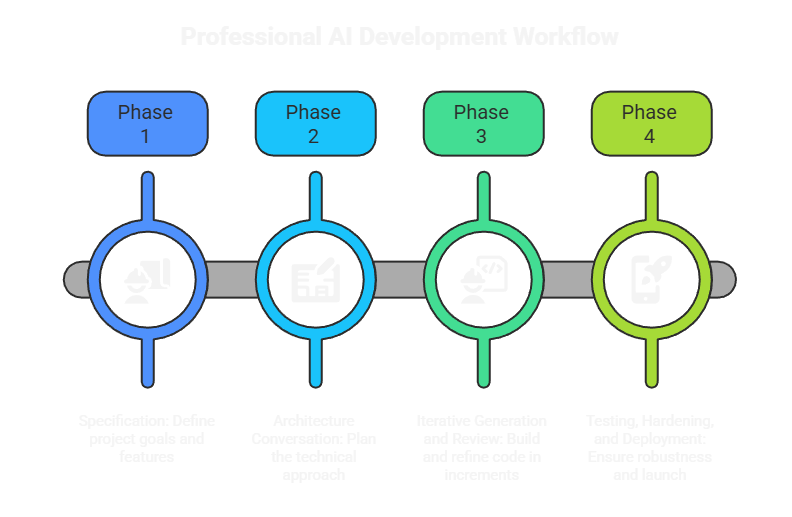
Phase 1: Specification (The Most Important Phase)
This is the phase beginners skip and professionals take seriously. Before you touch a single AI tool, you write a specification document.
A good spec answers: – What are you building and why? – Who is the user and what problem does it solve for them? – What are the key features (and equally important, what is NOT in scope)? – What is the technical stack? – What are the edge cases and error conditions? – What does “done” look like?
This is called Spec-Driven Development (SDD), and it is the framework that separates professional vibe coders from people who spend three days debugging a mess of AI-generated code.
Here’s why it matters. AI models have infinite patience and will write code forever. Without a spec, they will make reasonable-sounding decisions at every step, and those decisions will slowly diverge from what you actually want. Two hours in, you have a running app. Just not the app you meant to build.
A spec is your contract with the AI. It anchors every decision.
Example spec (simple):
Project: Task management app
Users: Solo professionals managing their daily work
Core features: Add tasks, mark complete, set due dates, view today's tasks
Out of scope: Teams, sharing, mobile app (Phase 1 only)
Stack: Next.js, TypeScript, SQLite via Prisma, Tailwind
Done means: Working locally, all 4 core features functional, no console errors
That took five minutes to write. It will save five hours of misdirected AI effort.
Phase 2: Architecture Conversation
Before code generation begins, have a conversation with your AI about how to build the spec. Not generating code yet. Just thinking through the approach.
Ask: – “Given this spec, what is the recommended folder structure?” – “What are the potential pitfalls in this approach?” – “What would you do differently if you were building this from scratch?”
This phase catches architectural mistakes before they are baked into hundreds of lines of code. Five minutes here saves five hours later.
Phase 3: Iterative Generation and Review
Now you generate code, in small, reviewable increments. Not “build the whole app.” Instead:
- “Build the data model and database schema only”
- “Build the API endpoints for task creation and retrieval”
- “Build the task list UI component connected to the API”
Review each increment before moving to the next. You don’t need to understand every line, but you should understand what each piece does and whether it aligns with your spec.
The professional discipline here: if something doesn’t feel right, say so. AI will take your direction. “This works but feels complicated. Is there a simpler approach?” is a completely valid instruction.
Phase 4: Testing, Hardening, and Deployment
Generated code is a starting point, not a finished product. The final phase involves: – Running the test suite (or asking AI to write one) – Trying to break the app with unexpected inputs – Identifying and fixing edge cases – Deploying to production (Vercel, Railway, Render, Google Cloud Run)
A professional vibe coder doesn’t consider the app done when the happy path works. They consider it done when the unhappy paths are handled, too.
For Beginners: Your First Vibe Coding Project
If you’ve never built anything before, start here. This is the path from zero to a working app.
Step 1: Choose the Right Starting Tool
Go to Bolt.new, Google AI Studio, or Lovable. These are browser-based, require no setup, and are designed for exactly this starting point. You don’t need to install anything.
My recommendation for absolute beginners: Google AI Studio is free with no limits on the AI model, and one-click deploys your app to a real URL. Bolt.new is fastest for getting something on screen. Lovable gives you the most complete application (with back-end and authentication included).
Step 2: Write a One-Paragraph Description
Before you open the tool, write one paragraph describing what you want to build. Keep it specific.
Example: > “A simple habit tracker web app. Users can add daily habits, check them off each day, and see a streak count showing how many consecutive days they’ve completed each habit. Simple list interface, no login required.”
Notice what this does. It specifies the core features, the user interaction, and a key constraint (no login). That’s enough to get started.
Step 3: Paste Your Description and Iterate
Paste your paragraph into your chosen tool and watch it generate. When it produces something, your job is not to accept it. Your job is to react: – “The habit list looks good, but I want the streak counter to show the number in orange when it is above 7 days.” – “Add a button to delete habits.” – “The layout breaks on mobile. Fix it.”
You are directing, not coding. Your clarity of direction determines your speed.
Step 4: Level Up When You Are Ready
Browser-based tools are excellent for prototypes and simple apps. When you want to build something production-ready, add custom logic, or connect to real databases and APIs, move to Cursor or Claude Code.
The transition is simpler than it sounds. Export your project, open it with your next tool, and describe what you want to add.
Your First Real App: A Realistic Expectation
Here’s what a determined beginner can ship in 2-3 weeks of daily one-hour sessions: – A functional to-do or habit tracking app – A personal expense tracker – A simple blog or portfolio site – A tool that solves a specific personal pain point (a custom reminder system, a recipe organizer, a workout log)
These are real, working applications. They are not enterprise software. But they are legitimate first projects that will teach you more than any tutorial.
For Professionals: Integrating Vibe Coding into Your Workflow
If you are an experienced developer, the question is not “should I try vibe coding?” The question is: how do I use this without compromising quality?
Here’s the honest answer. Vibe coding doesn’t replace your judgment. It accelerates your execution. The gap between a vibe coder with no engineering background and one with 15 years of experience is enormous, because engineering experience is what lets you recognize when AI-generated code is subtly wrong.
Where Vibe Coding Gives Professionals the Biggest Returns
Boilerplate elimination. Every project starts with 20-30% of work that is pure repetitive scaffolding. Authentication systems, CRUD endpoints, form validation, database migrations. This work is important but doesn’t require expert thinking. Let the AI write it while you focus on the parts that actually need you.
Unfamiliar territory. You need to add Stripe integration but have never worked with Stripe. You need to write a Python script but live in Java. In traditional development, this means hours of documentation reading. In vibe coding, you describe what you need and get working code in minutes, which you then review with your engineering judgment.
Speed on well-defined features. When requirements are clear and the implementation is straightforward, vibe coding is simply faster. What would take 4 hours to write manually might take 45 minutes with Claude Code or Codex CLI, leaving more of your day for the work that actually requires human judgment.
Test suite generation. Describing what should be tested and having AI write the actual test code is one of the highest-ROI uses of vibe coding for professional developers. The logic of what to test requires your expertise. The mechanics of writing the test code doesn’t.
A Real Professional Workflow
Here’s how a typical professional vibe coding session works in practice:
- Open your project with Claude Code (or Codex CLI, or Cursor)
- Describe the feature: “I need to add webhook handling for Stripe payment events. We should handle successful payments, failed payments, and refunds. Payment events should update the order status in our database.”
- The AI reads your existing codebase, understands the data models and patterns, and writes the webhook handler, the database updates, and the tests
- You review the generated code, ask follow-up questions, and request adjustments
- Run the tests, verify the behavior in a test environment, ship
The total time for a feature like this drops from a half-day to 1-2 hours. The output quality is high because these tools understand your existing codebase patterns and write code consistent with what you already have.
OpenClaw: The Orchestration Layer That Changes Everything
Here’s where vibe coding goes from impressive to genuinely transformative.
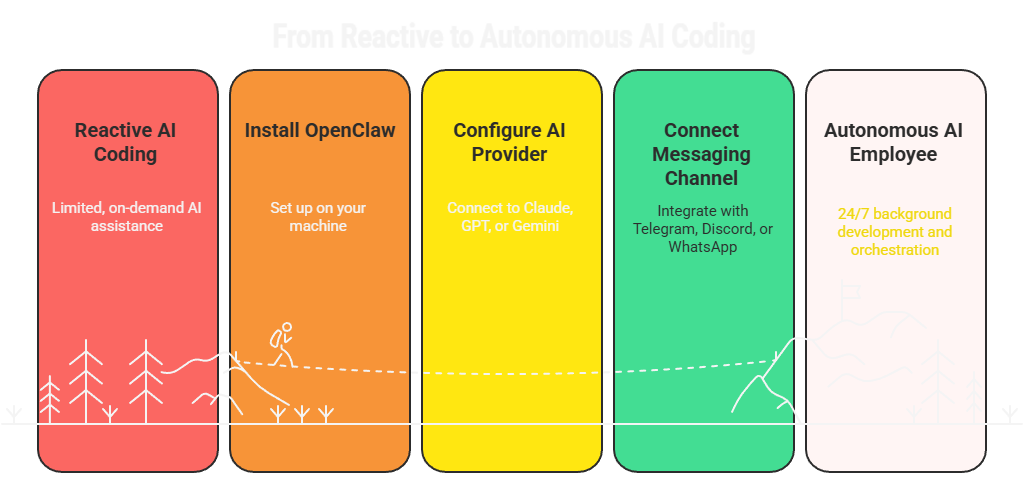
All the tools we’ve discussed so far are reactive. You prompt them, they respond. You close the app, they stop working. OpenClaw changes that equation. It’s an autonomous AI agent that runs on your machine 24/7, integrates with your messaging apps (WhatsApp, Telegram, Discord), and can orchestrate coding work in the background while you sleep.
Think about what this means in practice.
Background Development While You Sleep
You can give OpenClaw a development task in the evening, leave your machine running, and wake up to completed work. It runs Claude Code under the hood, executes the task, runs tests, and reports back to you on Telegram or Discord when it is done.
This isn’t a demo scenario. This is a real workflow thousands of OpenClaw users have adopted.
Triggered Coding Workflows
OpenClaw can be set up to run coding tasks on triggers: – Every morning at 7am: “Run the test suite and send me a summary of any failures” – When a GitHub issue is created: “Analyze this issue and suggest an implementation approach” – When you message “ship it”: kick off a Claude Code session for a previously defined feature
The cron system in OpenClaw lets you define these workflows without touching code.
Model-Agnostic Orchestration
Here’s what most people miss about OpenClaw. It’s not tied to any single AI provider. You can use Claude, GPT, or Gemini. You can switch models per task. You can run Claude Code for complex architectural work and Codex CLI for parallel feature implementation. OpenClaw coordinates between them.
A practical example: You are building a SaaS product. You set up OpenClaw to: 1. Run a nightly Claude Code session that implements the next feature from your spec 2. Post a summary to your Discord server when it is done 3. Flag any issues it couldn’t resolve for your review in the morning
You wake up, review the work, give feedback, and OpenClaw handles the next cycle. A single developer can maintain the velocity of a small team.
Your AI Employee
This is the concept that the OpenClaw community has converged on. Not just an AI coding assistant, but an AI employee that works on your product while you are not watching it.
You define the workspace (a folder with your project files), you define the skills (Claude Code for development, web search for research, messaging for reporting), and you give it a task queue. OpenClaw executes the queue, communicates progress, and asks questions when it hits blockers.
For solo developers and small teams, this is a legitimate competitive advantage. The ability to run 24-hour development cycles on a side project without burning yourself out changes what you can build.
Getting Started with OpenClaw
Getting started involves:
- Install OpenClaw on your machine (Mac, Windows via WSL2, or Linux)
- Configure your AI provider: Claude via Anthropic API is recommended for development work
- Connect a messaging channel: Telegram is the easiest starting point
- Set up the coding-agent skill: this enables Claude Code under the hood
- Create a workspace: a directory where your project lives and OpenClaw has permission to read and write
- Define your first task: send a message to your OpenClaw assistant describing what you want built
The learning curve is real. The first setup takes a couple of hours. But once it is running, the leverage is significant.
What People Are Actually Building with Vibe Coding in 2026
Enough theory. Here is what the vibe coding community is actually shipping.
Creator tools. Apps that help content creators manage their workflows. Video idea generators, thumbnail concept tools, social media schedulers with AI-written captions. Most built by non-coders who had a problem they wanted solved.
Niche SaaS tools. Highly specific tools for specific professional contexts. A legal document summarizer for a specific jurisdiction, a pricing optimizer for a specific industry, a customer communication template tool for a specific service business. These aren’t consumer products. They are B2B tools serving small markets that larger companies ignore.
Internal business tools. Small businesses using vibe coding to build tools they could never have afforded to commission from a development agency. Custom CRM systems, inventory managers, client portals. An OpenClaw setup with Claude Code is replacing the $10,000 custom software quote.
AI-powered services. Businesses adding AI capabilities to their existing services. A copywriting agency adding AI-assisted drafting, a data consultancy adding automated reporting, a coaching business adding AI-powered assessments.
Personal productivity systems. Highly customized personal tools built in a weekend that are genuinely more useful than existing apps because they are built around one person’s specific workflow. A reading tracker that generates weekly summaries, a note-taking system with AI organization, a habit tracker with AI coaching messages.
The common thread: these are people who had a clear problem, could describe what they wanted in plain language, and used vibe coding to build the solution. The technical barrier that would have stopped them two years ago no longer exists.
The Honest Assessment: What Vibe Coding Cannot Do (Yet)
A complete guide needs to cover the limitations honestly.
Vibe coding produces code that works but may not scale. AI-generated code is optimized for correctness, not for performance at scale. If you are building something that needs to handle millions of requests, the architecture needs expert attention.
Security review is not optional. AI models don’t always generate secure code. SQL injection, XSS vulnerabilities, improper authentication handling. These vulnerabilities exist in AI-generated code. If you are handling user data or payments, get a security review.
The “vibe coding loop” is real. This is the most common failure mode. For complex, poorly specified tasks, AI can produce code that is almost right. You ask it to fix the issue, and the fix breaks something else. You ask it to fix that, and it introduces a new problem. This loop can consume hours. The solution is better specs and smaller increments, not more prompting. When you hit a loop, stop. Rewrite your spec. Start that section fresh.
Maintenance gets complicated. A vibe-coded app where you don’t understand what the AI built is harder to maintain than code you wrote yourself. Over time, you need to develop enough understanding of the generated code to extend and debug it. This is especially true for applications that need to evolve over months and years.
It’s not a replacement for domain expertise. Building a financial application without understanding accounting principles, or a healthcare tool without understanding medical data privacy requirements, will produce a technically working product with serious real-world problems. AI generates code. Domain knowledge is still your responsibility.
The Skill Set That Actually Matters
Here’s the genuine insight that most vibe coding content misses. The skill that determines your results is not technical. It is communicative.
The ability to describe what you want with precision. To anticipate where your description is ambiguous. To recognize when AI output diverges from your intent. To give useful feedback when something is wrong. These are the skills that separate effective vibe coders from frustrated ones.
Professional vibe coders are, at their core, skilled thinkers who’ve learned to use AI as their execution layer. The quality of their thinking determines the quality of the result.
This is good news for experienced professionals. The judgment you have built over years of working in your domain is not obsolete. It is more valuable than it has ever been.
Getting Started Today: Your First 48 Hours
If you are a complete beginner: 1. Go to Bolt.new, Google AI Studio, or Lovable 2. Write one paragraph describing a simple tool you actually want 3. Iterate until something works 4. Show it to someone
If you are an experienced developer: 1. Install Claude Code (npm install -g @anthropic-ai/claude-code) or Codex CLI 2. Open a small side project you’ve been meaning to work on 3. Describe one feature you want to add. Let the AI build it. 4. Review the code with your engineering judgment, give feedback, iterate
If you want the full autonomous setup: 1. Install OpenClaw following the docs at docs.openclaw.ai 2. Connect it to Telegram or Discord 3. Create a project workspace 4. Send it a task and watch it work overnight
The first project doesn’t need to change the world. It needs to change your intuition about what is possible. Once you experience the leverage, the question shifts from “should I use this?” to “what should I build next?”
Your Turn To Share
The vibe coding ecosystem is moving fast. New tools are launching every week, and the best insights come from practitioners, not from guides. What tool are you using right now, and what has surprised you most about the experience? Drop it in the comments. I read every one, and the community’s real stories shape what I write next.